EasyManua.ls Logo

Hanasis HIT - Kitchen Printer Bell

Hanasis HIT
34 pages
Print Icon
To Next Page IconTo Next Page
To Previous Page IconTo Previous Page
Loading...
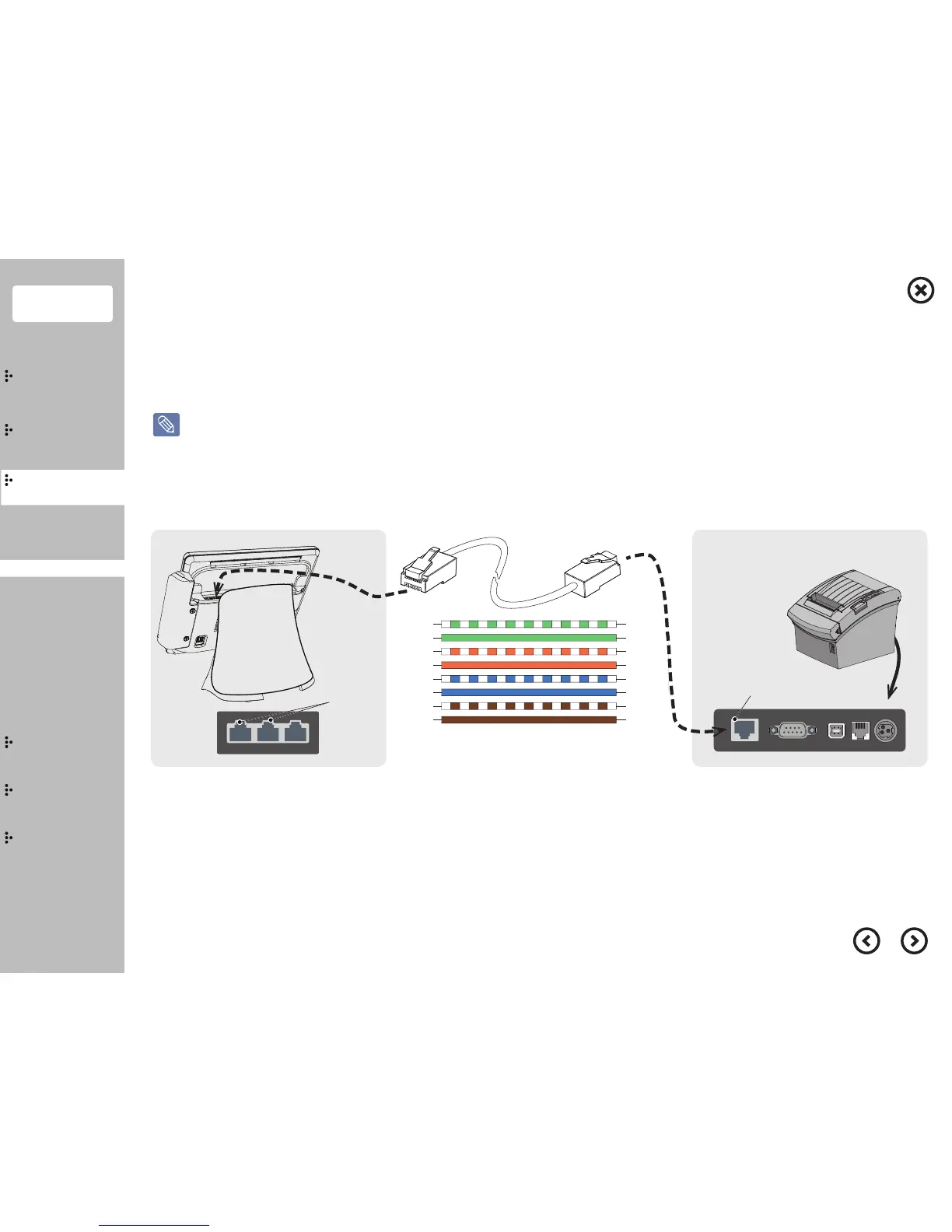
[ Printer : SRP-330II, GIANT-100 ][ Extension Cable ][ POS ]
1: N.C
2: DSR
3: TXD
4: RXD
5: RTS
6: CTS
7.GND
8: DTR
POS
(COM3,4)
1: N.C
2: DSR
3: TXD
4: RXD
5: RTS
6: CTS
7.GND
8: DTR
Kitchen Printer
(Serial, RJ-45)
1
8
8
1
Extention Cable port
(Serial, RJ-45)
COM3 COM4 MSR
Extension
Cable port
(COM3, 4)
Contents
System
Installation
Using
the product
Assembly &
Disassembly
BIOS
Appendix
System
Introduction
Touch Screen
MSR
Kitchen Printer Bell
Winclon (Backup)
Winclon (Restore)
POS Driver & Utility
In order to connect POS device with kitchen printer, please regard to the following connection drawing.
You must use the interchangable gender that is provided by Hanasis.
Cable connection specification for kitchen printer serial cable
Kitchen Printer Bell

Related product manuals