4
1
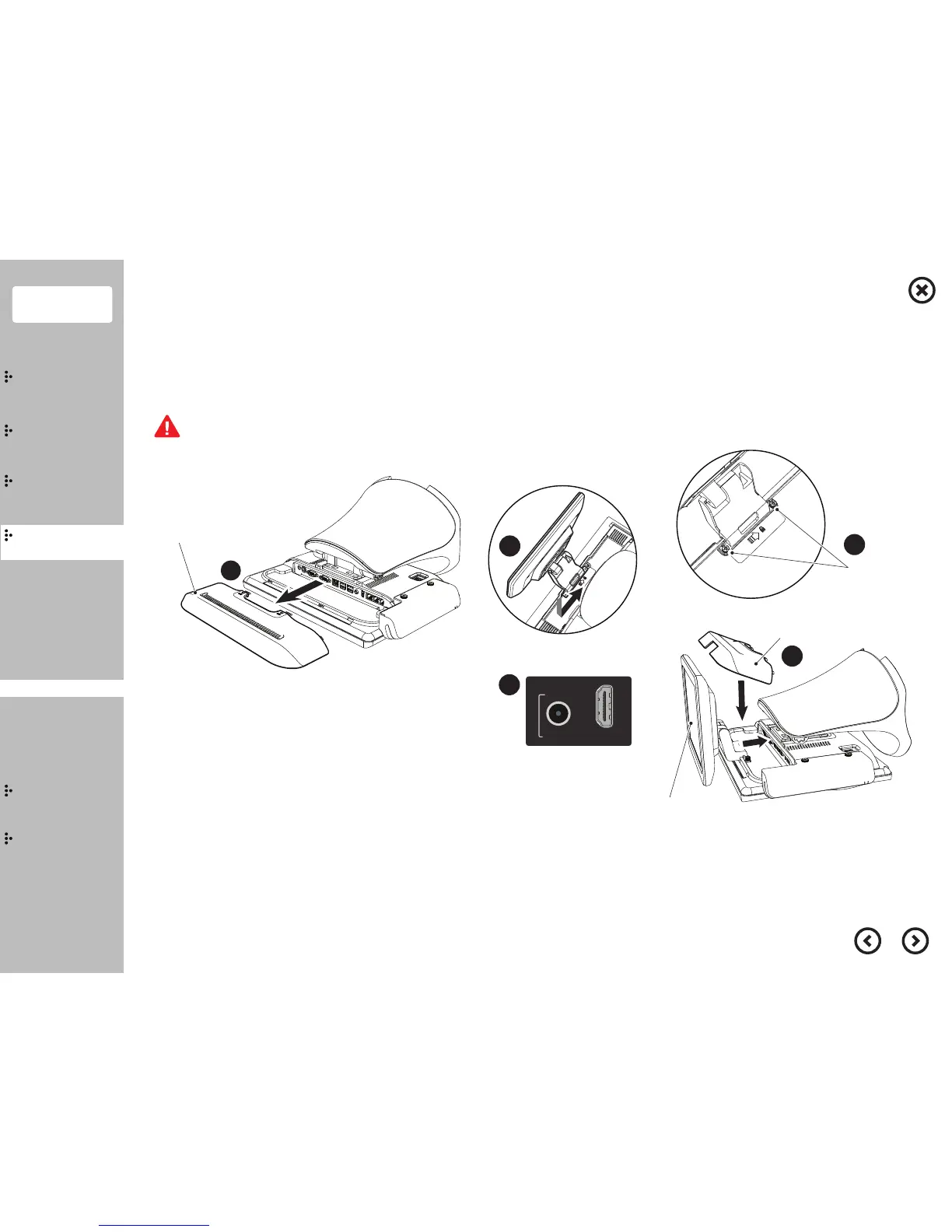
I/O Ports Cover
2
3
Coin Screw
I/O Ports Cover (Second Monitor type)
Protective Film
5
Contents
System
Installation
Using
the product
Assembly &
Disassembly
BIOS
Appendix
System
Introduction
MSR
Stand
Storage(HDD/SSD)
Cover Rear
EMI
Second Monitor
VFD
Wall Mount
Connect the power cable to the adaptor firmly. Use only the adaptor supplied with the product.
Otherwise, there is a danger of fire due to an incomplete contact. Do not touch the system plug or power cable with wet hands.
Setup & Connecting the power cable
9.7” Second Monitor & Touch Monitor - Step 1
①
Separate the I/O ports cover.
②
Attach the 9.7” second monitor.
③
Fasten 2 coin screws.
④
Connect the HDMI cable, power cable and USB cable(only touch monitor).
⑤
Connecting the power cable, assemble the separated I/O ports cover(second monitor type).
⑥ Please remove the protective film before use.


 To Next Page