EasyManua.ls Logo

HBC-Radiomatic technos A - Battery Charging Process

HBC-Radiomatic technos A
34 pages
Print Icon
To Next Page IconTo Next Page
To Previous Page IconTo Previous Page
Loading...
25 / 34
Charging the Battery
1. Connect the charger to the power supply via the connecting cable or the wall plug transformer.
2. Insert the battery into the compartment.
Charging will start automatically.
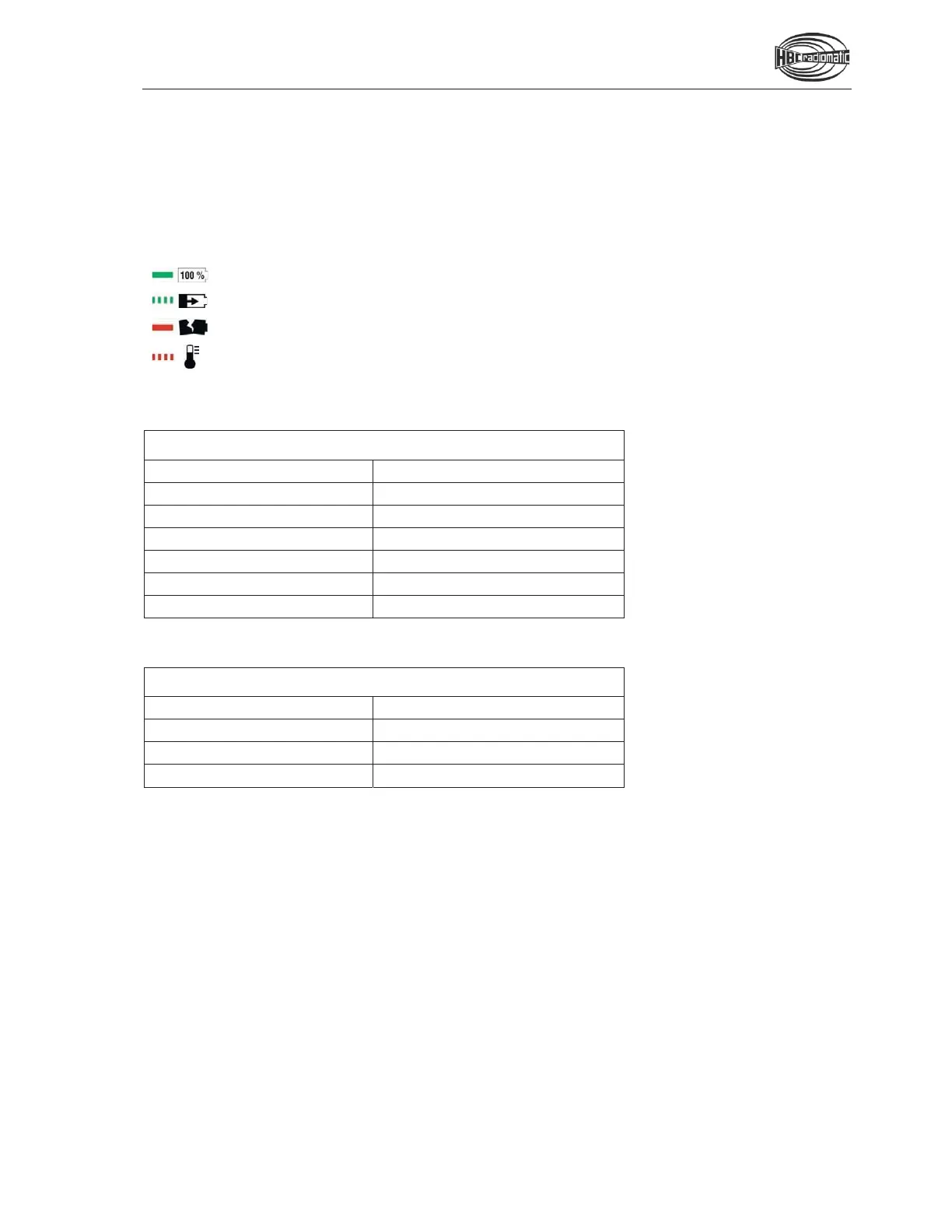
A duo LED indicates the current operating state of the battery.
The battery is charged
The battery is charging
The battery is defective
The battery temperature is below 0 °C (32 °F) or above
45 °C (113 °F). The battery is not charged in this case.
Technical Data QD405000
Operating voltage
10 – 30 V DC
Charging time
< 5 h
Operating temperature
0 – 45 °C (32 °F – 113 °F)
Housing material
Plastic
Protection class
II
Charging method
CC/CV
End-of-charge voltage
4.2 V
Technical Data PA006040
Operating voltage
100 – 240 V AC
Input current
1.5 A
Output voltage
12 V DC
Output current
3 A