EasyManua.ls Logo

HBC-Radiomatic technos A - User Manual

HBC-Radiomatic technos A
34 pages
Print Icon
To Next Page IconTo Next Page
Loading...
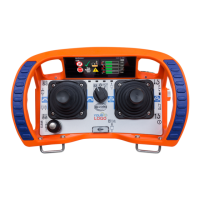
technos A
YOT100U0
Operating Instructions
Original Operating Instructions

Questions and Answers

  • D
    Donna MarshallAug 6, 2025
    Why HBC-Radiomatic technos A Transmitter does not react when switched on?
    • M
      Michael SullivanAug 6, 2025
      If your HBC-Radiomatic Transmitter doesn't react when switched on, it's likely due to a power issue. First, check the battery contacts for any signs of damage or contamination. If the contacts are fine, ensure a fully charged battery is properly inserted into the battery compartment. If the problem persists, try recharging the battery.
  • B
    Brandon VaughnAug 17, 2025
    What to do if HBC-Radiomatic technos A display illuminates but control commands don't work?
    • P
      Patricia BrandtAug 17, 2025
      If the display on your HBC-Radiomatic Transmitter illuminates but you can't effect control commands, the issue might be with the receiver. Check the connecting cable to the receiver to ensure it is properly connected. Also, check the functions via the LEDs in the radio status panel of the receiver to diagnose radio communication issues.
  • J
    Jessica RuizAug 27, 2025
    Why does my HBC-Radiomatic technos A show low-power indication so quickly?
    • C
      Christopher RodriguezAug 27, 2025
      A low-power indication after minimal operating time on your HBC-Radiomatic Transmitter can stem from several causes. Start by checking the battery contacts for contamination or damage. If they're damaged or contaminated, clean or repair them. Also, ensure the battery is fully charged and that the recharging process runs correctly. If the issue continues, the battery might be defective; test the transmitter with a fully charged or replacement battery.

Summary

Technical Data

Dimensions

Provides the physical measurements of the radio system.

Pictographs

Safety Instructions

Intended Use

Details the specific applications and purposes for which the radio system is designed.

Installation and Operation Safety

Provides critical guidelines for the safe setup, use, and maintenance of the radio system.

FCC Compliance Notes

Outlines compliance information related to the Federal Communications Commission regulations.

IC Compliance Notes

Details compliance information related to Industry Canada regulations for radio equipment.

Transmitter Equipment

Operation

Activating the Transmitter

Step-by-step guide on how to power on and prepare the transmitter for use.

Deactivating the Transmitter

Procedure for safely shutting down the transmitter.

Automatic Power Off (APO) Function

Explanation of the automatic shutdown feature to save power and enhance safety.

Automatic Movement Off (AMO) Function

Describes the function that automatically deactivates movement commands after a set period.

Integrated LED Flashlight

Details how to activate and deactivate the built-in LED flashlight.

Front Panel Lighting

Explains how to use the front panel lighting for improved visibility.

Display Content and Functions

Status Bar

Describes the top section of the display showing field strength, battery status, and time.

Field Strength Indication

Details how signal quality is indicated on the display.

Battery Status Display

Explains how the battery charge level is shown on the display.

Navigation

Display Navigation

Explains how to navigate between different displays and select options.

Menu Structure Overview

Details the different menus available: Start, Customer, and HBC menus.

HBC Menu

System Information and Diagnostics

Access to warnings, system info, service details, operating hours, software, and info text.

User Customization

Settings for personalization, power information, language, and backlight.

Connectivity and General Settings

Configure display, RF interface, and master level access.

Safety Feature Configuration

Adjust sensitivity, activate inclination switch, configure APO/AMO, and manage PIN.

Battery and Battery Charger

Li-ion Battery Details

Covers battery capacity, environmental effects, and safety precautions for Li-ion batteries.

DC Battery Charger Operation

Guidelines for safe operation, maintenance, and handling of the DC battery charger.

Battery Charging Process

Step-by-step process for charging the transmitter's battery, including LED indicators.

Options

Safety Features Overview

Details on safety features that prevent unintended machine movements like shock-off, zero-g, and inclination switch.

User Identification with merlin TUC

Explains the merlin® TUC user identification function for access management and data logging.

Enabling Switch Functionality

Information on the two-step enabling switch for enhanced safety during operation and maintenance.

radiomatic Infrakkey Activation

How to activate the radio system using an infrared link between transmitter and receiver.

Micro Drive Functionality

Details on limiting machine speed for controlled maneuvers and user safety.

Orthogonal Drive (Electronic Cross Gate)

Preventing dangerous diagonal movements by requiring joysticks to return to zero position.

Shut-off on Implausible Commands

Automatic shutdown triggered by sequences of questionable movement commands.

Frequency Management

Fixed Frequency Operation

Information on transmitters operating on a pre-assigned fixed radio frequency.

Manual Frequency Switching

How to change the radio channel manually during operation.

radiomatic AFS

Automatic Frequency Selection feature for finding and using free radio channels.

2.4 GHz Technology

Overview of 2.4 GHz technology for automatic frequency coordination and global use.

DECT Technology

Explanation of DECT technology for uninterrupted radio control without frequency conflicts.

Catch-Release Operation

Tandem Operation

Tandem Operation T1

Configuration for 1 transmitter controlling 2 machines individually or in parallel.

Tandem Operation T2

Configuration for 2 master transmitters controlling 2 machines individually or in parallel.

Tandem Operation TM;TS

Configuration for 1 master and 1 slave transmitter controlling 2 machines.

Pre-selection of Trolley or Hoist

Cable Control

radiomatic CPS

Technical Data Overview

Dimensions and Diagram

Visual representation and measurements of the transmitter's physical size and form factor.

Troubleshooting Guide

Maintenance

Fault Handling Procedures

Instructions and warnings for dealing with system faults, repairs, and shipping defective equipment.

HBC-Radiomatic technos A Specifications

General IconGeneral
BrandHBC-Radiomatic
Modeltechnos A
CategoryTransmitter
LanguageEnglish

Related product manuals