12
4.2 REMOVING THE TRANSPORT LOCKS
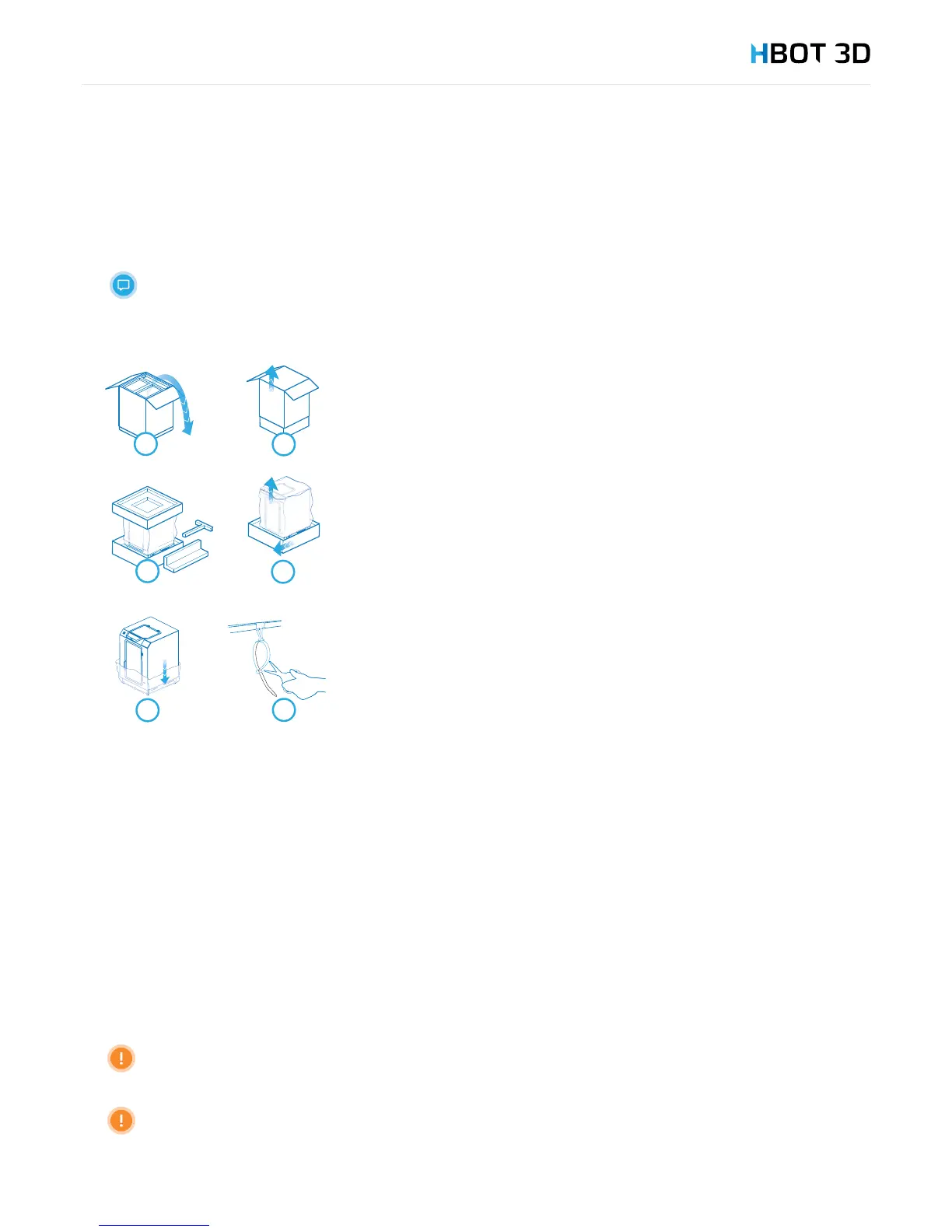
After removing all items and placing them in a safe place, remove other transport locks.
Weight of the device exceeds 30 kg. For safety reasons, it is recommended that these operations
be performed by at least 2 persons.
4.3 SELECTING LOCATION
To ensure operational safety and obtain best printer performance by minimizing vibration or uneven distribution of its weight, the
printer must be erected on a rm surface.
Before installing make sure that the location where the device is to be installed:
• Has a rm and even surface;
• Is located clear of elements that may block the ventilation holes;
• Is clear of direct sunlight;
• Is properly ventilated;
• Is not exposed to negative temperatures (below 0 °C),
• Is located clear of sources of heat and water;
• Provides sufcient footprint to enable full opening of printer doors (front and top);
• Supply outlet and SD Card slot are easily accessible.
The printer may not installed on table top, or structures with inadequate support.
Please note that dangerous toxins may be released from the hot material, so the device must be located in a well-
ventilated area.
STEP 1
Open the box
STEP 2
Remove the carton by lifting it upwards.
STEP 3
Remove the protective foam pads (one upper and four on each corner).
STEP 4
Lift the device and remove protecting pads under the printer (foam and carton).
STEP 5
Carefully remove the protective bag.
STEP 6
Remove strap protecting clips (inside the printer).


 To Next Page