24
Your HBOT 3D F300 builds a real model on the basis of instructions saved on an SD Card in the format of a .gcode le. Every printing
process needs an individual .gcode le, which stores all printing data and model coordinates. A .gcode le is generated using the
Simplify 3D Software included in the kit. This chapter describes the software program installation process, its essential features, and
steps to be followed to correctly prepare les for your printing job.
For additional information we encourage you to refer to the knowledge base on the manufacturer’s website at: www.simplify3d.com
6.1 INSTALLATION OF SIMPLIFY 3D
STEP 1
Log in to your account at: www.simplify3d.com in the Account tab using the credentials provided by Simplify3D Support Team to the
e-mail address specied when purchasing the device.
If you did not receive an e-mail with login credentials, contact our Technical Department by email at: serwis@hbot3d.com
STEP 2
Change the default access password
STEP 3
Download the software installation le by selecting a version appropriate for your operating system from the Download Software tab.
STEP 4
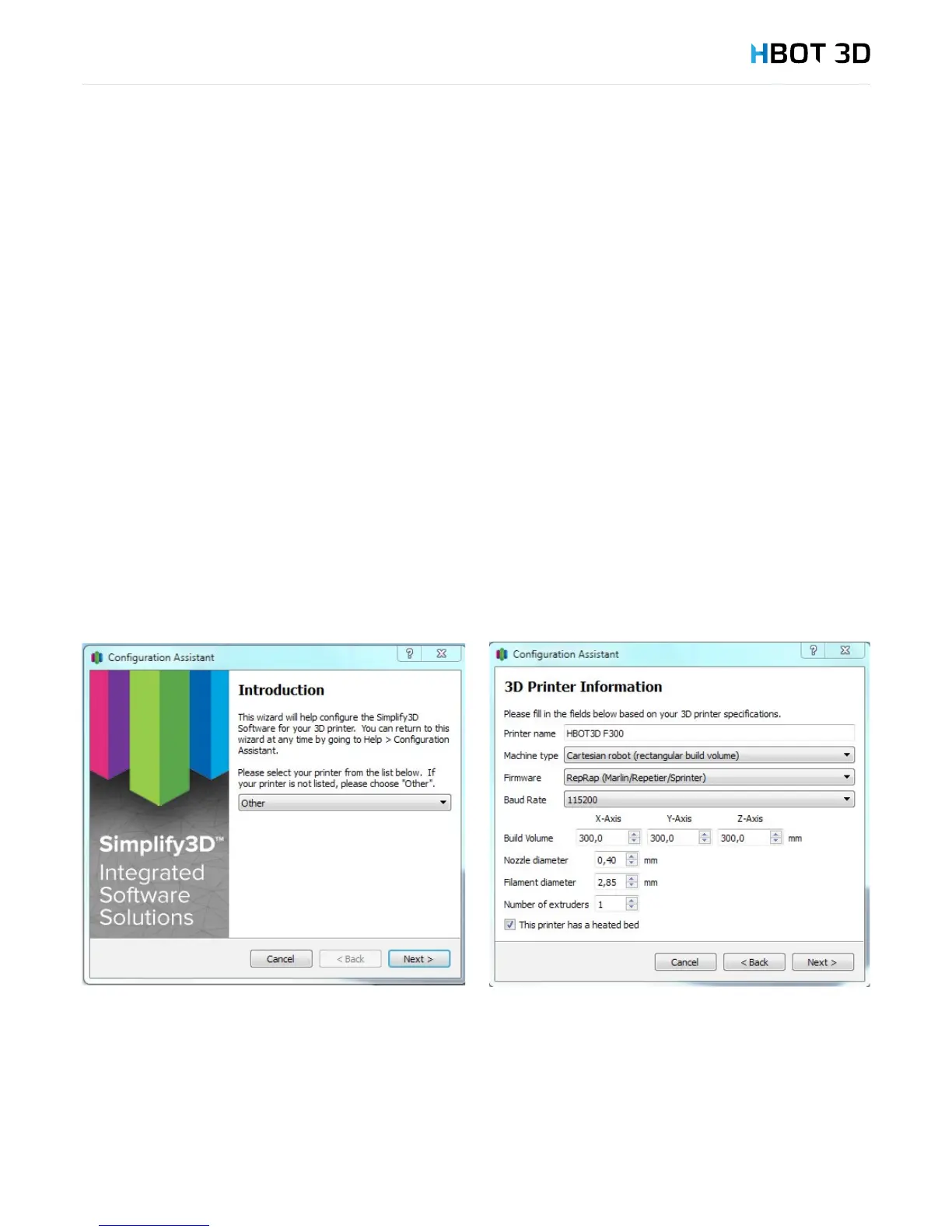
Follow the instructions in the wizard. Once you go through standard settings and the “Introduction” screen appears, select Other from
the drop-down list and ll in the elds as shown in the following diagram.
6. Preparing les


 To Next Page