29
Editing supports
1. To add a new support use the Add new support structures button, then place the pillar in the desired place of your model.
2. To delete a support use the Remove existing supports button, then click the support you want to delete.
3. To reset all supports and restore automatic support placement, use the Clear All Supports button.
6.9 ADVANCED PRINT PARAMETERS
Simplify3D Software allows you to change more than ve basic print parameters. To edit advanced parameters, open the FFF Settings
window to edit process parameters (the Edit Process Settings button or double-click on the process name) and then select Show
Advanced.
We recommend you to ONLY edit the parameters described in this Manual. Incorrect conguration of the
other parameters may result in a failed print or even a damage to your printer.
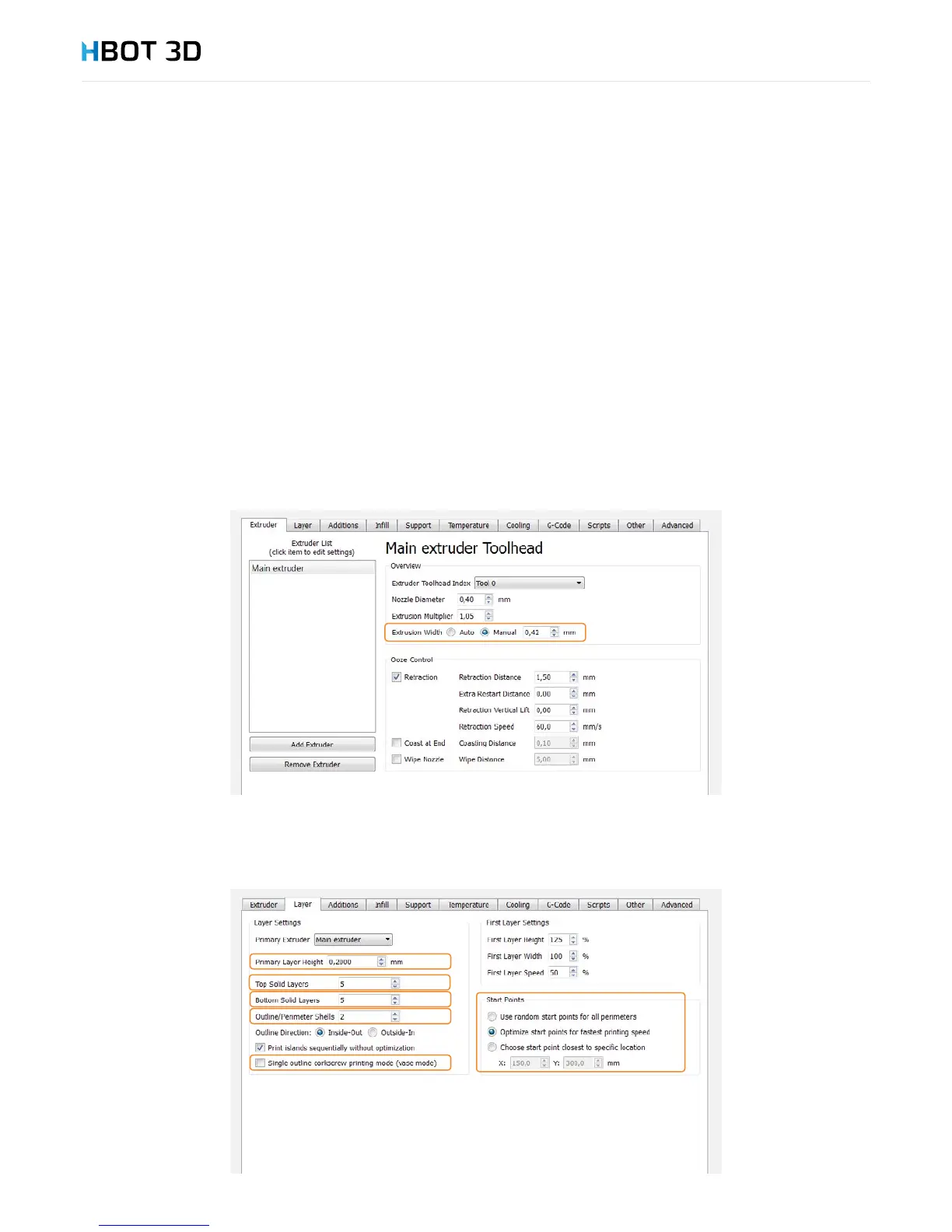
Extruder tab
Extrusion Width – width of the paths laid down during extrusion. This value may be set between 100% up to 120% of nozzle diameter.
Layer tab
The Layer tab contains all layer related parameters. Primary layer height is the basic layer height. You can change this parameter if you
need to use other layer height than the one dened in the drop-down list in section Auto-Congure for Print Quality. The minimum
layer height is 0.25 and the maximum one - 0.75 of nozzle diameter.


 To Next Page