Mounting Originals 5
TANGO / TANGO XL – Operation 5–11
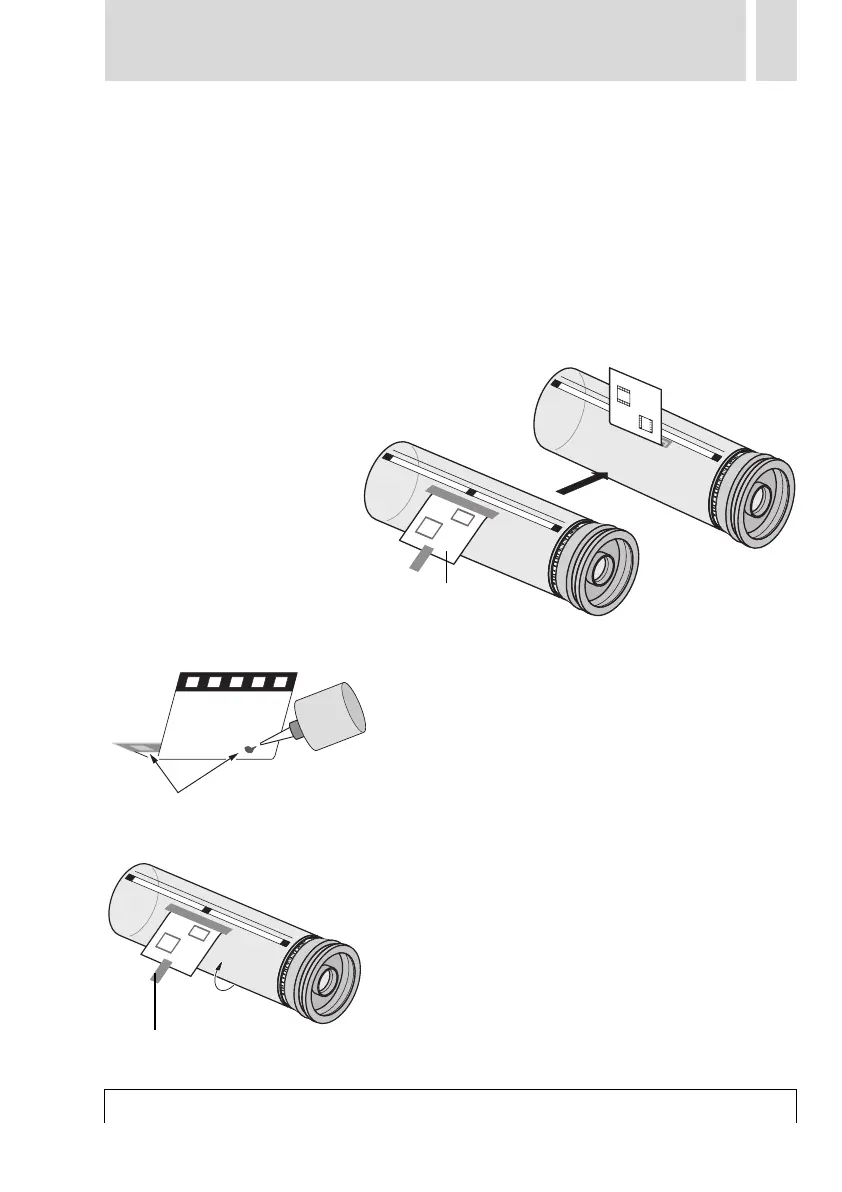
■ Check the film with the transparencies
for cleanness.
■ Stick the film parallel for the groove on
the drum. To do this, fix the film to start
off with at the top end using short adhe-
sive strips and then attach them onto all
sides.
■
■
Flip the film over backwards.
■ Apply a trace of oil (or similar) along the
top edge and, in the case of pronounced
angles, along both sides as well on and
under the transparency. Apply the
amount in accordance with the size of the
transparency. If necessary, apply several
traces.
■ Flip the film back again. Attach a sup-
porting adhesive strip to the bottom edge
of the film.
■ By applying even pressure with a soft
cloth or using the pressure roller of the
mounting device, stretch the original
over the scanning drum. Continue to a
point beyond the end of the film until the
Mounting film
Apply oil film to both sides
Auxiliary adhesive strip



 To Next Page