Start-Up Start-Up
10 11
Start-Up
Setting up device
Warning:
Risk of slipping device!
In operation the device might slide off the table top.
The surface must be smooth and clean and should be properly
leveled.
➜ Locate the unit on a stable, horizontal surface.
➜ Clean surface and feet with a damp cloth and ethanol regularly.
Switch main switch on and off
The ON/OFF switch is situated on the back
side of the unit.
✓ ON/OFF switch is in „power off”
position.
Switch unit on
➜ Press ON/OFF switch.
✓ ON/OFF switch is in „power on” position.
Hei-FLOW Advantage
✓ The indicator light of actual direction illuminates.
Hei-FLOW Precision
✓ The settings are displayed in following order:
▪ set pump head (e. g. „Pu 1”)
▪ gear ratio (e. g. „5”)
▪ set inner tubing diameter (e. g. „3,1”)
▪ possible back hub (z. B. „r on”)
✓ The indicator light of actual direction illuminates.
✓ Unit is switched on.
Switch unit off
➜ Press ON/OFF switch.
✓ ON/OFF switch is in „power off” position.
Hei-FLOW Advantage, Hei-FLOW Precision
✓ All indicator lights power off.
✓ Unit is switched off.
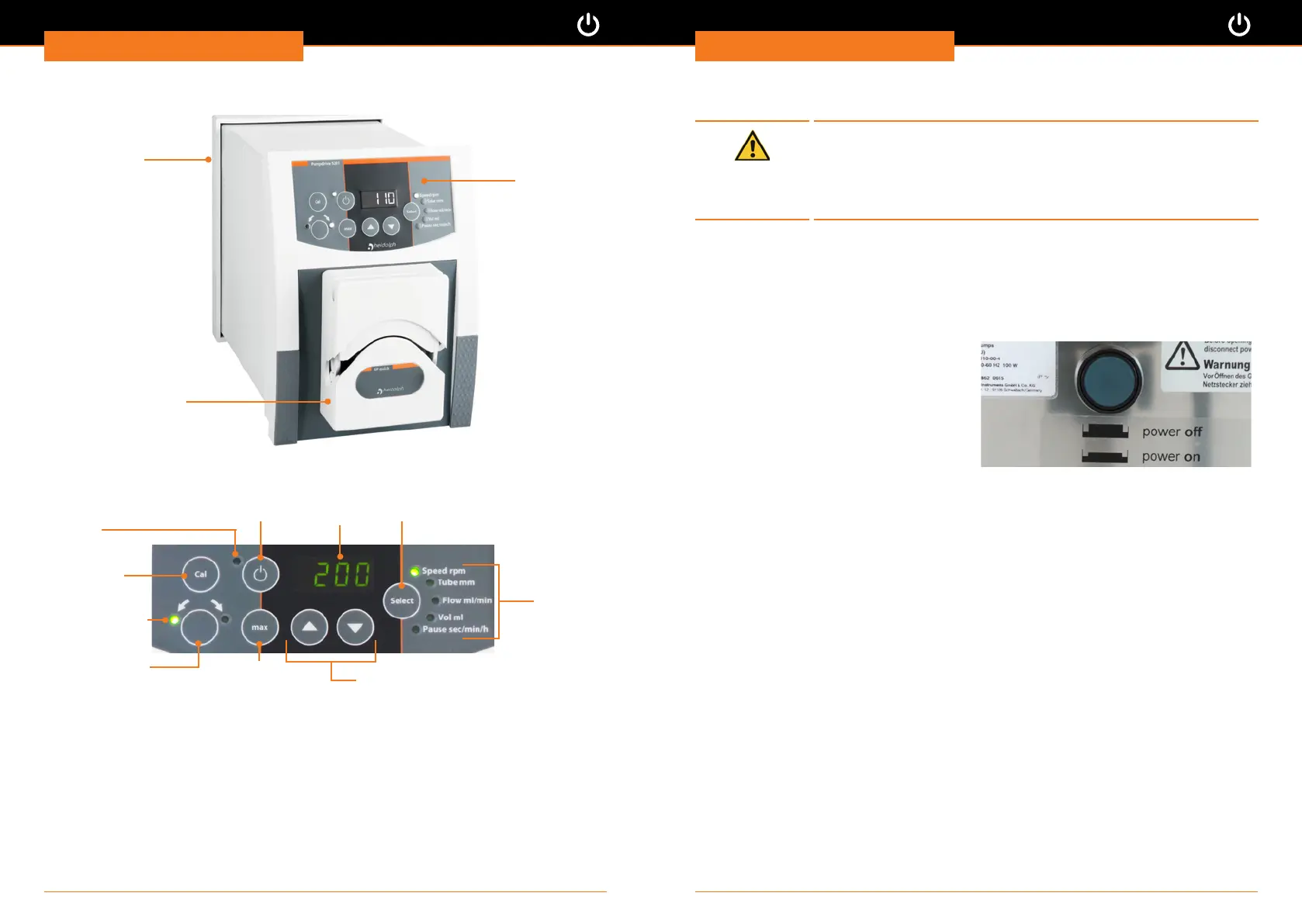
Hei-FLOW Precision: overall view
Control panel
Example:
Pump head SP quick
ON/OFF switch
(device back side)
Hei-FLOW Precision: control panel
Rotation key
Direction key:
change rotation
direction
Control indicator
parameter
Control indicator
rotation
Calibrating
key
Control indicator
direction
Select key parameter
Max key: for
lling and draining
Arrow key: increase, decrease value
Set parameter




 To Next Page