Operation Operation
14 15
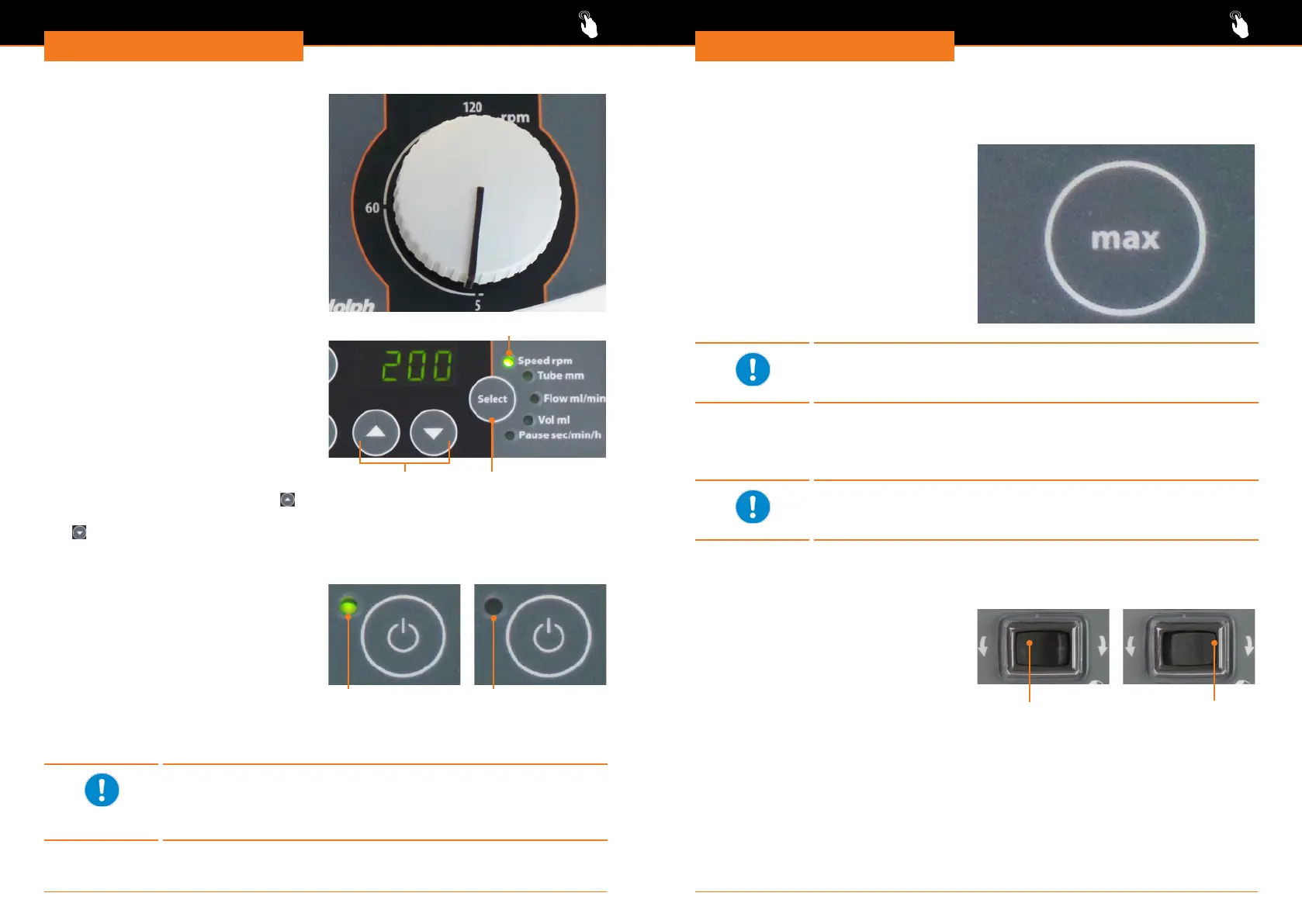
Set speed: Hei-FLOW Advantage
Speed is set via rotation knob.
✓ Unit is switched on.
✓ Required direction of rotation is
activated.
➜ Turn knob to set speed.
Set speed: Hei-FLOW Precision
▪ Hei-FLOW Precision 01: 5 - 120 rpm
▪ Hei-FLOW Precision 06: 24 - 600 rpm
Speed is set via selection key „Speed
rpm”.
✓ Unit is switched on.
✓ Required direction of rotation is
activated.
➜ Press selection key repeatedly, till
control light „Speed rpm” illuminates.
➜ Increase speed via arrow key up
.
➜ Decrease speed via arrow key down
.
✓ Set speed will be displayed as rpm.
Selection key
Control light speed
Arrow keys
Switch rotation on
➜ Press rotation key.
✓ Control light of rotation key will
illuminate.
✓ Pumping starts.
Switch rotation off
➜ Press rotation key.
✓ Control light of rotation key will power
off.
✓ Pumping stops.
Pumping active
Rotation key
Pumping inactive
Feed rate depends on media, inner diameter and material of tubing
and speed.
To determine speed see chapter „Technical data, Performance
range”.
Charge and discharge tubes
With the key „max” charging and discharging of the tubes can be sped up without
changing any settings.
✓ Unit is switched on.
✓ Rotation is switched off.
✓ Required direction of rotation is
activated.
➜ Press key „max” and hold pressed.
✓ Pump is running with maximum speed.
Hei-FLOW Precision:
✓ The display shows „Full”.
✓ Release key „max”.
✓ Pumping stops.
A power cut will stop the pump. All settings will be saved.
With power return the device is switched on automatically. Rotation
must be started manually.
Change direction of rotation
Direction of rotation can only be changed if rotation is switched off.
A warning signal will be audible when trying to change direction
during operation.
Change direction: Hei-FLOW Value
✓ Rotation is switched off.
➜ Press direction switch on the right side.
✓ Pump will operate clockwise.
➜ Press direction switch on the left side.
✓ Pump will operate counter-clockwise.
counter-clockwise
Direction switch
Direction
clockwise




 To Next Page