User manual Urispec
®
Plus
12
Manual Urispec
®
Plus V2.01 HS USA / 04-19
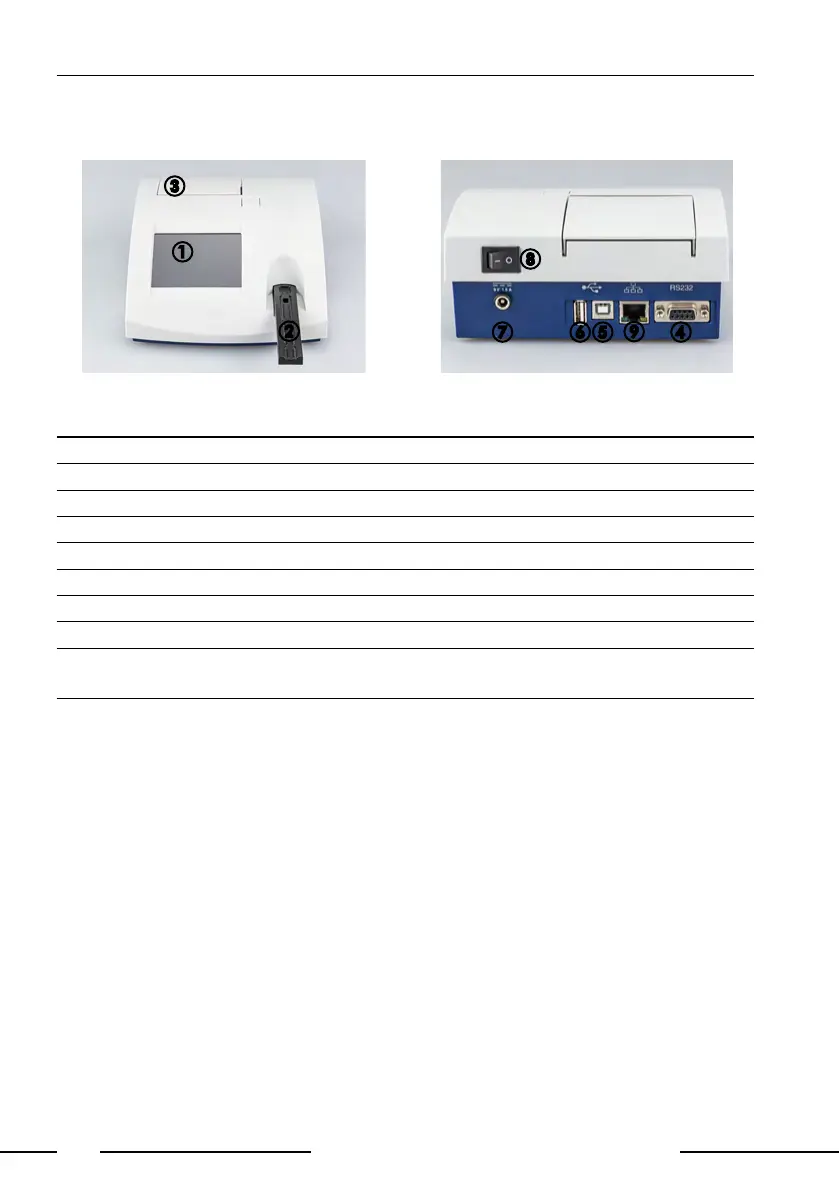
3.2. Description of instrument parts
A
B
C
Pic. 3: Front view
DEFG
Pic. 4: Backside view
Actuator Function
1. Touch-Screen Control of equipment functions
2. Test Strip Slide Test strip retainer and autonomous start of analysis
3. Printer Flap Opening the printer ap for paper replacement
4. Serial Interface Connection of a computer
5. USB - Interface Connection of a computer
6. USB - Interface Connection of a keyboard or a bar code scanner
7. Mains Connection Contact for the provided power pack
8. On/Off Switch (I/O) Turning the equipment on and off
9. LAN-Interface Connection to network (serial over LAN), not sup-
ported
3.3. Setting up the instrument
Place the instrument on a hard, even surface where humidity and temperature
are fairly constant. Make sure that the instrument is allowed to acclimate to
room temperature prior to use.
Make sure that you
• Do not place the instrument near strong electromagnetic elds
• Do not place the instrument near heating plates, ovens or radiators
• Do not expose the instrument to strong light sources (i.e. direct sunlight)
H
I



 To Next Page