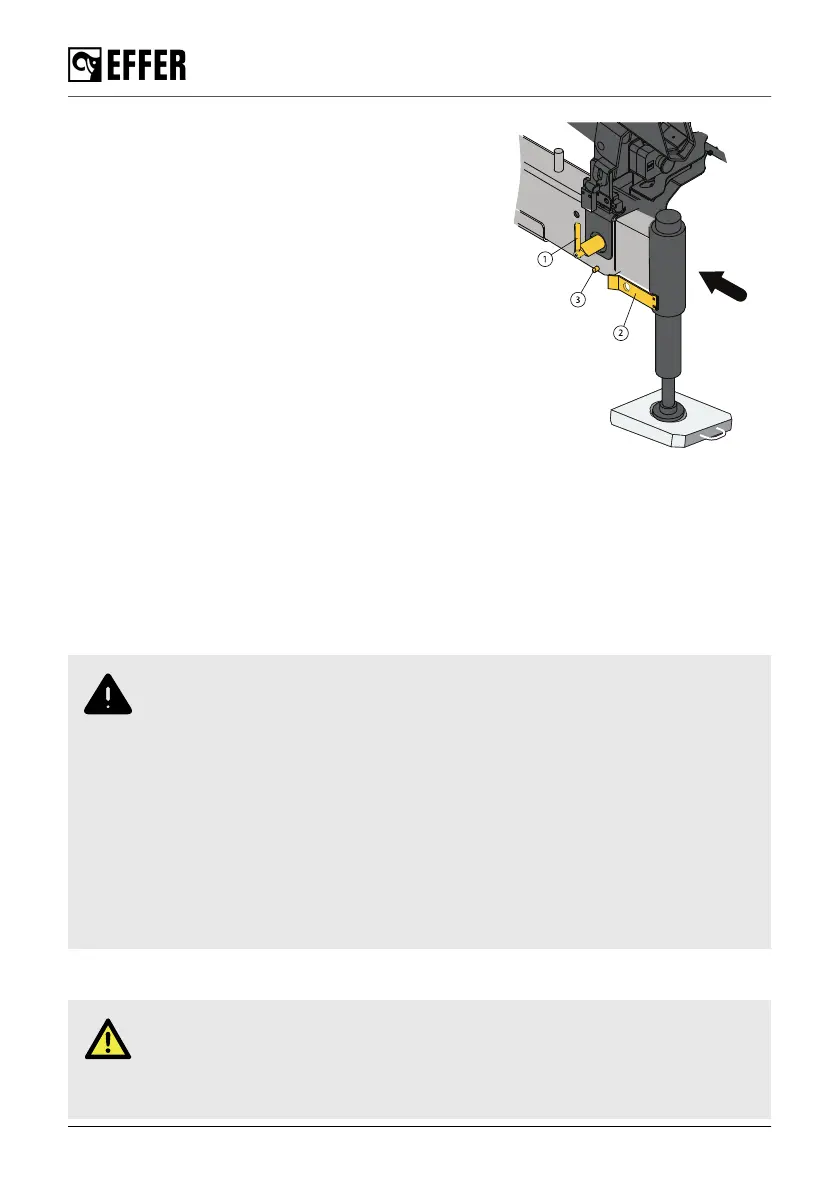
1. Turn the locking device (1) 180° pointing upwards
2. Manually retract the stabiliser extension about 20 cm
3. Turn the locking device (1) 180° pointing downwards
4. Retract the stabiliser extension completely
5. Make sure the locking device (1) lock the extension
6. Make sure the pin (3) goes into the hole on the locking
device (2)
Repeat the instructions for the stabiliser extension(s) on the
other side of the vehicle.
The procedure of setting the auxiliary [option] stabiliser
extensions differs depending on the type of stabiliser
extensions.
7.3. Switching off the system
1. Push the emergency stop button on the crane or on the controller [option].
2. Disengage the PTO.
7.4. Emergency operation
7.4.1. Crane movements in an emergency
WARNING
• The use of any emergency operation is under your direct responsibility as
operator of the crane.
• You must be qualified and correctly trained in the emergency operation to use
the manual commands unit. Pay careful attention when operating from the
operator station (crushing, falling, etc...) and watch out for hidden hazards (low
visibility, narrow spaces, etc...).
• Always operate the crane with caution and at reduced speed.
• It is strictly forbidden to use any emergency operation as normal operation (for
example lifting a load).
• Always go to/contact an authorised service workshop when a security seal has
been broken.
EMERGENCY operation of remote controlled crane
DANGER
Operating the crane in this way is HIGHLY DANGEROUS because during
emergency operation you may be forced to operate in conditions of poor visibility
of the operating area or very close to the crane boom.
Ending crane operation
68 EFFER 35





 To Next Page