Home
HIKVISION
Test Equipment
IPC-4300H
Page 155
HIKVISION IPC-4300H - Page 155
177 pages
Manual
Save Page as PDF
To Next Page
To Next Page
To Previous Page
To Previous Page
Loading...
UM IPC
-
4300H 040
3
20NA
155
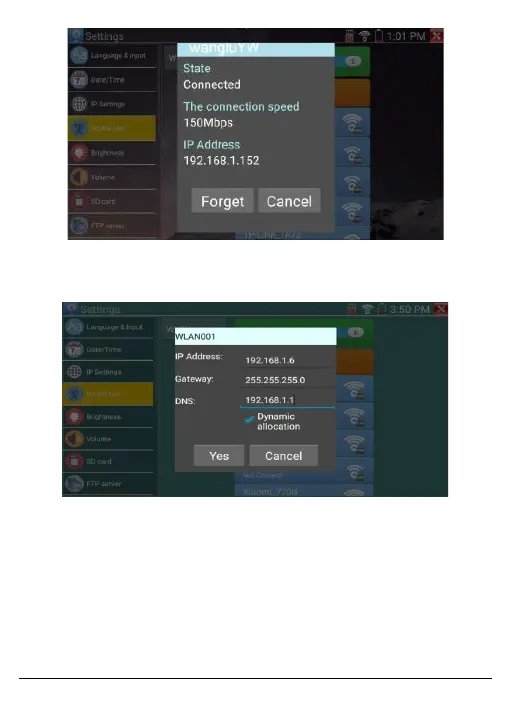
Figure
161,
Wi
-
Fi
Informa
tion
Scr
een
Selec
t a
nd pr
ess
Wi
-
Fi
sev
eral sec
o
nds
to set
a
st
ati
c I
P ad
dre
ss.
Figure
162
,
IP Inf
orma
tion S
creen
•
Wi
-
Fi Hotspot
: Enter
the
S
SID
and
Password
, and
click
OK
to
cre
ate
a Wi
-
Fi
hotspo
t.
154
156
Table of Contents
Main Page
ALL RIGHTS RESERVED
2
Any and all information, including, among others, wordings, pictures, graphs are the properties of Hangzhou Hikvision Digital Technology Co., Ltd. or its subsidiaries (hereinafter referred to be “Hikvision”). This user manual (hereinafter referred to ...
2
About this Manual
2
Manual Illustrations and Features
2
Trademarks Acknowledgement
2
Legal Disclaimer
2
Regulatory Information
3
FCC Information
3
FCC Conditions
3
EU Conformity Statement
3
Industry Canada ICES-003 Compliance
4
Hikvision North America Privacy Policy
5
What Information We Collect
5
How We Collect and Use Your Information
6
We may also use the information we collect for the following purpose:
6
Cookies and Other Technologies
7
How We Share Your Information
7
Securing Your Personal Information
8
Accessing, Correcting, and Retention of Your Personal Information
8
Social Community Features and Social Networks
9
Your Choices
9
Children’s Privacy
10
Global Operations
10
Contact Us
10
Mandatory Electrical Requirements
12
Symbol Conventions
13
Safety Instructions
13
Preventive and Cautionary Tips
14
Table of Contents
15
1. Introduction
17
1.1. General
17
1.2. Box Contents
18
1.3. Top Interface
19
1.4. Top Interface
22
2. Operation
24
2.1. Battery Installation
24
Use the original adaptor and connected device cable.
24
When the battery icon is full or the charge indicator turns off automatically, battery charging is complete.
24
When the charge indicator turns off, the battery is at approximately 90% of its capacity. The charging time can be extended for about 1 hour, and charging the battery within 12 hours will not damage it.
24
Press the key for several seconds to restore the default settings when the instrument works abnormally.
24
When using the multimeter function, the red and black leads must be inserted into the corresponding ports.
24
Subjecting the instrument communication port to a circuit voltage over 6 V will damage the Tester.
24
Do not insert the leads into the current terminals when measuring voltage.
24
2.2. Instrument Connection
25
2.2.1. IP Camera Connection
25
If the IP camera requires a PoE power supply, connect the IP camera to the Tester’s LAN port. The Tester will supply PoE Power to the IP camera. Click on the PoE icon to turn the PoE Power on or off.
26
When using Tester menu to turn the Tester’s PoE power supply on or off, the PoE switch and the power sourcing equipment can be connected to the Tester’s PSE port, and PoE power will be supplied to the IP camera using the Tester’s LAN port. The Tester ...
26
A PoE switch or PSE power sourcing equipment can only be connected to the Tester via the PSE In port, otherwise the Tester can be damaged.
26
2.2.2. Connecting Analog Cameras
27
2.2.3. Connecting Coaxial HD Cameras
27
2.2.4. HDMI IN (Optional)
29
2.3. OSD Menu
29
2.3.1. Drop-Down Menu
31
2.3.2. Shortcut Menu
33
2.3.3. Screen Capture
34
2.3.4. TesterPlay
34
2.3.5. Rapid Video
37
2.3.6. IP Discovery
38
2.3.7. Rapid ONVIF Testing
39
Video files can be played in the video player from the main menu.
53
2.3.8. IP Camera Testing
57
Currently, the IP Camera Test Application supports only specific models manufactured by ACTI, AXIS, Dahua, Hikvision, Samsung, and certain other brands. Use the ONVIF or RTSP applications for unsupported cameras.
57
When viewing video in the IP Camera Testing application, the “Video Menu” icon will be displayed in the top right-hand corner. This button provides access to the Snapshot, Record, Photo, Playback, PTZ, and Set functions. Return to the ONVIF section to...
60
2.3.9. HDMI IN (Optional)
60
2.3.10. Video Monitor Test
66
Check and set the protocols, address, interface and baud rate. All values must be consistent with those of the dome camera. After parameters are set, the Tester is able to control the PTZ and the lens.
68
Given that the resolution is 720 x 480 for zoomed in analog output, the images are not always clear.
71
Zoomed in IP images have a resolution of 960 x 540 and are therefore very clear. This facilitates IP camera installation.
71
2.3.11. Color Bar Generator (TV OUT)
78
2.3.12. SDI Camera Test (Optional)
80
2.3.13. CVI Camera Test (Optional)
82
2.3.14. TVI Camera Testing (Optional)
89
2.3.15. AHD Camera Test (Optional)
92
2.3.16. Network Tool
93
Trace route testing should only be used for rough estimation purposes. For accurate test route tracking, use a professional Ethernet Tester.
102
2.3.17. Rapid IP Discovery
105
2.3.18. PoE Power - USB Power Output
105
Do not input power into the “12 VDC/2A Output” port.
107
Do not output 12 VDC/2A power into the Tester’s 12 VDC/In port, as this will damage the device.
107
The Tester’s power output is close to 2A. For IP cameras with a power supply over 2 V, the Tester will automatically enter protection mode.
107
Disconnect all of the Tester connections, and reconnect the Tester to the power adaptor to restart the Tester.
107
Before turning on the PoE power output, make sure the IP camera supports PoE power. Otherwise, the IP camera may become damaged.
107
Make sure to plug in the IP camera into the LAN port prior to turning on PoE power.
107
Make sure the Tester is full charged, or at least 80% charged. Otherwise the, Tester will display a “Low Power” or “Not Able to Supply Power” message.
107
2.3.19. Cable Test
108
2.3.20. RJ-45 Cable TDR Test
109
2.3.21. Cable Search (Optional)
113
The Blue Cable Identifier requires two AAA batteries.
113
While the cable tracer is receiving an audio signal from the Tester, there may be interference from adjacent or crossing cables. However, the cable that makes the loudest noise is the one that is connected to the meter.
113
The cable tracer battery must be connected according to the corresponding positive pole (+) and negative pole (-). Otherwise, the Tester will be damaged.
114
While the cable tracer Tester is receiving an audio signal from the Tester, it may be influenced by other signals and make some noise.
114
2.3.22. TDR Cable Test (Optional)
114
The testing cable cannot be connected to any equipment, otherwise the Tester will be damaged.
114
The TDR reflect signal could be affected by the cable quality, cable not being connected, etc., which can cause differences in TDR measurements. The TDR measurement should be used for reference only.
118
2.3.23. PoE Voltage and Power Measurement
118
This test is used for measuring the voltage drawn by the PoE node. The IP Tester must be located between the PoE switch and the PoE node for this test to work.
119
The PoE switch must be connected to the PSE In port. The powered device (IP camera or other PoE node) must be connected to the LAN port.
119
Do not connect PoE power supply equipment (such as a PoE switch) to the Tester’s UTP/SCAN port. Doing so will damage the Tester.
119
2.3.24. 12 V Power Input Test
120
The battery charging power and the device’s working power is 12 V. The measured power will change depending on the difference between battery power and backlight brightness.
120
Do not connect devices with an input power greater than 17 V to the Tester’s 12V In port. This can damage the Tester.
121
2.3.25. Digital Multi-Meter (Optional)
121
Turn off the tested circuit and connect the meter to the circuit for measurement.
123
OL indicates the presence of an “over range” situation. A higher range must be selected.
124
When the scale of the value to be measured is unknown beforehand, set the range selector to the highest position.
124
The maximum current of an mA socket is 660 mA. Over current will destroy the fuse and will damage the Tester.
124
The maximum current of the 10 A port is 10 A. Over current will destroy the Tester and will damage the operator.
124
AC Mode only allows for “AC” inputs. Damage will result otherwise.
124
When measuring in-circuit resistance, make sure that the circuit being tested is unplugged and that all capacitors have been fully discharged.
124
The capacitance of a capacitor should be tested separately, and should not be tested on the circuit itself.
127
To avoid electric shock, ensure that the capacitors have been discharged fully before measuring the capacitance.
127
While testing the capacitance up to 660 µF, the maximum time will be 6.6 second. If the capacitor is damaged or has a leak, the data will not be read. The Tester will return to normal after the capacitor is disconnected.
127
The 10 A socket is not equipped with a fuse to protect the device with over range currents. Using the 10 A socket to measure voltage will damage the meter.
129
2.3.26. Optical Power Meter (Optional)
129
Keep the fiber connector and the dust cap clean, and clean the detector with special alcohol.
129
2.3.27. Visual Fault Locator (Optional)
132
2.3.28. Audio Recording
134
2.3.29. Data Monitor
135
2.3.30. Audio Player
136
2.3.31. Media Player
137
2.3.32. RTSP Player
138
In the event that the IP Tester does not automatically detect the RTSP stream, refer to the specific camera manufacturer for the specific RTSP stream URL. This information can be found online by searching for a camera’s model number and RTSP.
140
2.3.33. Hik Test Tool
140
2.3.34. Dahua Test Tool
144
2.3.35. Update
147
2.3.36. Office
148
2.3.37. LED Flashlight
149
2.3.38. Browser
150
Live video cannot be viewed in the Web browser. To view video, use the IP Tester‘s live camera view applications.
150
2.3.39. Notepad
151
2.3.40. System Settings
153
2.3.41. File Explorer
159
2.3.42. Theme
161
2.3.43. Audio Test
164
2.3.44. PoE Power Output
165
Ensure that the cable connected to the Tester’s LAN port is a straight-line cable and that there is no short circuit, otherwise the Tester will be damaged.
166
Before using PoE power output, ensure that the IP camera supports PoE power. Otherwise, the IP camera will be damaged.
166
The Tester’s maximum PoE power output is 24 W. If an ultra high-power load is connected, the Tester will enter protection mode.
166
2.3.45. HDMI Output
167
2.3.46. 12 VDC/2A Power Output
167
Do not plug in any power sources into the Tester’s 12 VDC/2A OUTPUT port.
168
Hikvision’s warranty does not cover damage due to human error.
168
The IP Tester’s power output capacity is 2A. If more than 2A are supplied, the Tester will automatically enter protection mode.
168
Disconnect all cables from the Tester and reboot it to resume use.
168
The Tester’s power output is close to 2A. If the IP camera’s power is greater than 2V, the Tester will automatically enter protection mode. Disconnect all Tester connections and reconnect the Tester to the power adaptor to resume use.
168
Make sure that the Tester is sufficiently charged. Otherwise, it will not be able to provide enough output power.
168
2.3.47. 5V/2A USB Power Output
168
The USB port is for power only and cannot be used for data transmission.
169
3. Specifications
169
3.1. General Specifications
169
3.2. Multi-Meter Specifications
174
3.3. Optical Power Meter Specifications
176
3.4. Visual Fault Locator Specifications
177



 To Next Page