EasyManua.ls Logo

Hill-Rom Isolette C2000 - System Failure Messages

Hill-Rom Isolette C2000
93 pages
Print Icon
To Next Page IconTo Next Page
To Previous Page IconTo Previous Page
Loading...
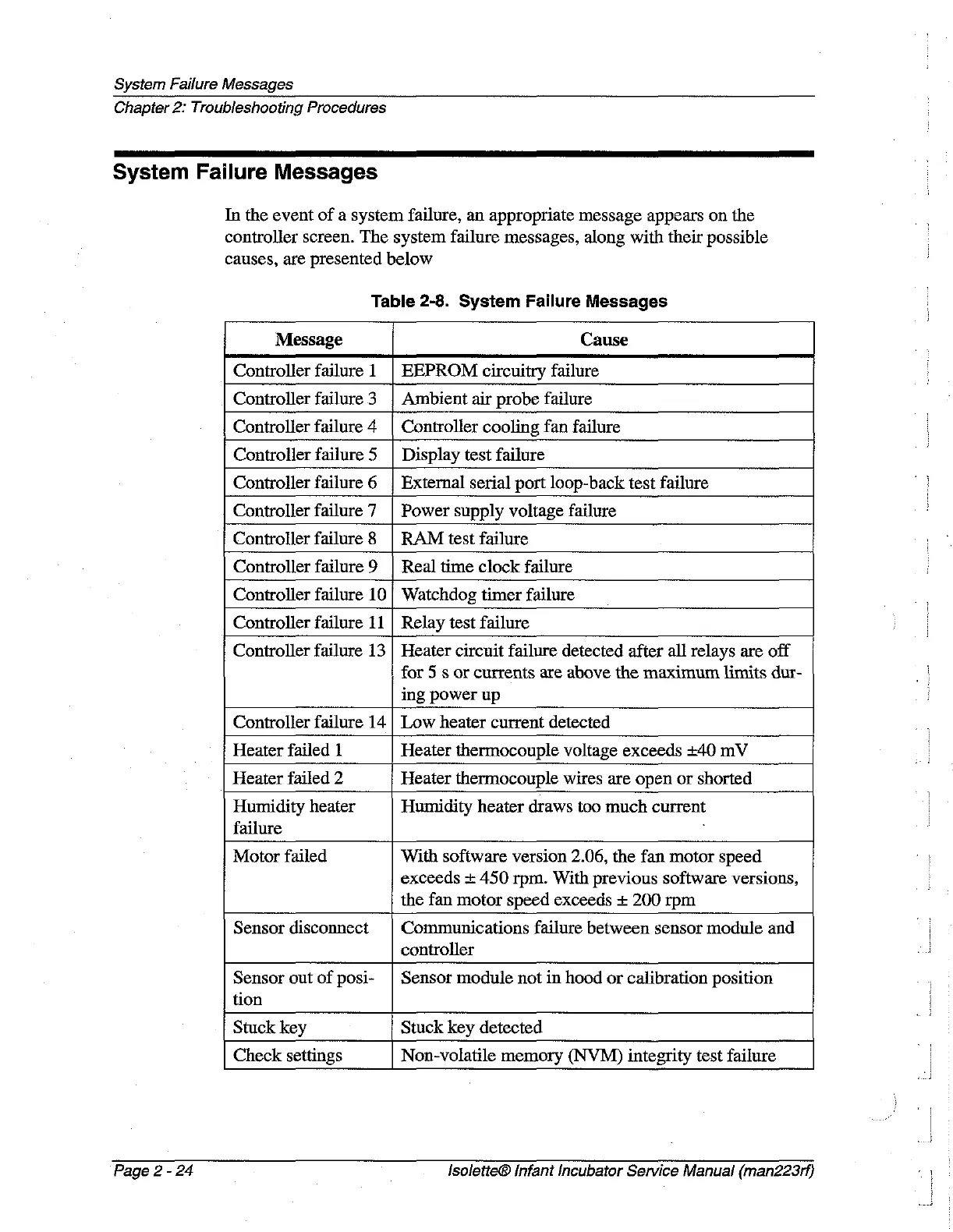
System
Failure
Messages
Chapter
2:
Troubleshooting
Procedures
System
Failure
Messages
In
the
event
of
a
system
failure,
an
appropriate
message
appears
on
the
controller
screen.
The
system
failure
messages,
along
with
their
possible
causes,
are
presented
below
Table
2-8.
System
Failure
Messages
Message
Cause
Controller
failure
1
|
EEPROM
circuitry
failure
Controller
failure
3
|
Ambient
air
probe
failure
Controller
failure
4
Controller
cooling
fan
failure
Controller
failure
5
Display
test
failure
Controller
failure
6
External
serial
port
loop-back
test
failure
Controller
failure
7
Power
supply
voltage
failure
Controller
failure
8
RAM
test
failure
Controller
failure
9
Real
time
clock
failure
Controller
failure
10
Watchdog
timer
failure
Controller
failure
11
Relay
test
failure
Controller
failure
13
Heater
circuit
failure
detected
after
all
relays
are off
for
5
s
or
currents
are
above
the
maximum
limits
dur-
ing
power
up
Controller
failure
14
Low
heater
current
detected
Heater
failed
1
Heater
thermocouple
voltage
exceeds
+40
mV
Heater
failed
2
Heater
thermocouple
wires
are
open
or
shorted
Humidity
heater
Humidity
heater
draws
too
much
current
failure
Motor
failed
With
software
version
2.06,
the
fan
motor
speed
exceeds
+
450
rpm.
With
previous
software
versions,
the
fan
motor
speed
exceeds
+
200
rpm
Sensor
disconnect
Communications
failure
between
sensor
module
and
controller
Sensor
out
of
posi-
| Sensor
module
not
in
hood
or
calibration
position
tion
Stuck
key
Stuck
key
detected
Check
settings
Non-volatile
memory
(NVM)
integrity
test
failure
Page
2
-
24
lsolette®
Infant
Incubator Service
Manual
(man223rf)

Table of Contents

Related product manuals