EasyManua.ls Logo

Hill-Rom Isolette C2000 - Diagnostic Menus

Hill-Rom Isolette C2000
93 pages
Print Icon
To Next Page IconTo Next Page
To Previous Page IconTo Previous Page
Loading...
2.1
Diagnostic
Menus
Chapter
2:
Troubleshooting
Procedures
2.1
Diagnostic
Menus
To
aid
in
troubleshooting,
the
Isolette®
Infant
Incubator
has
a
series
of
diagnostic
menus.
To
access
the
diagnostic
menus,
refer
to
“Entering
the
Diagnostic
Menus”
on
page
2-25.
Entering
the
Diagnostic
Menus
1.
Enter
the
set-up
menu.
2.
Tum
off
the
controller
power
switch.
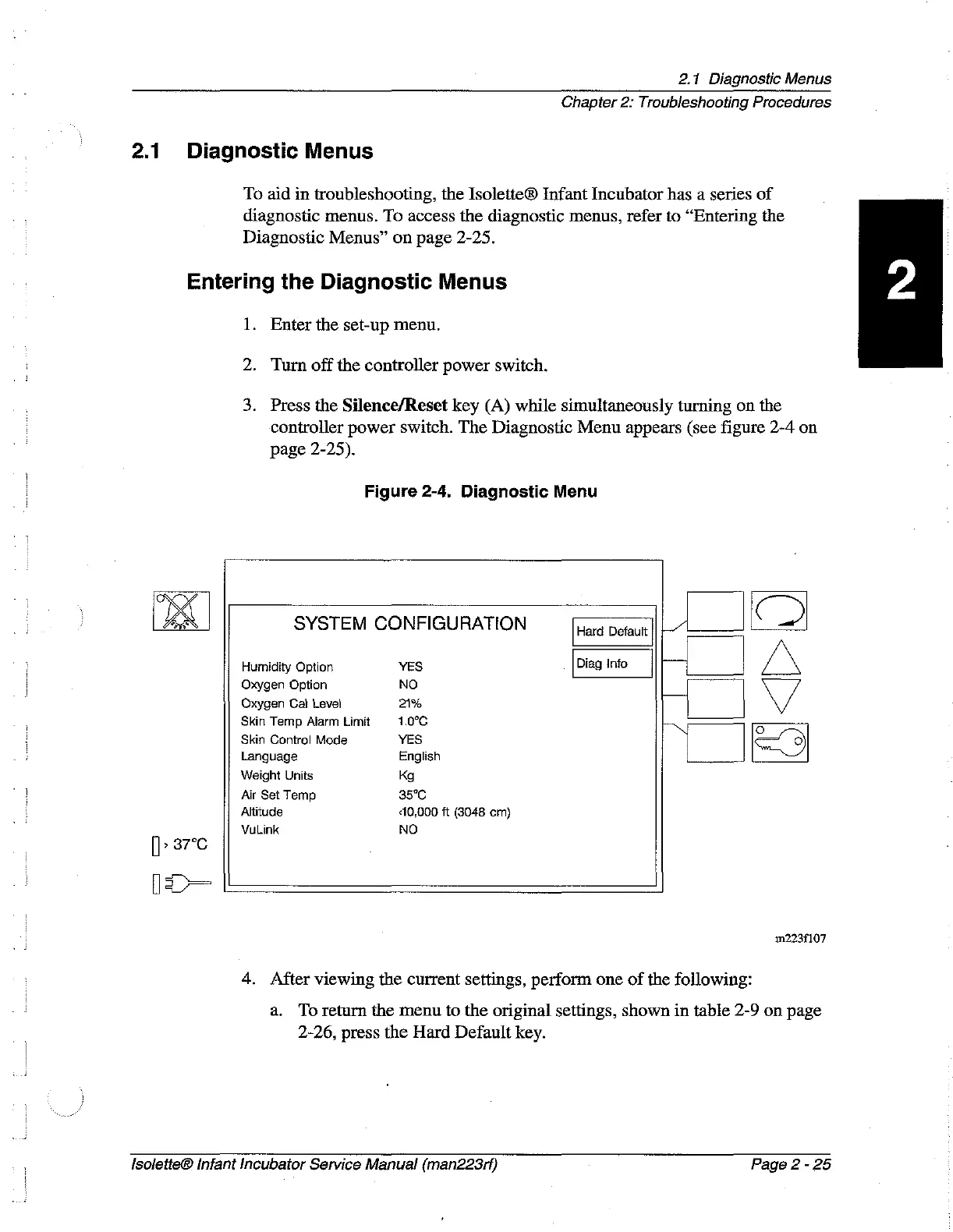
3.
Press
the
Silence/Reset
key
(A)
while
simultaneously
turning
on
the
controller
power
switch.
The
Diagnostic
Menu
appears
(see
figure
2-4
on
page
2-25).
Figure
2-4.
Diagnostic
Menu
Z
SYSTEM
CONFIGURATION
Hard
Defaut
|
1
CD
Humidity
Option
YES
Diag
Info
Γι
Oxygen
Option
NO
|
|
Oxygen
Cal
Level
21%
Skin
Temp
Alarm
Limit
1.0°C
Skin
Control
Mode
YES
ON
I
Language
English
Weight
Units
Kg
Air
Set
Temp
35°C
Altitude
10,000
ft
(3048 cm)
VuLink
NO
>
87°C
ПЕ
112234107
4.
After
viewing
the
current
settings,
perform
one
of
the
following:
а.
To
return
the
menu
to
the
original
settings,
shown
in
table
2-9
on
page
2-26,
press
the
Hard
Default
key.
Isolette®
Infant
Incubator
Service
Manual
(man223rf)
Page
2
-
25

Table of Contents

Related product manuals