EasyManua.ls Logo

Hill-Rom Isolette C2000 - Page 63

Hill-Rom Isolette C2000
93 pages
Print Icon
To Next Page IconTo Next Page
To Previous Page IconTo Previous Page
Loading...
2.1
Diagnostic
Menus
Chapter
2:
Troubleshooting
Procedures
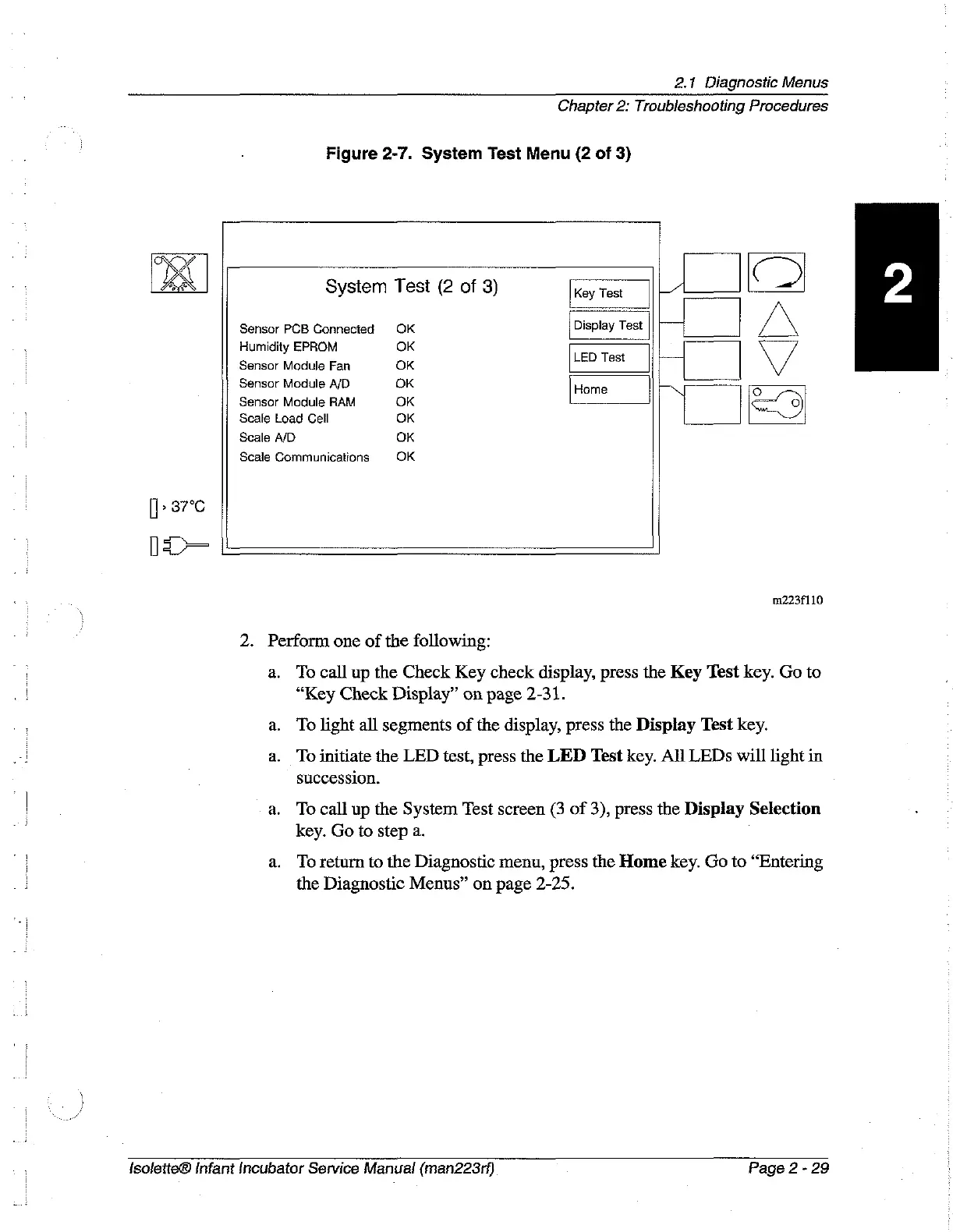
Figure
2-7.
System
Test
Menu
(2
of
3)
A
System
Test
(2
of
3)
Key
Test
LA
Sensor
PCB
Connected
OK
Display
Test
||
|
LN
Humidity
EPROM
OK
LEDT
Sensor
Module
Fan
OK
est
Sensor
Module
A/D
OK
Home
ON
5
Sensor
Module
RAM
OK
I
Scale
Load
Cell
OK
Scale
A/D
OK
Scale
Communications
OK
[|
»
87°C
05
m223f110
2.
Perform
one
of
the
following:
а.
To
call
up
the
Check
Key
check
display,
press
the
Key
Test
key.
Go
to
“Key
Check
Display”
on
page
2-31.
a.
To
light
all
segments
of the
display,
press
the
Display
Test
key.
a.
To
initiate
the
LED
test,
press
the
LED
Test
key.
All
LEDs
will
light
in
succession.
a.
To
call
up
the
System
Test
screen
(3
of
3),
press
the
Display
Selection
key.
Go
to
step
a.
:
a.
Toreturn
to
the
Diagnostic
menu,
press
the
Home
key.
Go
to
“Entering
the
Diagnostic
Menus”
on
page
2-25.
{solette®
Infant
Incubator
Service
Manual
(man223rf)
Page
2-29

Table of Contents

Related product manuals