9
Using the Remote Control
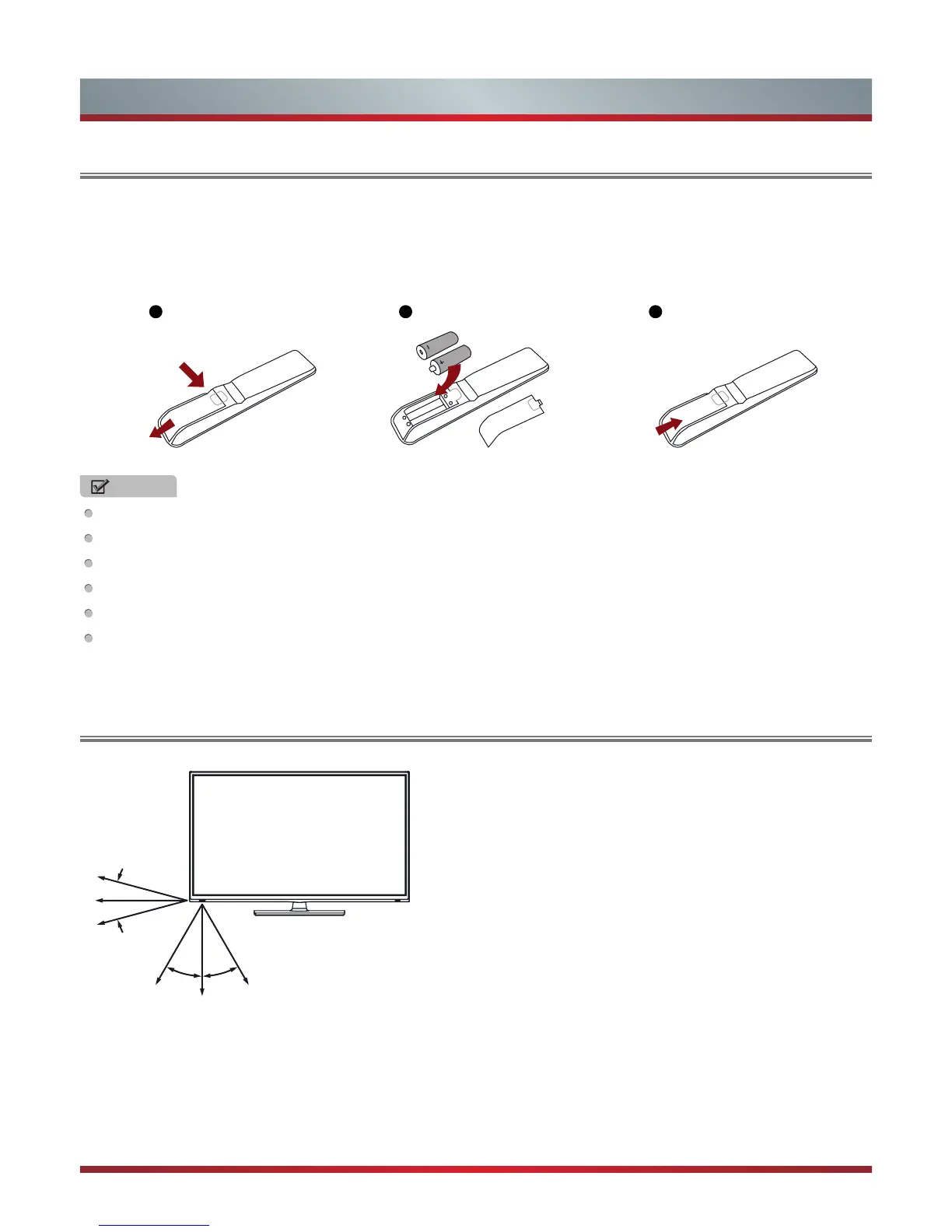
1. Slide the back cover to open the battery compartment of the remote control.
2. Insert two AAA size batteries. Make sure to match the (+) and ( - ) ends of the batteries with the (+) and ( - ) ends indicated in
the battery compartment.
3. Close the battery compartment cover.
1 2 3
Gently push and slide
Insert the batteries
Gently push and slide
NOTES
Dispose of your batteries in a designated disposal area. Do not throw the batteries into a fire.
Do not mix battery types or combine used batteries with new ones.
Remove depleted batteries immediately to prevent battery acid from leaking into the battery compartment.
If you do not intend to use the remote control for a long time, remove the batteries.
Batteries should not be exposed to excessive heat, such as sunshine, heat registers, or fire.
Battery chemicals can cause a rash. If the batteries leak, clean the battery compartment with a cloth. If chemicals touch your
skin, wash immediately.
Installing Batteries in the Remote Control
The Range of Remote Control
1. The maximum distance is 8 meters in front of the TV set.
2. The remote control is effective within 30 Degrees of horizontal
angle, or 15 Degrees of vertical angle at maximum distances of
6 meters.
15°
6m
6m 6m
8m
8m
6m
15°
30° 30°


 To Next Page