10
Using the Remote Control
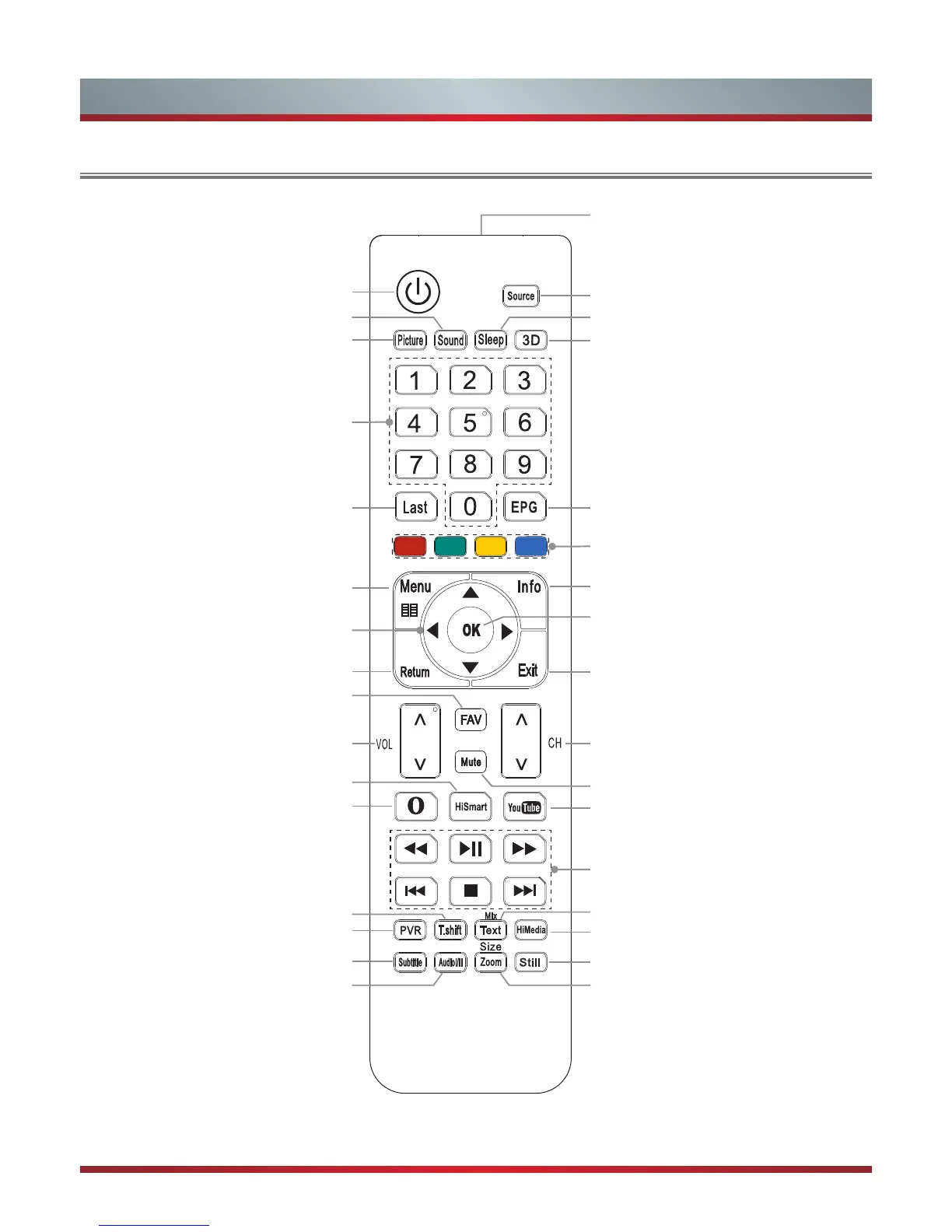
Remote sensing window
Select input sources
Set the TV sleep timer
3D button (The 3D button is only applicable
to the products which support it )
Display TV program and input source
information
Select sound mode
Power Standby button: Power on / Standby
Return to the previous channel
Fast access to your saved favorite
channels
Return the previous menu
Adjust the volume
Open the HiSmart Hub
Enter the Opera browser
Display the main menu
/ Back menu display
▲/▼/◄/►: Up/Down/Left/Right
Select picture mode
Freeze a picture on screen
Time shift of images on USB devices
Start video recorder in DTV mode
Select a channel or input numbers
Select a channel
Exit the menu
Display the Electronic Programming Guide
in DTV mode
Turn Subtitles on or off
Media player controls: Rewind, Play / Pause,
Fast Forward, Previous, Stop and Next
Mute and restore sound
Enter the Teletext mode
/ Mix Teletext with TV pictures
HiMedia (digital multimedia player) button
Enter the YouTube app
Conrm the selection / Display a list of
channels saved in TV tuner memory
Adjust aspect ratio / Adjust Teletext sizeSwitch between different audio.
(Only applicable when the TV program has
the feature)
ERF-32910
Special function buttons
Viewing the Remote Control



 To Next Page