28
Network Function
NOTE
Only recommend to open the English website.
Return
Back to previous page or exit current
page; Cancel pop dialoge or soft
keyboard
▲/▼/◄/►
Up/Down/Left/Right.
CH Λ/CH V
Page Up/Page Down.
EPG
History of viewed pages.
RED
Back to previous viewed web page.
Green Forward to previous viewed web page.
Yellow
Open marked page.
Blue
Favorite marker.
Zoom Zoom in or Zoom out.
Menu Toolbar
Enter Enter
VOLΛ/VOLV Volume Control
Mute Mute
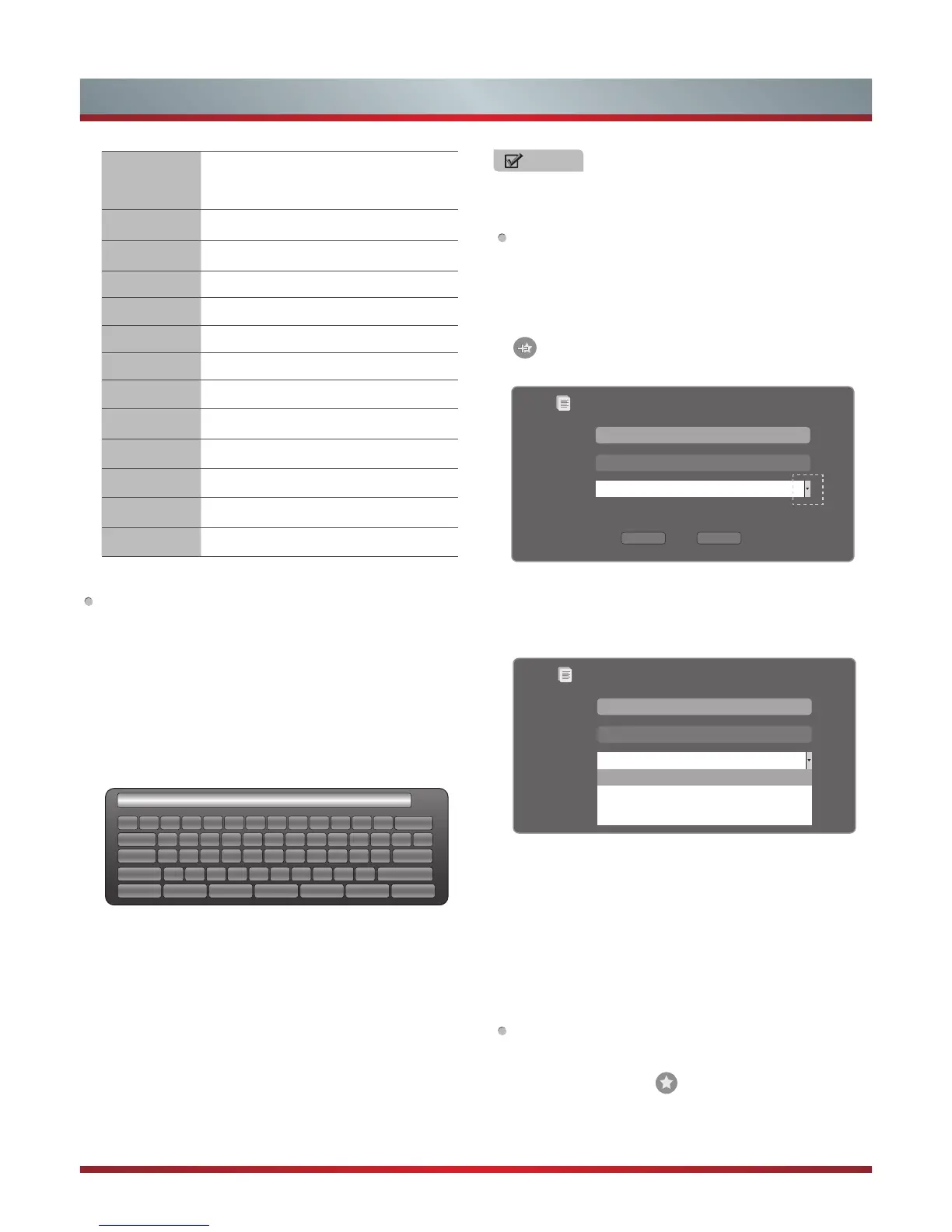
How to Input the New Address
1. Press the [▲/▼/◄/►] buttons to move the cursor to the
address bar.
2. Press the [OK] / [Return] buttons to display / close the
keyboard.
There are some shortcuts on the bottom of the keyboard
so that you can input part of the address often used
directly. Other keys are used as the keyboard of your
computer.
1 2
w
s
x
e
d
c
r
f
v
t
g
b
y
h
n
u
j
m
i
k
,
o
l
.
p
;
/
[
‘
]
Enter
Space
\q
a
z
Tab
Caps L
Shift
http:// www. .com .org .gov .net Reset
3 4 5 6 7 8 9 0 - = Back
、
3. Press the [▲/▼/◄/►] buttons to move the cursor to the
characters you want to select and then press the [OK]
button to confirm.
If you want to delete one character, move the cursor to
Back key and press the [OK] button to confirm. Or if you
want to re-enter all the characters, move the cursor to
Reset key and press the [OK] button to confirm.
4. Move the cursor to Enter key and press the [OK] button
to confirm to enter the website.
Then the new address will appear on the address bar.
How to Add a Bookmark
If you want to find the often viewed website from the favorite
folder, you can follow the steps to add it to the folder.
1. Firstly, input the address on the address bar and enter it.
2. Press the [▲/▼/◄/►] buttons to move the cursor to the
and press the [OK] button to confirm.
The menu will pop up on the screen.
3. Press the [▲/▼/◄/►] buttons to move the cursor to the
icon marked with dashed box on the right screen. Then
press the [OK]/ [▲/▼] buttons to confirm to display the
folders.
Add a bookmark
Are you sure to add it?
Name:
URL:
Folder:
OperaHttp://www.Manufacturer.
com.au/
Root folder
Root folder
Opera Software
GOGI SDK
Opera technology
4. Press the [▲/▼] buttons to select the folder you want
to add the bookmark to. And press the [OK] button to
confirm.
5. Move the cursor to the Add button and then press the [OK]
button to confirm.
If you do not want to add the book mark, move the cursor
to the Cancel button and press the [OK] button to confirm.
How to Add a Folder
You can add a folder to the favorite as follows:
1.
Move the cursor to the
icon and press the [OK] button
to confirm. The menu will pop up on the screen.
Add a bookmark
Are you sure to add it?
Name:
URL:
Folder:
Add Cancel
Operattp://www.Manufacturer.
com.au/
Root folder


 To Next Page