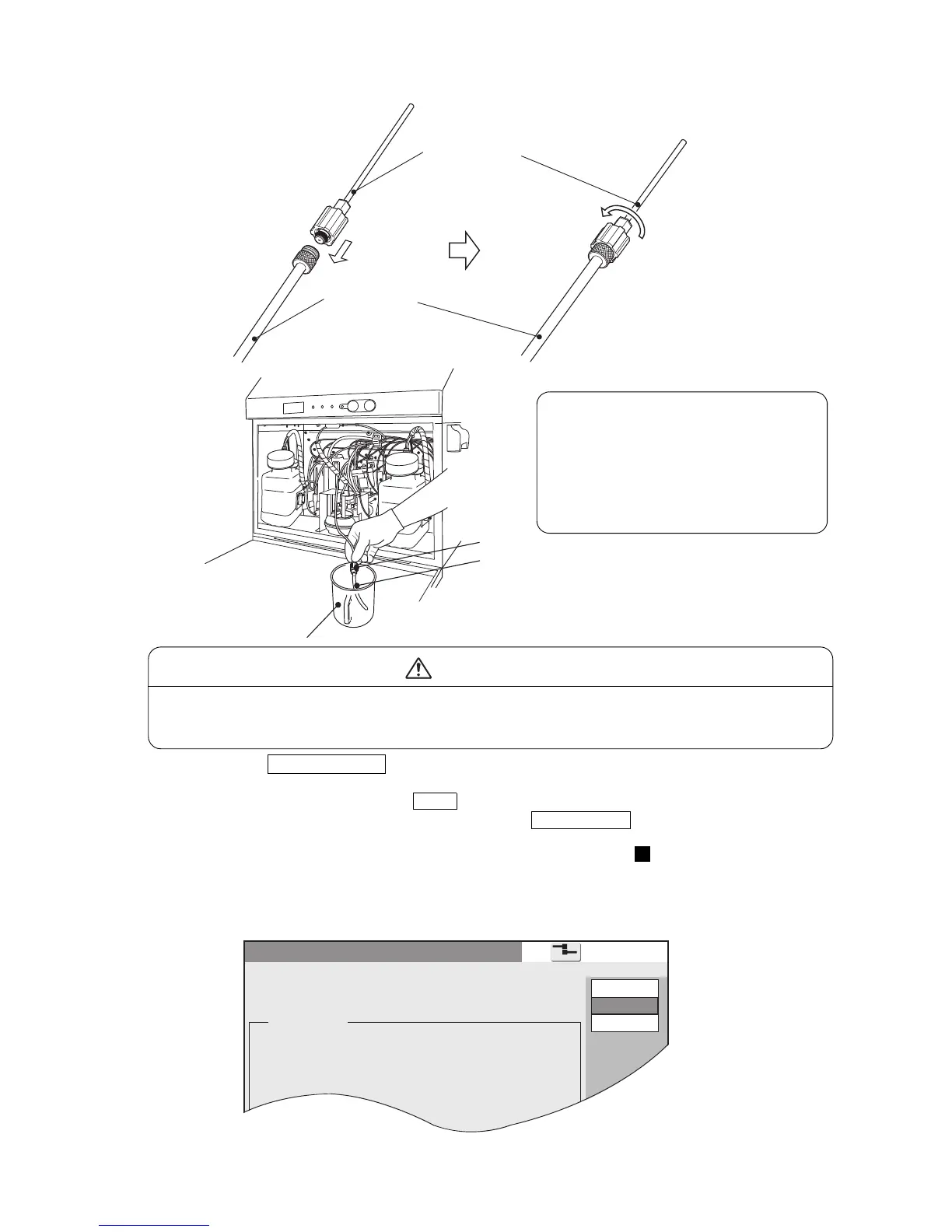
● Remove the recovery tube, connect it to the accessory drainage tube and put it into the beaker.
If ink is accidentally spilt, wipe it up promptly with wiping paper or equivalent.
In addition, do not close the maintenance cover until you are sure that the wiped area
is completely dried.
CAUTION
Keep the drain tube clean with
makeup after it is used.
Otherwise, the pressure in the
recovery line rises by the clogged
ink, and it may cause a damage of
the circulation pump.
(b) Press the Start/Continue key.
The ink in the printer is drained from the drainage tube.
● To abort the sequence, press the Abort key. Then, follow the on-screen instructions to return the
recovery tube to its original position and press the Start/Continue key .
You are then returned to the "Circulation control" screen.
● When you have aborted the sequence, perform the procedure from again.
* When aborting the operation, be sure to return the recovery tube to its original position.
(c) When the predetermined period of time elapses, follow the operation guidance on the
screen and place the recovery block of the Main ink tank block to original position.
1
*1 Clean the connection at the end of the recovery tube sufficiently with the makeup,
and then connect it as it originally was.
*2 To prevent the recovery tube from becoming crimped, be careful not to let it cross
another tube.
Recovery tube
Drainage tube
Recovery tube
Drainage tube
Beaker



 To Next Page