EasyManua.ls Logo

Hitachi VIV-E553LE - Page 114

Hitachi VIV-E553LE
118 pages
Print Icon
To Next Page IconTo Next Page
To Previous Page IconTo Previous Page
Loading...
3.4
Guide
Roller
(O)
and
Guide
(I)
Heights
Adjustment
(Adjustment
After
Replacing
Cylinder)
(Fig.
3-4
-
3-6)
Notes:1.
Be
sure
to
perform
this
adjustment
after
replacing
the
guide
roller
(O),
guide
(I)
or
cylinder
base.
After
replacing
the
guide
roller
(O)
or
guide
(I),
perform
the
coarse
adjustment
in
the
previous
item
in
advance.
2.
When
the
cylinder
is
replaced,
the
electric
circuit
adjustment
is
also
necessary.
See
the
service
manual
of
this
model
and
also
perform
electrical
circuit
adjustment.
3.
Before
starting
adjustment,
modify
the
ATF-R
jig,
referring
to
Fig.
3-6.
mg
Test
Equipment/Jig
Alignment
Tape
ATF-R
Jig
Oscilloscope
Special
Driver
DVM
@
Test
Point
TP1
(SW80/25)
on
ATF-R
jig
TP2
(GND)
on
ATF-R
jig
TP3
(FM
OUT)
on
ATF-R
jig
m@
Adjustment
Point
Top
of
the
Guide
(I)
Top
of
the
Guide
Roller
(O)
m@
Procedure
(1)
Insert
the
alignment
tape
which
has
been
completely
rewound,
and
set
the
camcorder
to
the
test
mode
by
the
following
procedure.
[To
set
to
the
test
mode]
1)
Remove
the
power
supply
(adapter,
battery,
etc.).
2)
Set
the
power
switch
to
the
VCR
position.
3)
Connect
the
ATF-R
jig
to
the
test
terminal
(test
connector),
supply
power
again
with
the
playback
button
held
down.
Notes:
1.
If
the
mechanism
operates
(enters
the
playback
mode)
when
power
is
supplied,
it
indicates
that
the
camcorder
has
not
been
set
to
the
test
mode.
Start
from
item
1)
over.
2.
The
test
mode
is
released
when
the
power
supply
is
removed.
(2)
Connect
an
oscilloscope
to
TP3
and
press
the
playback
button.
(3)
Synchronize
the
oscilloscope
with
TP1
(SW30/25).
(4)
Set
the
oscilloscope
probe
to
(+).
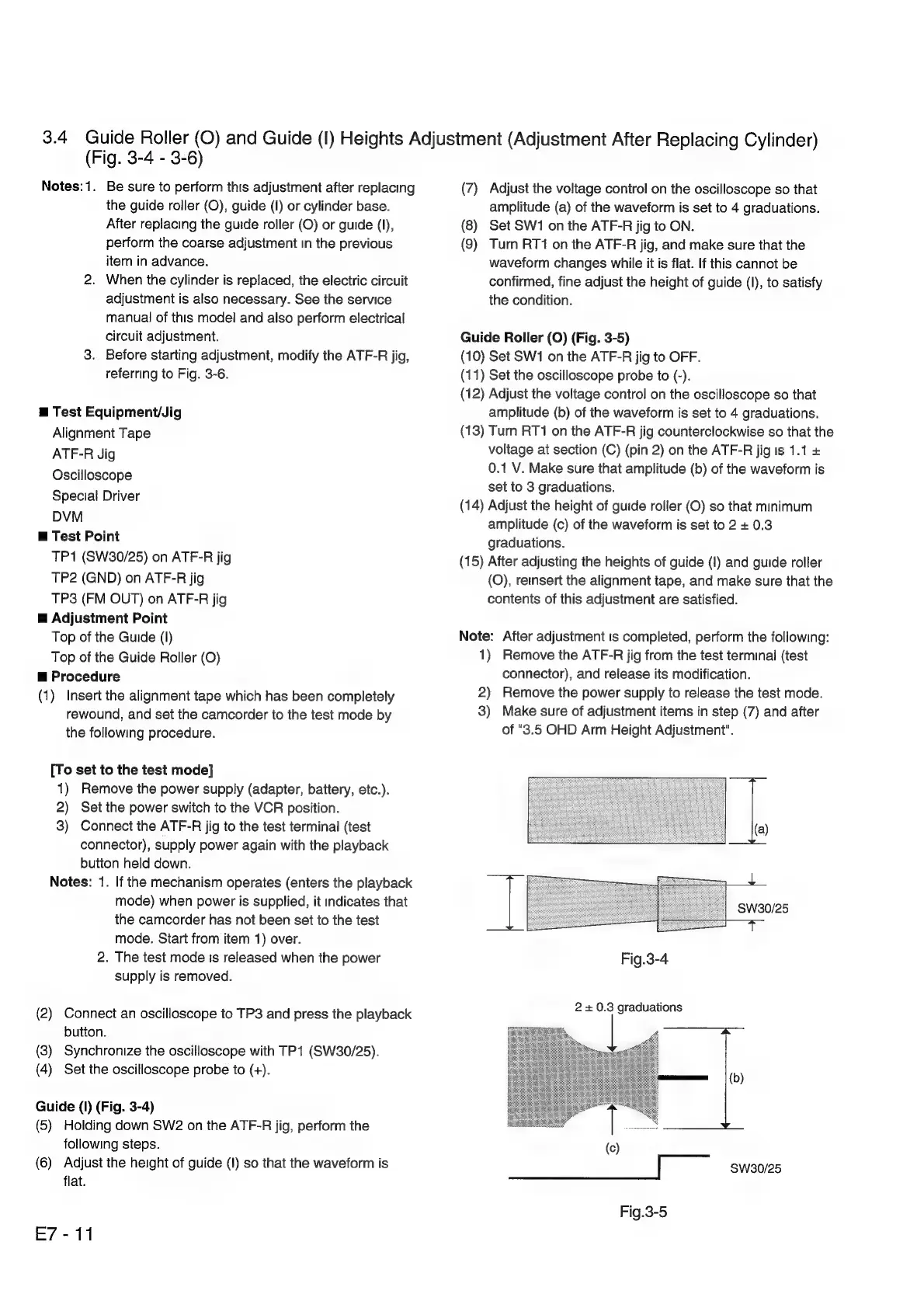
Guide
(I)
(Fig.
3-4)
(5)
Holding
down
SW2
on
the
ATF-R
jig,
perform
the
following
steps.
(6)
Adjust
the
height
of
guide
(I)
so
that
the
waveform
is
flat.
E7-11
(7)
Adjust
the
voltage
control
on
the
oscilloscope
so
that
amplitude
(a)
of
the
waveform
is
set
to
4
graduations.
(8)
Set
SW1
on
the
ATF-R
jig
to
ON.
(9)
Turn
RT1
on
the
ATF-R
jig,
and
make
sure
that
the
waveform
changes
while
it
is
flat.
If
this
cannot
be
confirmed,
fine
adjust
the
height
of
guide
(I),
to
satisfy
the
condition.
Guide
Roller
(O)
(Fig.
3-5)
(10)
Set
SW1
on
the
ATF-R
jig
to
OFF.
(11)
Set
the
oscilloscope
probe
to
(-).
(12)
Adjust
the
voltage
control
on
the
oscilloscope
so
that
amplitude
(b)
of
the
waveform
is
set
to
4
graduations.
(13)
Turn
RT1
on
the
ATF-R
jig
counterclockwise
so
that
the
voltage
at
section
(C)
(pin
2)
on
the
ATF-R
jig
Is
1.1
+
0.1
V.
Make
sure
that
amplitude
(b)
of
the
waveform
is
set
to
3
graduations.
(14)
Adjust
the
height
of
guide
roller
(O)
so
that
minimum
amplitude
(c)
of
the
waveform
is
set
to
2
+
0.3
graduations.
(15)
After
adjusting
the
heights
of
guide
(1)
and
guide
roller
(O),
reinsert
the
alignment
tape,
and
make
sure
that
the
contents
of
this
adjustment
are
satisfied.
Note:
After
adjustment
is
completed,
perform
the
following:
1)
Remove
the
ATF-R
jig
from
the
test
terminal
(test
connector),
and
release
its
modification.
2)
Remove
the
power
supply
to
release
the
test
mode.
3)
Make
sure
of
adjustment
items
in
step
(7)
and
after
of
"3.5
OHD
Arm
Height
Adjustment".
Fig.3-4
2
+
0.3
graduations
(c)
|
SW30/25
Fig.3-5

Related product manuals