EasyManua.ls Logo

Hitachi VIV-E553LE - Page 115

Hitachi VIV-E553LE
118 pages
Print Icon
To Next Page IconTo Next Page
To Previous Page IconTo Previous Page
Loading...
Swi
OFF
on
FAT!
a
eTP1
_
SW3
ONT)
RI
TP2e
OFF
Tes
gwa|
O
(A)
a
Lu
Swi
+
TRACKING
|2
OFF-ON|a74|
6)!
SW30/25Hz13—e
TP1|
o
So
S|
22k
GND
4
TP2
|
|
MODIFICATION
FMOUT
_[5}—“eTP3
(4)
sws
|
TEST
6
:
|
——
de
Ie
R1
18k
OFF!
ml
[AY
4
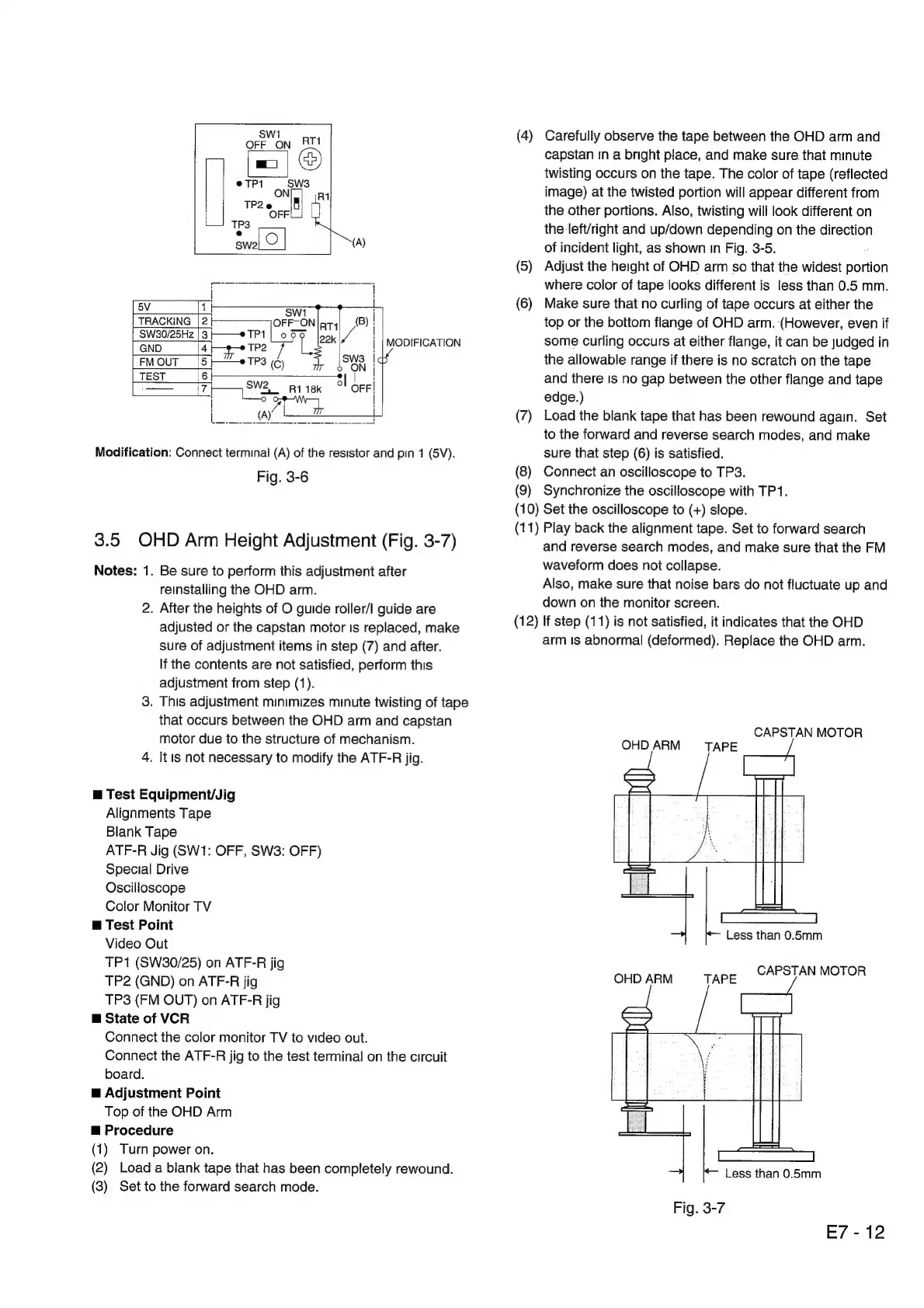
Modification:
Connect
terminal
(A)
of
the
resistor
and
pin
1
(5V).
Fig.
3-6
3.5
OHD
Arm
Height
Adjustment
(Fig.
3-7)
Notes:
1.
Be
sure
to
perform
this
adjustment
after
reinstalling
the
OHD
arm.
2.
After
the
heights
of
O
guide
roller/I
guide
are
adjusted
or
the
capstan
motor
Is
replaced,
make
sure
of
adjustment
items
in
step
(7)
and
after.
If
the
contents
are
not
satisfied,
perform
this
adjustment
from
step
(1).
3.
This
adjustment
minimizes
minute
twisting
of
tape
that
occurs
between
the
OHD
arm
and
capstan
motor
due
to
the
structure
of
mechanism.
4.
It
is
not
necessary
to
modify
the
ATF-R
jig.
m@
Test
Equipment/Jig
Alignments
Tape
Blank
Tape
ATF-R
Jig
(SW1:
OFF,
SW3:
OFF)
Special
Drive
Oscilloscope
Color
Monitor
TV
@
Test
Point
Video
Out
TP1
(SW30/25)
on
ATF-R
jig
TP2
(GND)
on
ATF-R
jig
TP3
(FM
OUT)
on
ATF-R
jig
m@
State
of
VCR
Connect
the
color
monitor
TV
to
video
out.
Connect
the
ATF-R
jig
to
the
test
terminal
on
the
circuit
board.
m@
Adjustment
Point
Top
of
the
OHD
Arm
m@
Procedure
(1)
Turn
power
on.
(2)
Load
a
blank
tape
that
has
been
completely
rewound.
(3)
Set
to
the
forward
search
mode.
(4)
Carefully
observe
the
tape
between
the
OHD
arm
and
capstan
In
a
bright
place,
and
make
sure
that
minute
twisting
occurs
on
the
tape.
The
color
of
tape
(reflected
image)
at
the
twisted
portion
will
appear
different
from
the
other
portions.
Also,
twisting
will
look
different
on
the
left/right
and
up/down
depending
on
the
direction
of
incident
light,
as
shown
in
Fig.
3-5.
(5)
Adjust
the
height
of
OHD
arm
so
that
the
widest
aeaion
where
color
of
tape
looks
different
is
less
than
0.5
mm.
(6)
Make
sure
that
no
curling
of
tape
occurs
at
either
the
top
or
the
bottom
flange
of
OHD
arm.
(However,
even
if
some
Curling
occurs
at
either
flange,
it
can
be
judged
in
the
allowable
range
if
there
is
no
scratch
on
the
tape
and
there
Is
no
gap
between
the
other
flange
and
tape
edge.)
(7)
Load
the
blank
tape
that
has
been
rewound
again.
Set
to
the
forward
and
reverse
search
modes,
and
make
sure
that
step
(6)
is
satisfied.
(8)
Connect
an
oscilloscope
to
TP3.
(9)
Synchronize
the
oscilloscope
with
TP1.
(10)
Set
the
oscilloscope
to
(+)
slope.
(11)
Play
back
the
alignment
tape.
Set
to
forward
search
and
reverse
search
modes,
and
make
sure
that
the
FM
waveform
does
not
collapse.
Also,
make
sure
that
noise
bars
do
not
fluctuate
up
and
down
on
the
monitor
screen.
(12)
If
step
(11)
is
not
satisfied,
it
indicates
that
the
OHD
arm
ts
abnormal
(deformed).
Replace
the
OHD
arm.
CAPSTAN
MOTOR
OHD
7
TAPE
/
Less
than
0.5mm
CAPSTAN
MOTOR
OHD
ARM
TAPE
E7
-
12

Related product manuals