EasyManua.ls Logo

Hitachi VIV-E553LE - Page 34

Hitachi VIV-E553LE
118 pages
Print Icon
To Next Page IconTo Next Page
To Previous Page IconTo Previous Page
Loading...
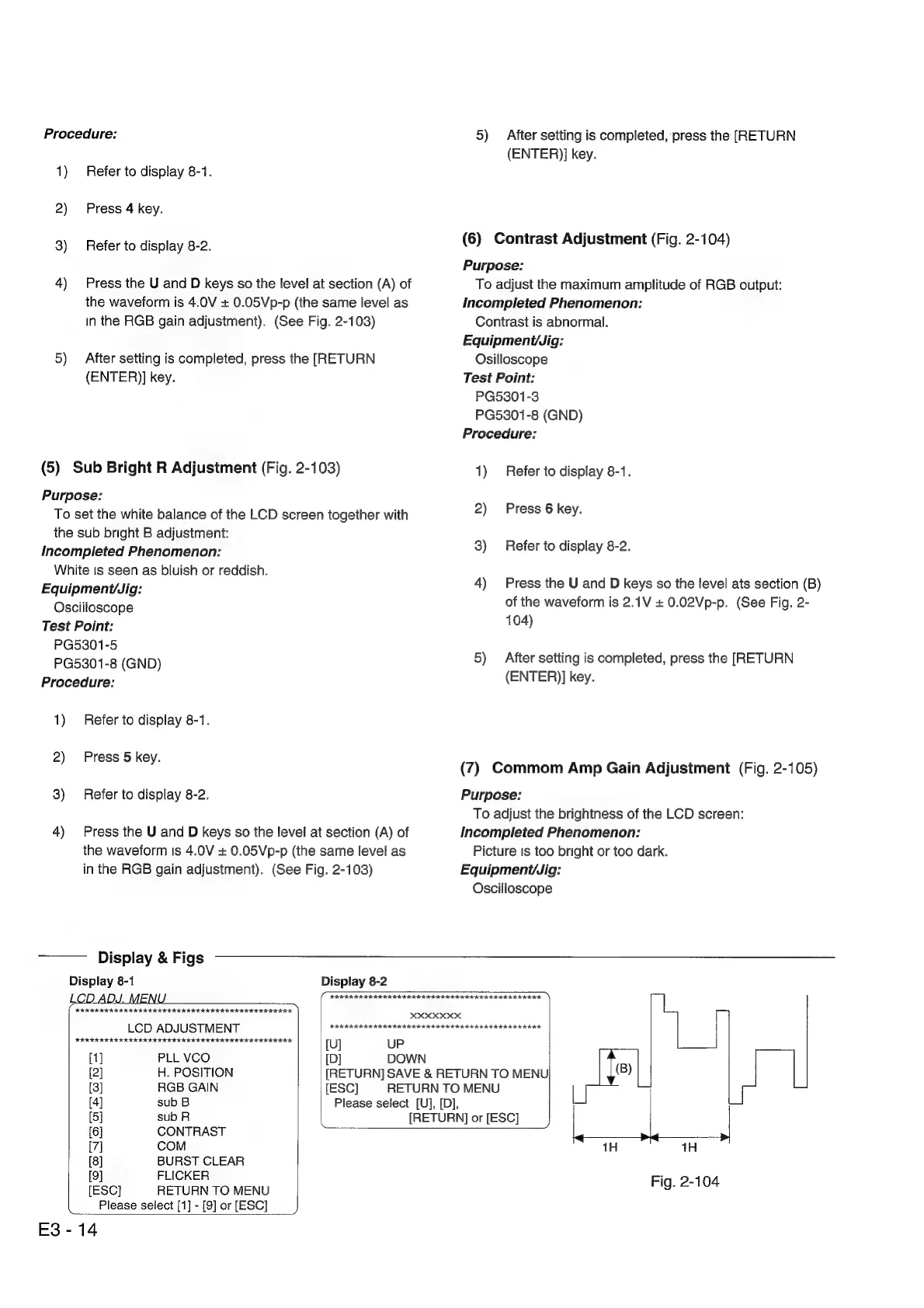
Procedure:
1)
Refer
to
display
8-1.
2)
Press
4
key.
3)
Refer
to
display
8-2.
4)
Press
the
U
and
D
keys
so
the
level
at
section
(A)
of
the
waveform
is
4.0V
+
0.05Vp-p
(the
same
level
as
in
the
RGB
gain
adjustment).
(See
Fig.
2-103)
5)
After
setting
is
completed,
press
the
[RETURN
(ENTER)]
key.
(5)
Sub
Bright
R
Adjustment
(Fig.
2-103)
Purpose:
To
set
the
white
balance
of
the
LCD
screen
together
with
the
sub
bright
B
adjustment:
Incompleted
Phenomenon:
White
ts
seen
as
bluish
or
reddish.
Equipment/Jig:
Osciiloscope
Test
Point:
PG5301-5
PG5301-8
(GND)
Procedure:
1)
Refer
to
display
8-1.
2)
Press
5
key.
3)
Refer
to
display
8-2.
4)
Press
the
U
and
D
keys
so
the
level
at
section
(A)
of
the
waveform
Is
4.0V
+
0.05Vp-p
(the
same
level
as
5)
After
setting
is
completed,
press
the
[RETURN
(ENTER)]
key.
(6)
Contrast
Adjustment
(Fig.
2-104)
Purpose:
To
adjust
the
maximum
amplitude
of
RGB
output:
Incompleted
Phenomenon:
Contrast
is
abnormal.
Equipment/Jig:
Osilloscope
Test
Point:
PG5301-3
PG5301-8
(GND)
Procedure:
1)
Refer
to
display
8-1.
2)
Press
6
key.
3)
Refer
to
display
8-2.
4)
Press
the
U
and
D
keys
so
the
level
ats
section
(B)
of
the
waveform
is
2.1V
+
0.02Vp-p.
(See
Fig.
2-
104)
5)
After
setting
is
completed,
press
the
[RETURN
(ENTER)]
key.
(7)
Commom
Amp
Gain
Adjustment
(Fig.
2-105)
Purpose:
To
adjust
the
brightness
of
the
LCD
screen:
Incompleted
Phenomenon:
Picture
is
too
bright
or
too
dark.
in
the
RGB
gain
adjustment).
(See
Fig.
2-103)
Equipmenit/Jig:
Oscilloscope
Display
&
Figs
Display
8-1
Display
8-2
FeO
IE
IETS
II
ISOS
ISOS
IIR
)
ie
ee
ye
XXXXXXX
LCD
ADJUSTMENT
HARKER
KKK
KIKI
KEKE
KK
KEKE
KEIR
EIER
EEE
KER
ERE
HERREREREE
REE
RIK
HIER EKER
KERRIER
ER
KEE
KE
RERREREERE
[U]
UP
[1]
PLL
VCO
[D]
DOWN
[2]
H.
POSITION
[RETURN]
SAVE
&
RETURN
TO
MENU
(8)
[3]
RGB
GAIN
[ESC]
RETURN
TO
MENU
[4]
sub
B
Please
select
[Uj],
[D],
[5]
sub
R
[RETURN]
or
[ESC]
__}
[6]
CONTRAST
[7]
COM
1H
ea
1H
»
[8]
BURST
CLEAR
[9]
FLICKER
Fig.
2-104
[ESC]
RETURN
TO
MENU
g:
Please
select
[1]
-
[9]
or
[ESC]
E3-14

Related product manuals