BASE STATION SETTINGS
56
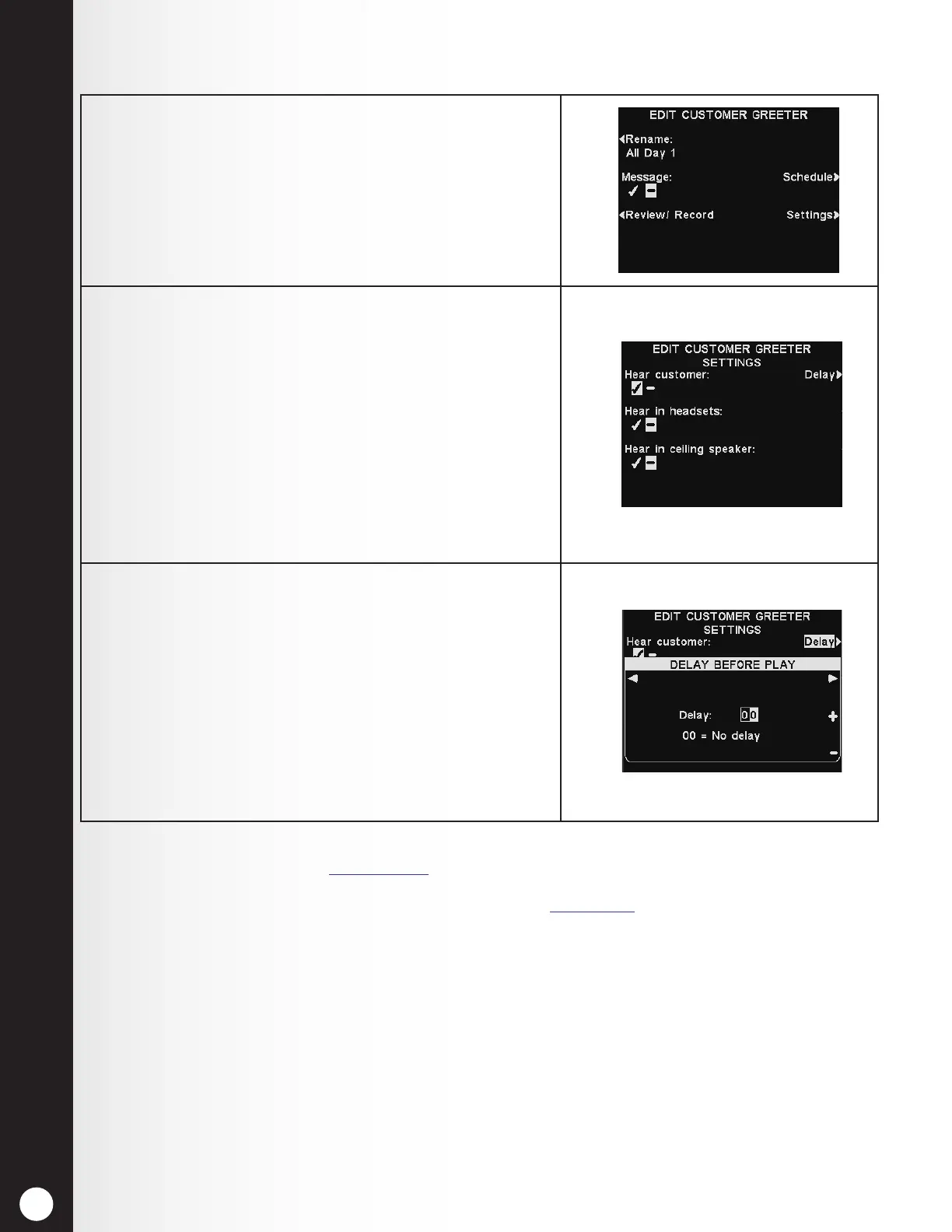
1. To edit where the selected Customer Greeter message
will be heard (in addition to the speaker post),
press the Settings button on the EDIT CUSTOMER
GREETER display.
2. On the EDIT CUSTOMER GREETER SETTINGS
display, press the button corresponding to the location
where you would like the selected Customer Greeter
message to be heard or not heard, to highlight ✔ (on)
or − (off).
If you select Hear customer: ✔ (on), you will hear the
customer’s voice and the Customer Greeter message
in your headset.
If you select Hear customer: − (off), you will not
hear the customer’s voice until the Customer Greeter
message has nished playing.
3. If you would like a delay to occur after the Customer
Greeter message is triggered, select Delay on the EDIT
CUSTOMER GREETER SETTINGS display.
On the DELAY BEFORE PLAY display, use the + and −
buttons to change the number in the highlighted box,
and use the ◄ or ► button to move the highlight to
the opposite position.
When you are nished, press the Back button to save
the setting.
Note: Customer Greeter messages are always directed to the drive-thru speaker in addition
to these settings. See Section 5.7.1, pg. 70. For the message to be heard at the drive-thru
speaker, the outbound Customer Greeter volume must be adjusted, and then checked at
the speaker post. For multiple-lane operations, see Section 5.7, pg. 70.
Message Playback Settings



 To Next Page