EQUIPMENT INSTALLATION
13
4.2 Drive-Thru Layouts
4.2.1 Single Lane Drive-thru
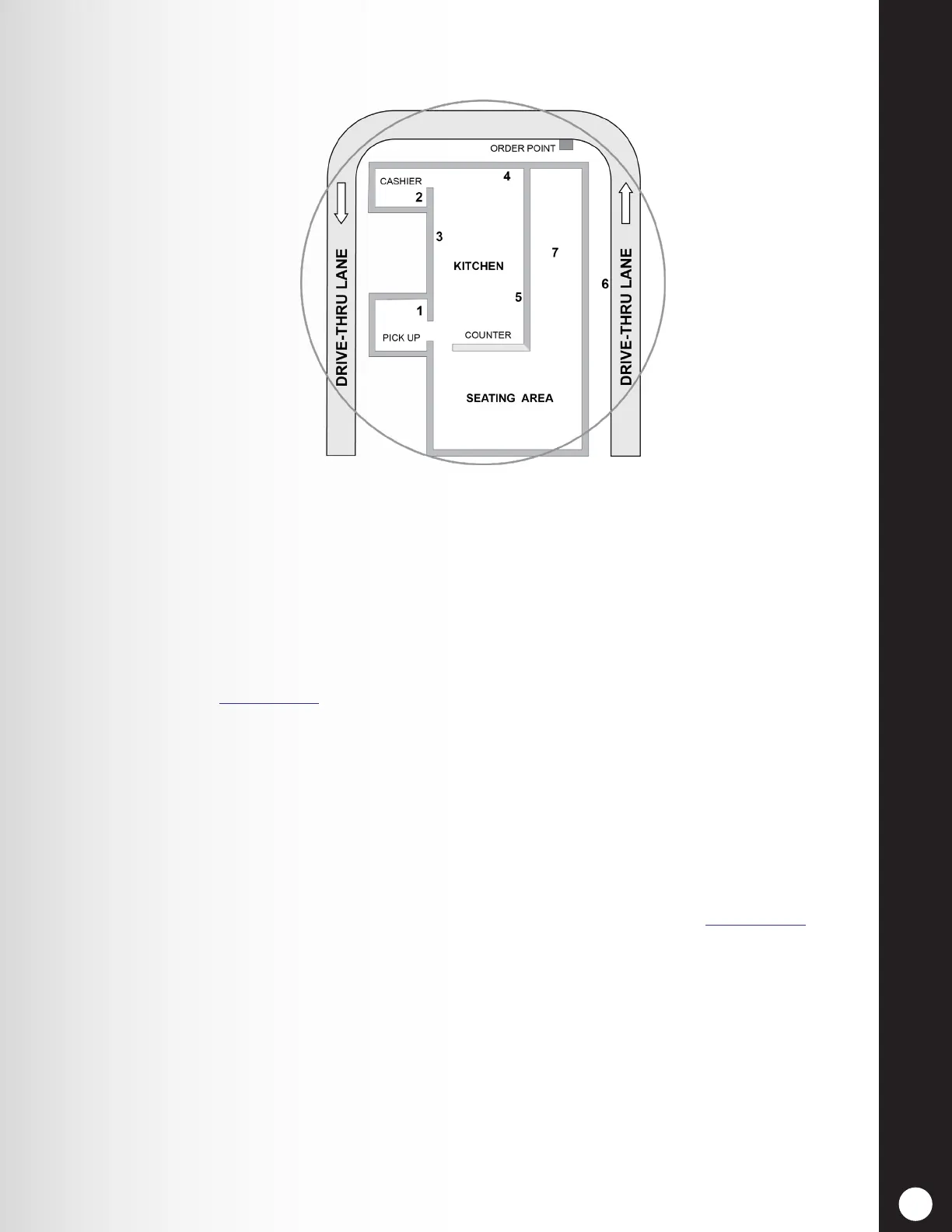
A typical drive thru QSR building is set up as shown in Figure 13. The area inside the CIRCLE
represents the required headset communication range you will need to consider before mounting
the base station. The number of walls, machinery and other obstructions between locations must be
minimized.
Whether a store frequently uses Speed Team operations will also factor in the decision where to mount
the base station. See Section 5.6.2, pg. 49, for more information on Speed Team.
Location #1 (Pick Up): For Speed Team operations in the drive-thru lanes, a signal from this location
would have to penetrate three walls to reach location #6. Mounting the base station at this location would
NOT be optimal to reach all locations.
Location #2 (Order Taker): Signals from the kitchen must only penetrate one wall. Two walls separate
location #1 and #2, so this location MAY NOT be optimal.
Location #3, 4 and 5 (Kitchen): Headset signals from these work areas require a minimal amount wall
penetration, so these areas should be considered for optimal signal range for all locations.
Location #6 and 7 (Seating area, Drive-thru): These areas should NOT be considered for mounting the
base station. Coverage in these areas can be poor at times, regardless of the base station location.
In this event, the remote Antenna Kit may be installed to increase coverage area. See Section 4.2.9, pgs.
18 -19, for antenna installation instructions.
Discuss the location of the base station with the store owner or manager. It should be mounted less than
10 feet (3 meters) from an available electrical outlet, and away from grease and large metal objects. It
should also be mounted near eye level, so the display screen will be easily visible and the control buttons
will be accessible.
The base transmitter antenna(s) must not be installed near any other antenna or transmitter.
Figure 13. Typical Drive-Thru Store Layout



 To Next Page