BASE STATION SETTINGS
27
5.2 Basic Installer Setups
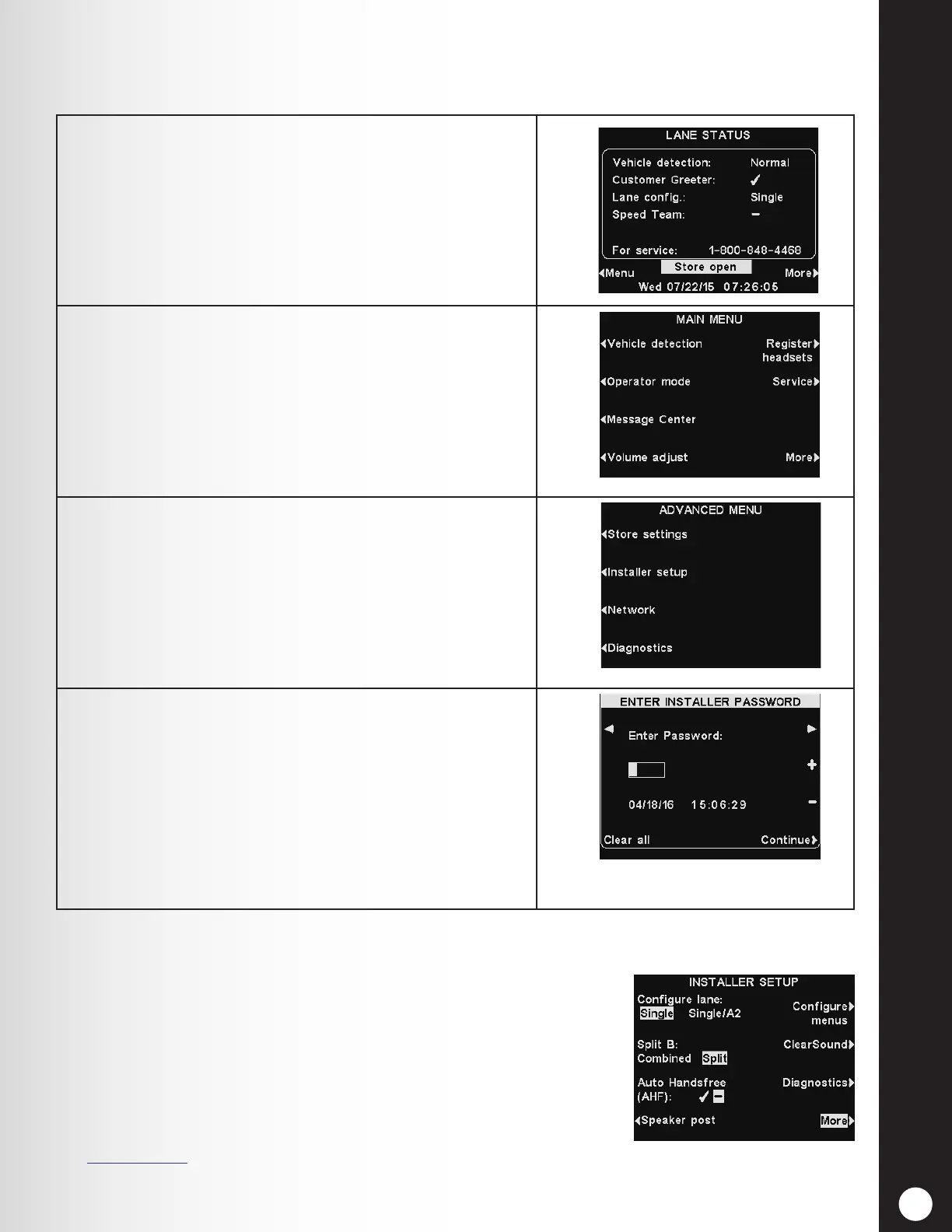
To access the Installer Setup mode, you must have an installer password. With an installer password:
1. Press the Menu button on the LANE STATUS display
to access the MAIN MENU.
2. Press the More button on the MAIN MENU to access
the ADVANCED MENU.
3. Press the Installer setup button on the ADVANCED
MENU to access the ENTER INSTALLER PASSWORD
display.
4. Enter the rst character of the 4-digit password in
the highlighted box in the Enter Password eld by
pressing the + button to enter alphabetic characters,
or the − button to enter numbers.
Press the ► button to move the highlight to the next
position to the right. Repeat this process until all four
digits of the password are entered, and then press the
Continue button to access the INSTALLER SETUP
display.
Note: If you make a mistake, you can use the ◄ and ► buttons to move the highlighted box to
the necessary position and change the character entered there, or press the Clear all button to
clear all entries and start over.
If you enter an incorrect password and then press the Continue button,
you will see the message “Invalid password, try again”. Re-enter the
password. If you enter an incorrect password three times, you will be
locked out for ve minutes. Afterward, you may attempt to enter the
password again.
Note: In multiple-lane congurations, the INSTALLER SETUP
display includes Split B settings, as well as other lane-
conguration settings (not shown here).
See Section 5.4.1, pg. 39, for more information.



 To Next Page