BASE STATION SETTINGS
84
5.7.11 Early Warning Setting
An external vehicle detector can be used with the EOS|HD to give a pre-warning signal when a vehicle
enters the drive-thru area. To set up a pre-warning signal, rst install the external vehicle detector at
the desired detection point then connect its cable to the base station audio circuit board according to
the appropriate wiring diagram listed in Section 14, pg. 102.
5.8 PC Navigation
If your EOS|HD was set up to operate on a network, you can access base station settings using a web
browser. Refer to Section 5.5, pg. 41, to congure the base with the proper Network settings according
to information from your IT department.
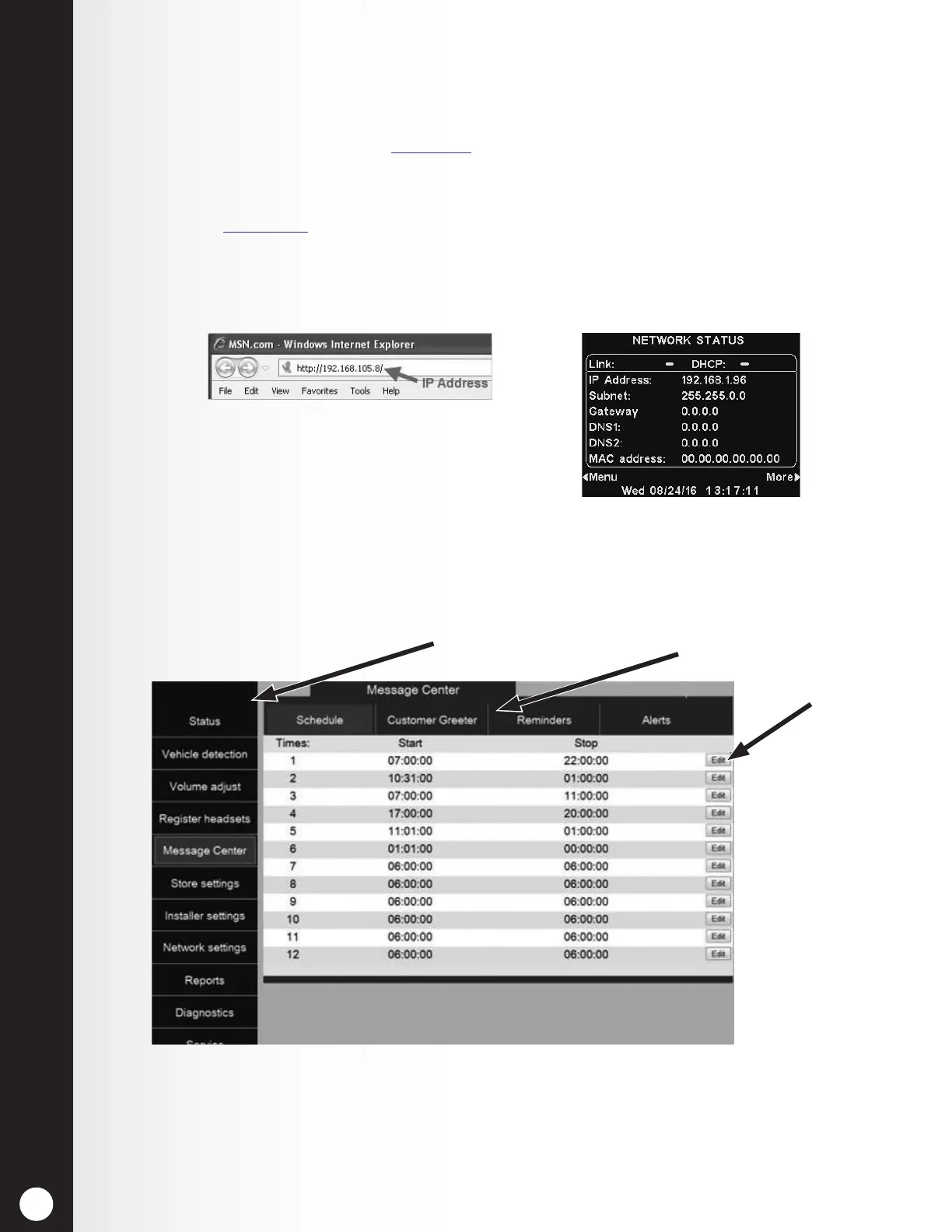
To open the EOS|HD on your PC, enter its IP Address in the address bar on your internet browser as
shown below, and then press the Enter key on your keyboard.
Note: You can nd the IP Address on the
base station Network Status display by using
the following button sequence:
LANE STATUS > More > More > More > More
From the Main Menu, select a category to view or edit.
Some topics have a Secondary Menu bar from which you can select a sub-topic.
If you click your cursor on an Edit button, an edit bar will appear with setup options. If you make any
setup changes, you must click on the Save button to save your changes.
Main Menu
Secondary Menu
Edit
buttons



 To Next Page