BASE STATION SETTINGS
63
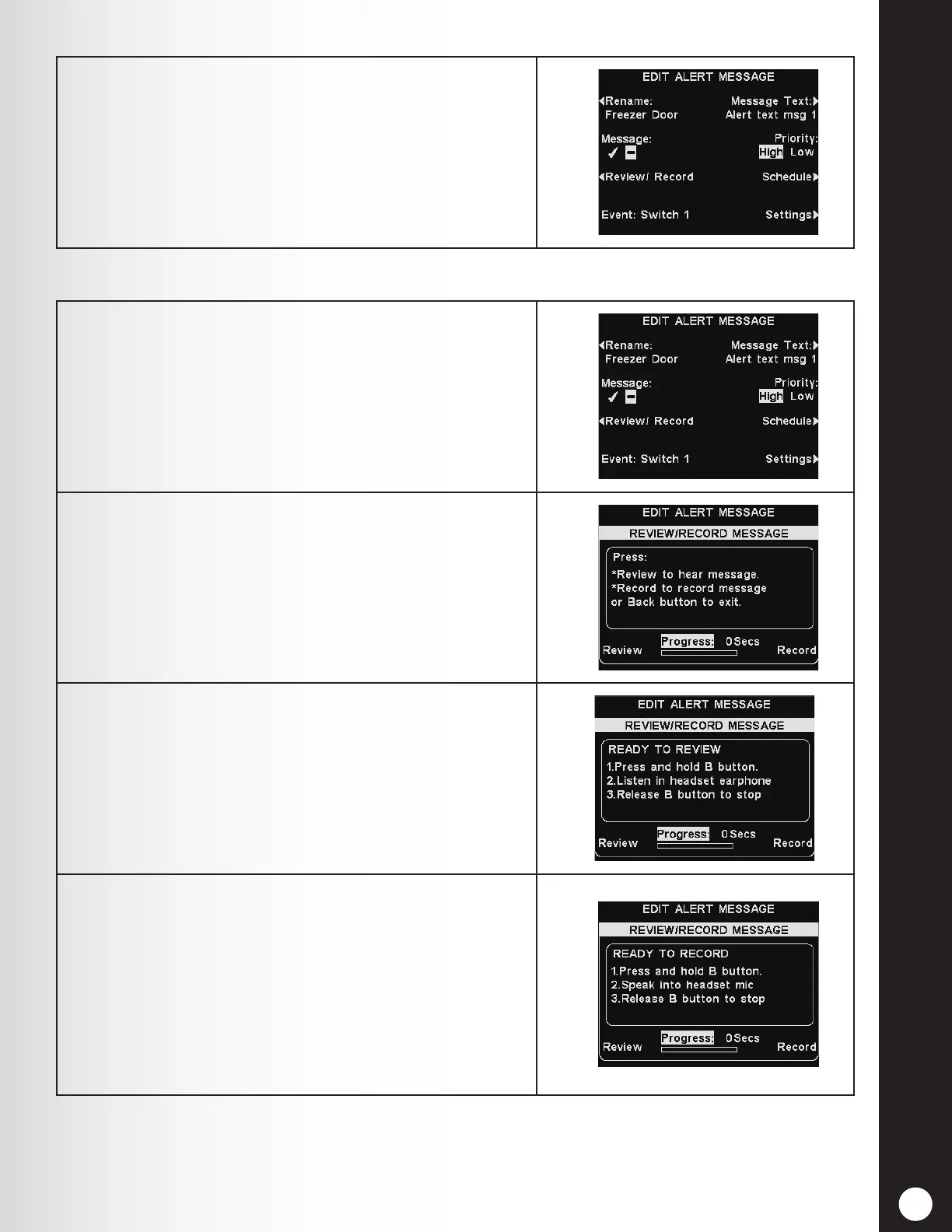
5. To turn the selected message on or off, press the
Message button on the EDIT ALERT MESSAGE
display to highlight either ✔ (on) or −(off).
Press the Back button to save this setting.
1. To review the existing selected message, or to record
a new message, press the Review/Record button on
the EDIT ALERT MESSAGE display.
Note: Reviewed messages are played to a specic
headset to avoid interfering with lane operations.
2. To listen to the existing message, press the Review
button on the REVIEW/RECORD MESSAGE display.
Follow instructions listed under READY TO REVIEW.
Press and hold the headset B button to play the
message.
3. To record a new message, press the Record button on
the REVIEW/RECORD MESSAGE display.
4. Follow the instructions under READY TO RECORD on
the display. You will a maximum 10 seconds to record
a message while pressing and holding the headset B
button. The Progress indicator will countdown the
seconds.
When nished, release the headset B button. Press
the Review button on the display, and follow the
instructions listed under READY TO REVIEW to
conrm the recording.
Review or Record



 To Next Page