uuAdjustment of Each Type of MirroruCentre Camera Mirror System
*
218
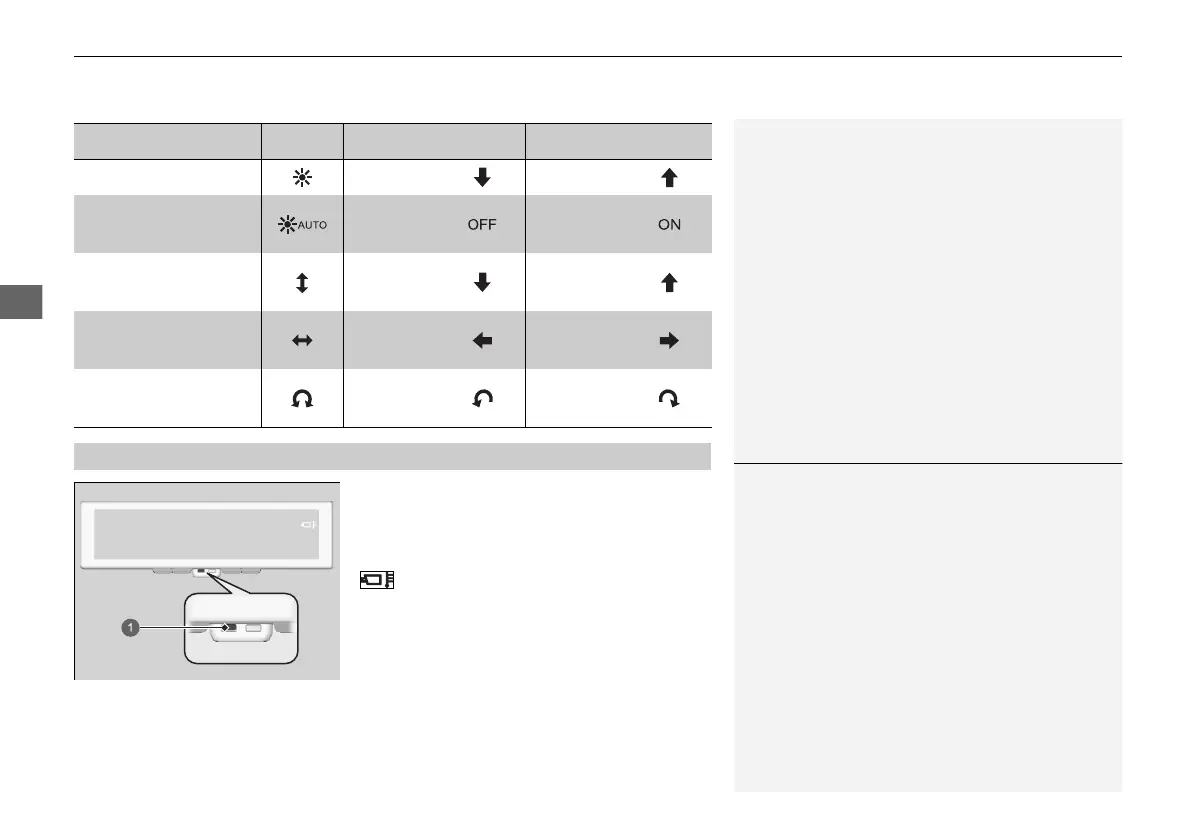
When the indicator turns on, quickly change
to mirror mode.
If the mirror becomes too hot or cold, this icon
will display on the image in addition to
the indicator.
If only the indicator continues to stay on, it is
most likely a system problem so have your
vehicle checked by a dealer.
Setting Icon Button 1 Button 2
Brightness Low High
Automatic brightness
(On/Off)
Off On
Field of view
(up/down)
Down Up
Field of view
(left/right)
Left Right
Field of view
(rotation)
Counter-
clockwise
Clockwise
■
Indicators
1Indicators
If the mirror becomes hot, the image may darken,
and if it becomes too hot the image may no longer
display. If the mirror becomes cold, there may be
after-images on the display, and if it becomes too
cold the image may no longer display.
When the indicator is on, the image may stop
automatically adjusting brightness or may no longer
display.
20 2EX JSS (KE KG)-32TYF6000.book 218 ページ 2020年3月6日 金曜日 午後6時58分













 To Next Page