Web Operation | 85
800-18161V1 - A - 07/2014
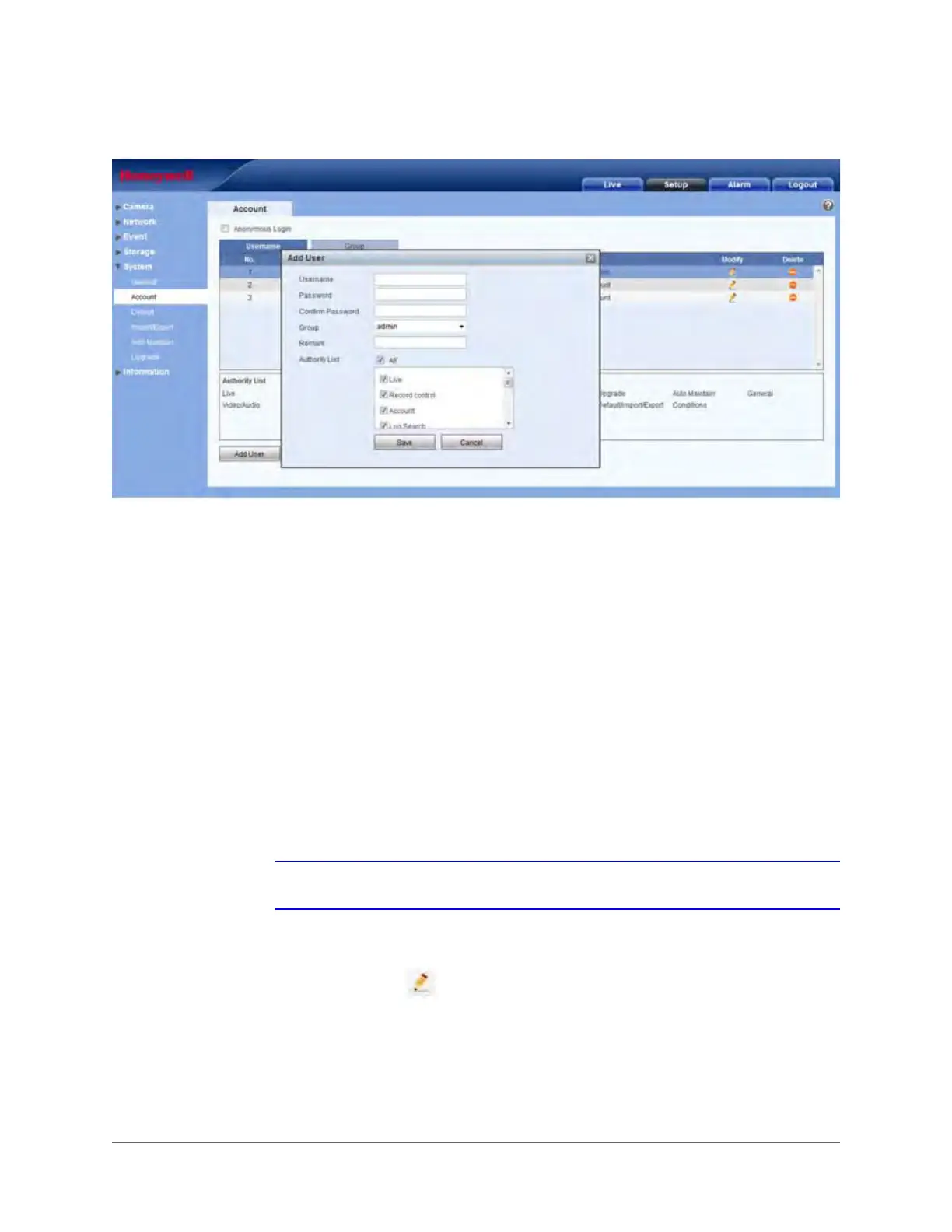
Figure 3-48 Add User Configuration Interface
There are four types of default user:
•admin
• 888888
• 666666
• hidden user "default"
All user types except 666666 have administrator rights. 666666-type users have only monitoring
rights.
The hidden user "default" is for internal system use only, and it can not be deleted. When there
is no login user, this hidden user "default" is automatically used for logging in. You can configure
some rights for the hidden user, such as monitoring ability, so that user can view channels
without logging in.
In the Add User configuration interface, you can enter a user name and password, then select
a group.
Note User rights can not exceed the rights of the group to which that user belongs.
TIP! Ensure that the general user has lower rights than the admin user.
Modifying Users: Click to modify a user’s properties, including their group, passwords,
and rights.







 To Next Page