For Systems With Hospira MedNet
TM
Software
4- 10 430-95597-001 (Rev. 06/05)
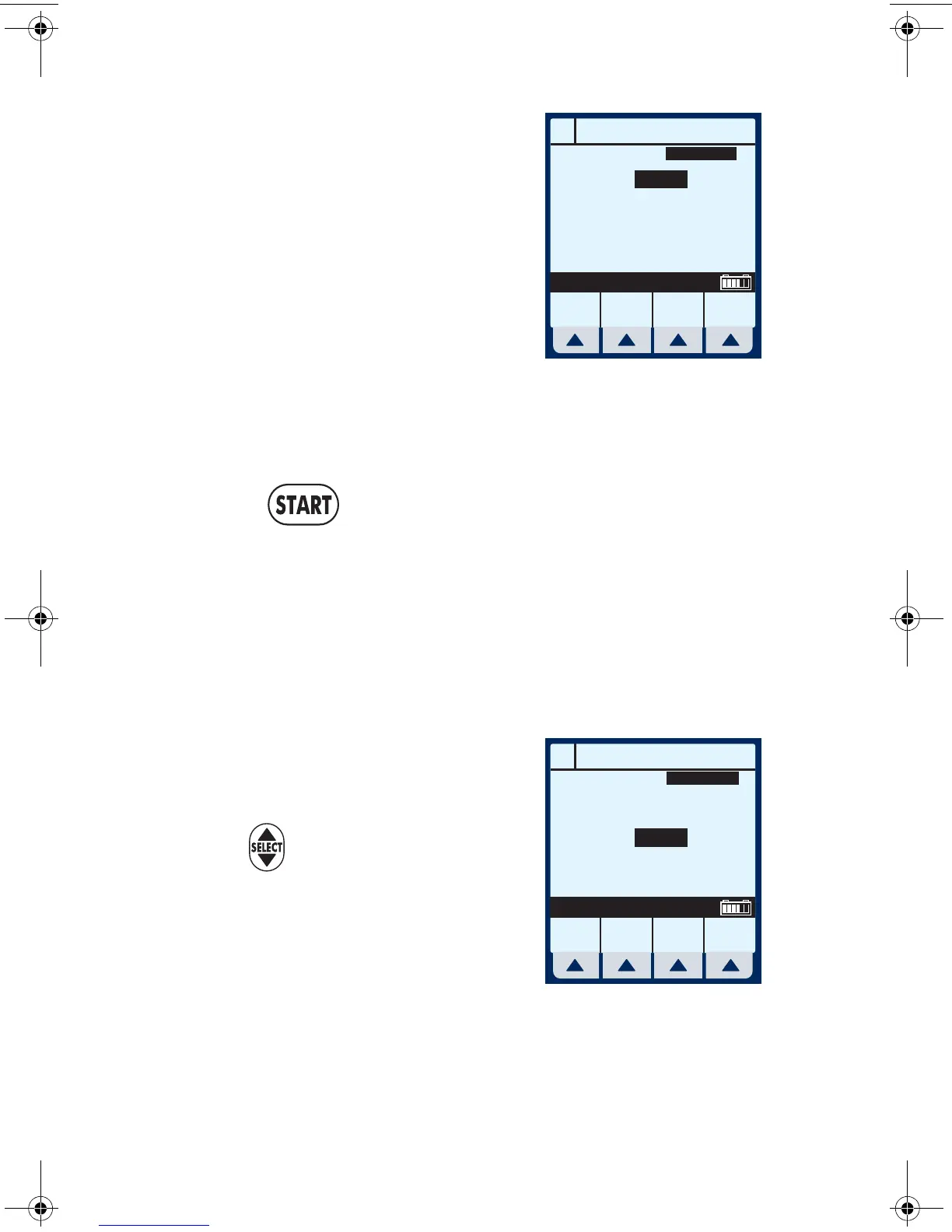
Example of changed rate.
4 From the Main Delivery
Screen, select
[A].
5 Use keypad to change the
RATE value.
NOTE: The display time is only
accurate to ± one minute. As shown in this example, the
delivery shows 3 hours and 20 minutes (not 3 minutes and 20
seconds).
6 Press .
Program Confirmation screen will appear. If correct,
press
[Yes] to begin infusion.
NOTE: [START] accepts the change. Delivery is changed to the
new RATE and DURATION and display returns to Main Delivery
Screen.
Example of Changed VTBI
value.
7 Use to highlight the VTBI
field.
8 Use the keypad to change the
VTBI value.
NOTE: When the VTBI is changed, the Duration is recomputed
with respect to the current Rate. To understand the Automatic
A
PROGRAM
Rate
VTBI
Duration
mL/hr
mL
hr : min
Program
Options
Cancel/
Back
Drug
List
Enter Value using keypad
15
50
03:20
MedSurg
A
PROGRAM
Rate
VTBI
Duration
mL/hr
mL
hr : min
Program
Options
Cancel/
Back
Enter Value using keypad
15
100
06:40
MedSurg
Drug
List
sec04.fm Page 10 Wednesday, June 8, 2005 8:22 AM


 To Next Page