For Systems With Hospira MedNet
TM
Software
4- 16 430-95597-001 (Rev. 06/05)
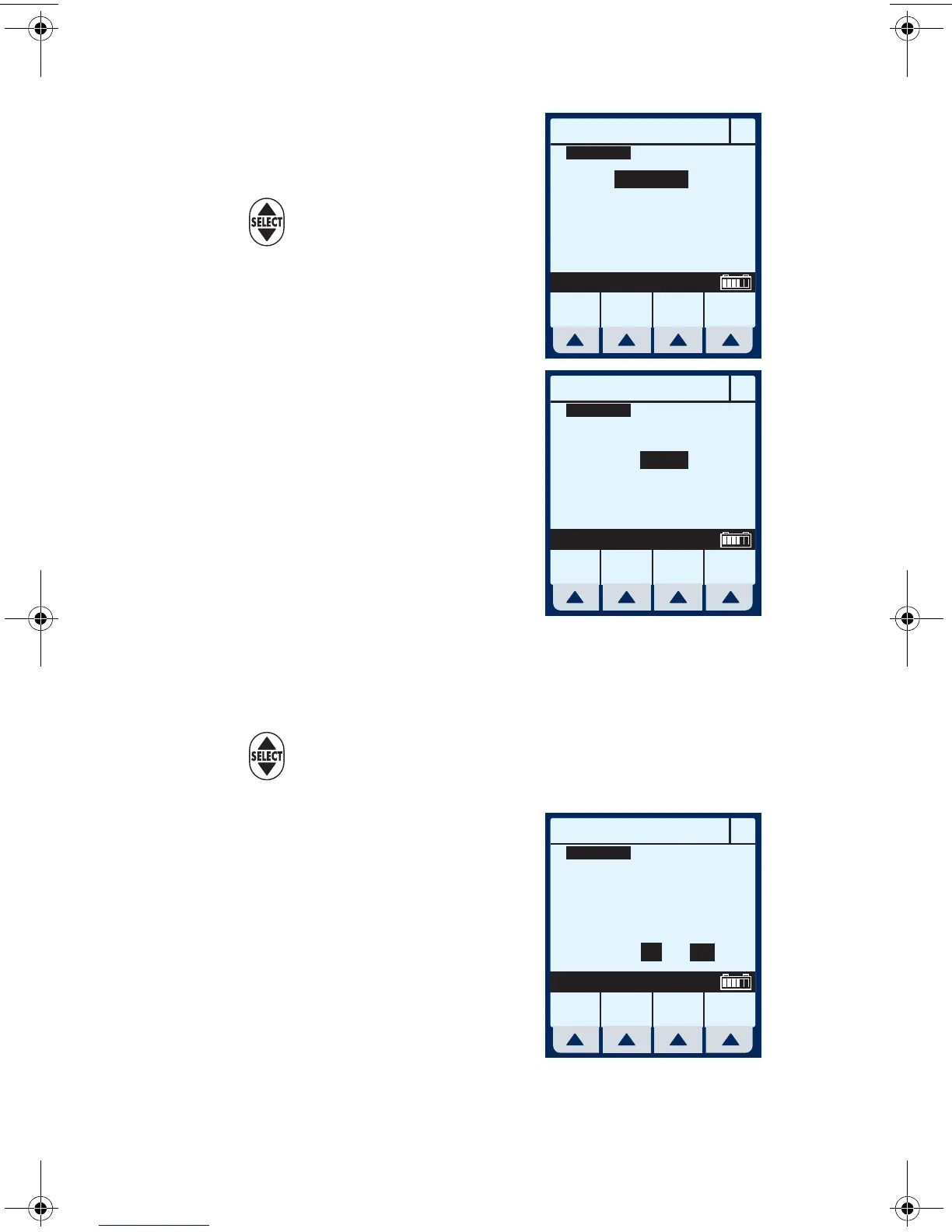
Verify change to “Concurrent”
mode.
2 Use to highlight Rate field.
3 To enter delivery rate, use
numeric keypad.
NOTE: When Rate for Line A plus
Rate for Line B is greater than valid
rate ranges, a “Concurrency violation”
message will explain why second line
did not start. See Section 9 for valid
delivery rate ranges.
NOTE: “Concurrency violation” may not be displayed if unit is
displaying “VTBI Complete”. The device will not start and an
invalid keypress sound will occur when [START] is pressed.
4 Use to move down to the VTBI field.
5 To enter VTBI amount, use
keypad.
NOTE: While the VTBI is being
entered, the duration is automatically
computed. If the computed value is
greater than 99:59, dashes (- -)
appear in place of hours. To
B
PROGRAM
Mode
Rate
VTBI
Duration
mL/hr
mL
hr : min
Program
Options
Change
Mode
Cancel/
Back
Change using Change Mode
Concurrent
0
0
00:00
MedSurg
Drug
List
B
PROGRAM
Mode
Rate
VTBI
Duration
mL/hr
mL
hr : min
Program
Options
Cancel/
Back
Enter value using keypad
Concurrent
10
0
00:00
MedSurg
Drug
List
B
PROGRAM
Mode
Rate
VTBI
Duration
Program
Options
Cancel/
Back
Enter value using keypad
Concurrent
10
100
10:00
mL/hr
mL
hr : min
MedSurg
Drug
List
sec04.fm Page 16 Wednesday, June 8, 2005 8:22 AM


 To Next Page
 Loading...