Plum A+
®
Infusion Systems
430-95597-001 (Rev. 06/05) 5- 3
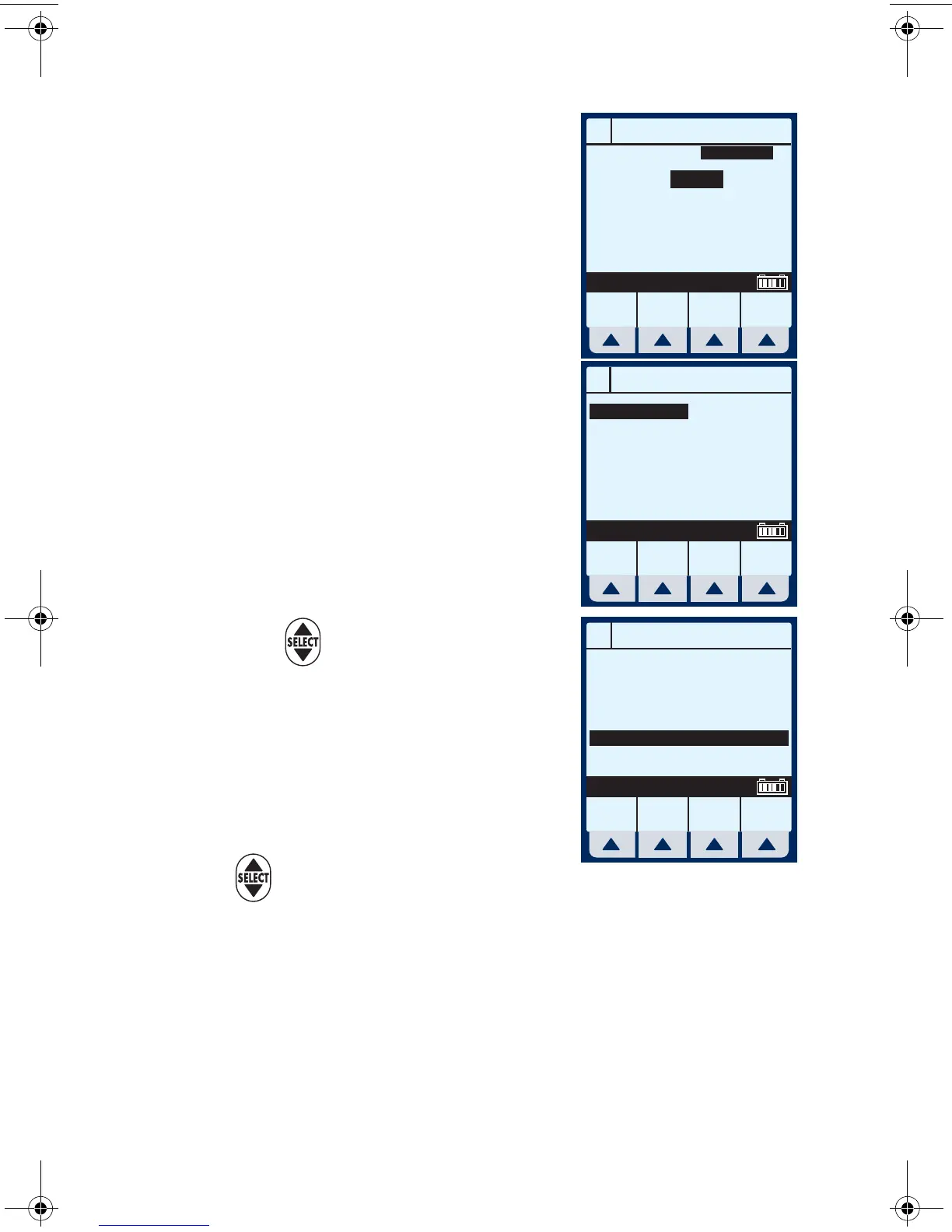
The Line A Programming
screen appears.
2 Select
[Drug List] for Dose
Calculation programming.
The Drug List Screen appears,
in mainly alphabetical order.
NOTE: Default entry is “No Drug
Selected”.
3 Use to highlight desired
drug name.
When list does not contain
desired generic drug name or
group name select
[Page Down] (or
[Page
Up]) until it shows, then use
to highlight choice.
4 Select
[Enter] to indicate selection and advance to
the Therapy selection screen.
Based on this selection, assume the hospital has set
the following rules for the Med/Surg Area:
A
PROGRAM
Rate
VTBI
Duration
mL/hr
mL
hr : min
Program
Options
Cancel/
Back
Drug
List
Enter Value using keypad
0
0
00:00
MedSurg
A
MedSurg
Page
Up
Page
Down
Cancel/
Back
Enter
Select, then Enter
No Drug Selected
Albumin 5%
Aldesleukin
Alfentanil
Alteplase
Alteplase
Amikacin
Amiodarone
25 grams/500 mL
2.6 mg/50 mL
10 mg/250 mL
50 mg/50 mL
100 mg/100 mL
100 mL
150 mg/100 mL
A
MedSurg
Page
Up
Page
Down
Cancel/
Back
Enter
Select, then Enter
Antibiotic
DOBUTamine
DOBUTamine
Docetaxel
DOPamine
DOPamine
DOPamine
Heparin
250 mg/500 mL
500 mg/500 mL
100 mg/250 mL
___ ___/___ mL
400 mg/250 mL
800 mg/250 mL
25,000 units/500 mL
sec05.fm Page 3 Wednesday, June 8, 2005 8:31 AM


 To Next Page