Top cover
Description Spare part number
Top cover (includes the TouchPad and cable) 785295-001
IMPORTANT: Make special note of each screw and screw lock size and location during removal
and replacement
Before removing the top cover, follow these steps:
1. Shut down the computer.
2. Disconnect all external devices connected to the computer.
3. Disconnect the power from the computer by first unplugging the power cord from the AC outlet and
then unplugging the AC adapter from the computer.
4. Remove the battery (see Battery on page 25).
5. Remove the service cover (see Service cover on page 26).
6. Remove the keyboard (see Keyboard on page 32)
When replacing the top cover, be sure that the power button board (see Power button board on page 42)
and Touchpad button board (see TouchPad button board on page 44) are removed from the defective top
cover and installed on the replacement top cover.
Remove the top cover:
1. Close the computer.
2. Turn the computer upside down with the front toward you.
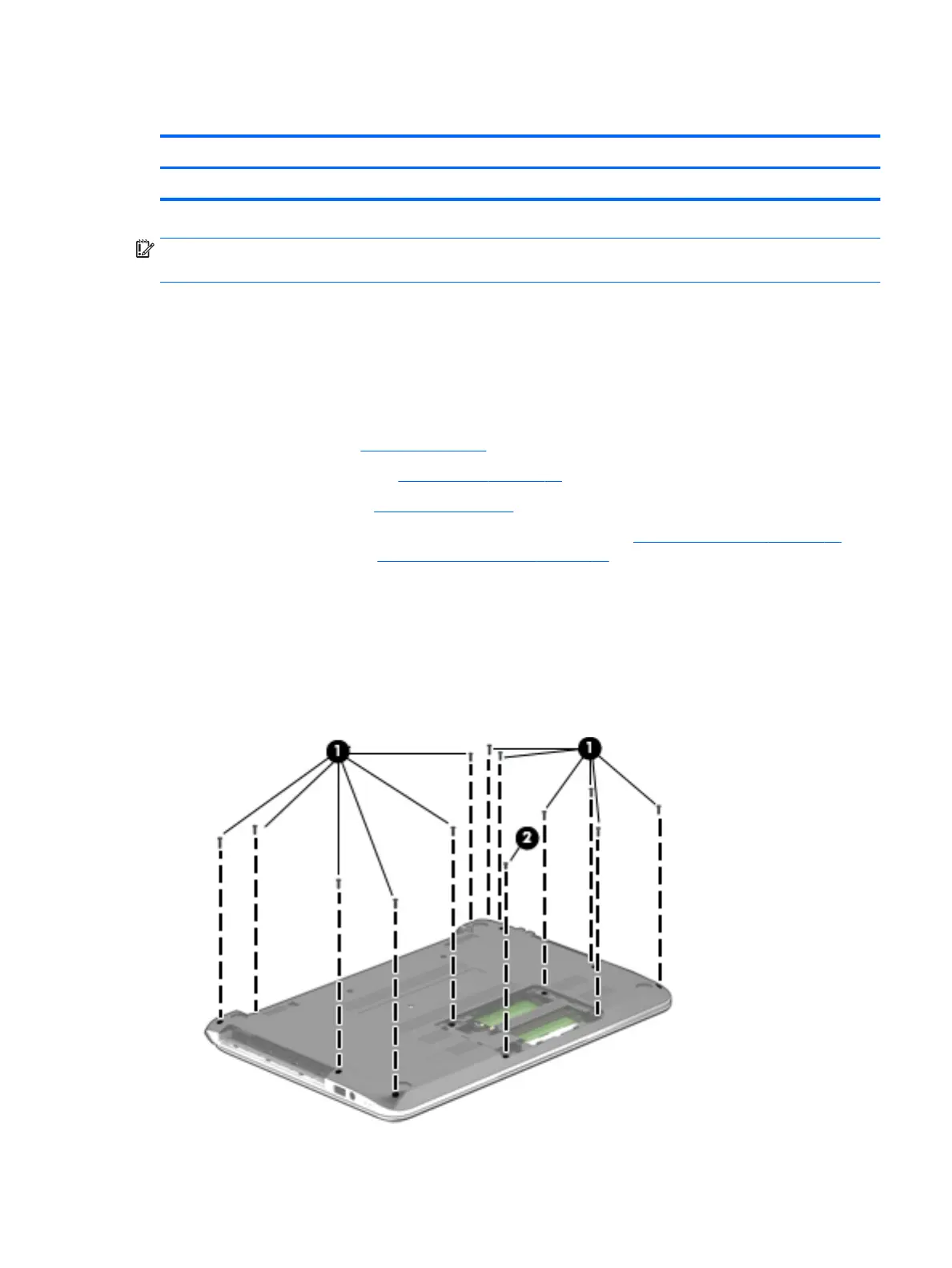
3. Remove the 12 Phillips M2.5×7.1 screws (1) and the Phillips M2.5×5.7 screw (2) that secure the top
cover to the base enclosure.
Component replacement procedures 39











 To Next Page