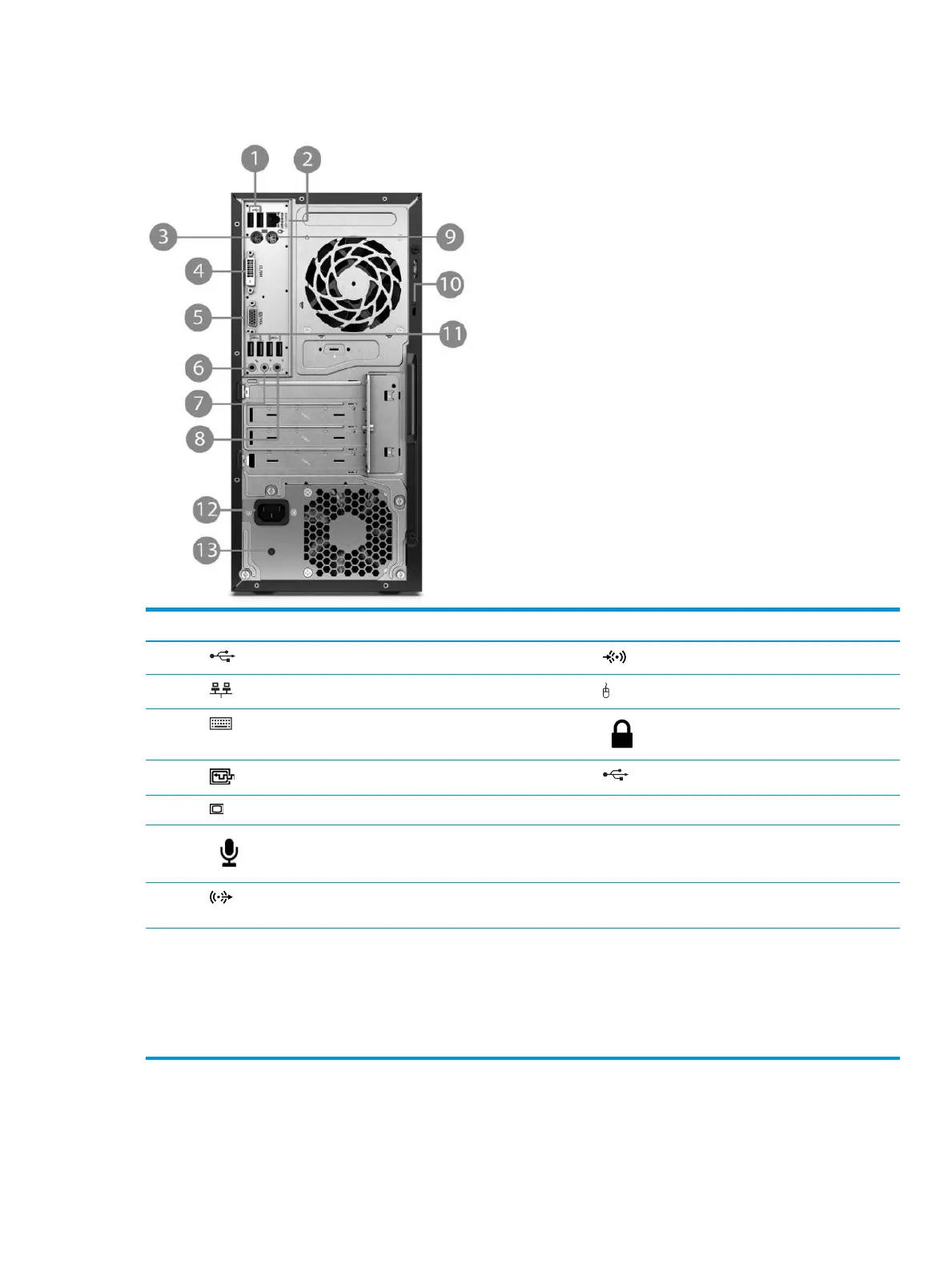
Rear panel components
Item Component Item Component
1 USB 2.0 ports (black) 8 Line-in audio connector (blue)
2 RJ-45 network connector 9 PS/2 mouse connector (green)
3 PS/2 keyboard connector (purple) 10 Security cable slot
4 DVI-D port 11 USB 3.0 ports (blue)
5 VGA monitor connector 12 Power cord connector
6 Microphone connector 13 Power supply activity light
7 Line-out connector for powered audio devices
(
green)
NOTE: When a device is plugged into the blue Line-In Audio Connector, a dialog box will pop up asking if you want to use the connector for a
line-in de
vice or a microphone. You can recongure the connector at any time by double-clicking the Audio Manager icon in the Windows
taskbar.
When a graphics card is installed in one of the system board slots, the video connectors on the graphics card and/or the integrated graphics
on the sys
tem board may be used. The specic graphics card installed and software conguration will determine the behavior.
The system board graphics can be disabled by changing settings in Computer Setup.
2 Chapter 1 Product features



 To Next Page