System board
1. Prepare the computer for disassembly (Preparation for disassembly on page 14).
2. Remove the access panel (Access panel on page 15).
3. When replacing the system board, make sure the following components are removed from the defective
system board and installed on the replacement system board:
●
Memory modules (Memory on page 19)
●
Expansion cards (Expansion cards on page 22)
●
Heat sink (Fan sink on page 35).
●
Processor (Processor on page 37)
4. Disconnect all cables connected to the system board, noting their location for reinstallation.
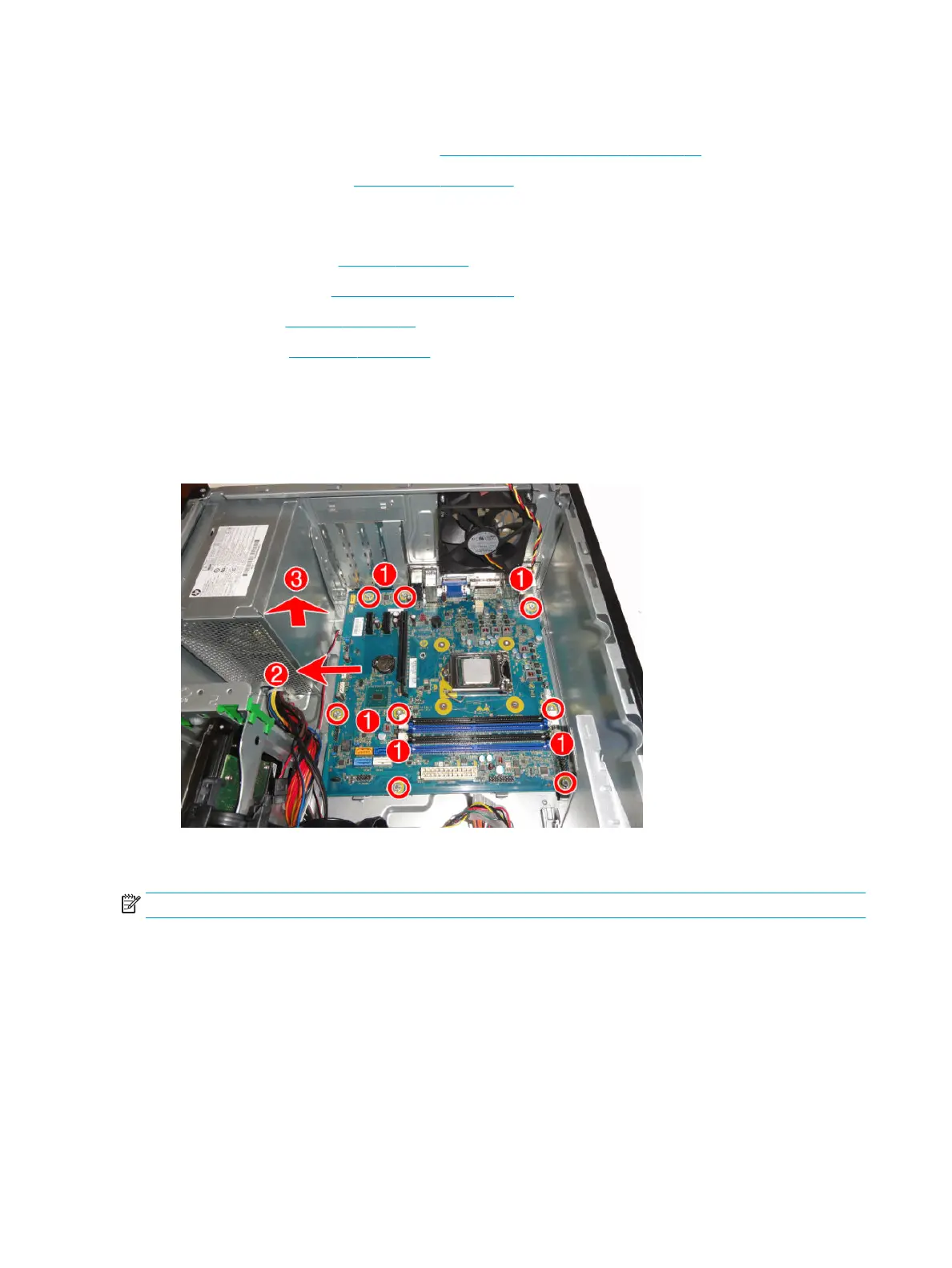
5. Remove the eight Torx T15 screws (1) that secure the system board to the chassis.
6. Slide the system board toward the power supply (2), and then lift the system board up and out of the
computer (3).
When reinstalling the system board, rst insert the I/O panel back into the slots in the rear of the chassis, and
then align the board with the chassis screw holes.
NOTE: When replacing the system board, you must change the chassis serial number in the BIOS.
42 Chapter 4 Removal and replacement procedures – Microtower (MT) chassis



 To Next Page