Processor
Description Description
Intel Core i7-6700, 3.4 GHz Intel Pentium G4520, 3.6 GHz
Intel Core i5-6500, 3.2 GHz Intel Pentium G4400, 3.3 GHz
Intel Core i3-6320, 3.9 GHz Intel Celeron G3900, 2.8 GHz
Intel Core i3-6100, 3.7 GHz
1. Prepare the computer for disassembly (Preparation for disassembly on page 14).
2. Remove the access panel (Access panel on page 15).
3. Remove the fan sink (Fan sink on page 35).
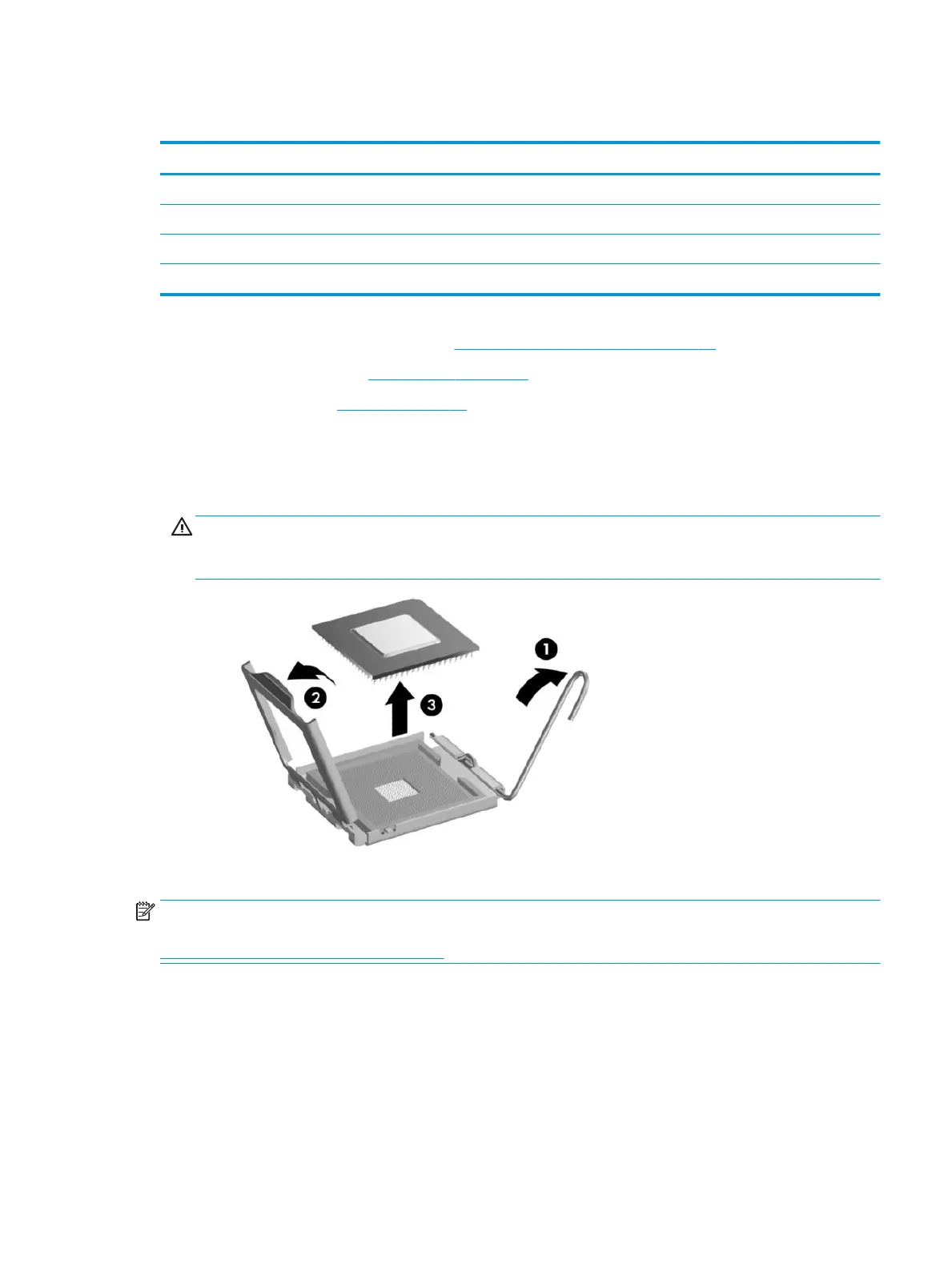
4. Rotate the locking lever to its full open position (1).
5. Raise and rotate the microprocessor retainer to its fully open position (2).
6. Lift the processor (3) straight up and remove it.
CAUTION: Do NOT handle the pins in the processor socket. These pins are very fragile and handling
them could cause irreparable damage. Once pins are damaged it may be necessary to replace the
system board.
Reverse the removal procedure to install a new processor.
NOTE: After installing a new processor onto the system board, update the system ROM to ensure that the
latest version of the BIOS is being used on the computer. The latest system BIOS can be found on the Web at:
http://h18000.www1.hp.com/support/les.
Processor 37



 To Next Page