250
SWEEP
WIDTH
MHz
100
©
CENTER
Model
8754A·
REAR
PANEL
FRONT
PANEL
Display Indicates
Center Frequency
SWEEP
INT
-=:J
EXT
/-
-
/ \
I
\
I
/ \
7
100 -
~
-
./
MHz
_
-
~
I
FREQUENCY MHz
150 200
300
SWEEP
WIDTH
MHz
100
©
START
Display Indicates
Start Frequency
I--
\
\
\
"-
"-
100 MHz
~
"-
,
....
~
FREQUENCY MHz
200
1300
©
TUNING
FULL
4-1300
Display Indicates
Tuning Marker Frequency
I~
1 i I
.........
TUNING
MARKER
I
~J
~
...
l...lIl....
-
4 200
_l_t-.
FREQUENCY MHz
12
Usual settings for the SWEEP controls are: AUTO
to
select
the internally-generated sweep trigger, and either FAST
or
SLOW
to
select
the
sweep time range. (Also, set
the
rear
panel SWEEP control
to
INT.) The vernier controls
the
sweep
time within the fast and slow ranges.
Markers are displayed
on
a rectangular trace
as
a positive amplitude mark (
SL
)
or
an intensified
short
dash
on
the
polar trace. The MARKERS
buttons
select display
of
internal crystal-generated harmonic
markers
at
50, 10,
or
1
~1Hz
intervals. (1 MHz markers are active only at 20
MHz
and below sweep widths.)
Front
Panel
Introduction
·The frequency
readout
is accurate
to
± 10 MHz over the full range and can be calibrated
to
1 MHz crystal
marker accuracy
at
the frequency
of
interest using any trace
on
the
rectangular display
and
the
CAL
vernier adjacent
to
the readout.
(If
the
trace is difficult
to
read, use the REFERENCE POSITION line
of
the
unused measurement channel
to
display
the
markers.) Calibrate the readout
as
follows: Select CENTER
sweep mode,
200
MHz sweep width, and 50 MHz markers. Use
the
TUNING control
to
center a marker
(
Jl_
) nearest
the
frequency
of
interest exactly over
the
centervertical graticule. With
the
marker centered,
adjust
the
CAL vernier for a
readout
of
XXOO
or
XX50 (some multiple
of
50
or
100 MHz).
Set Frequency Sweep
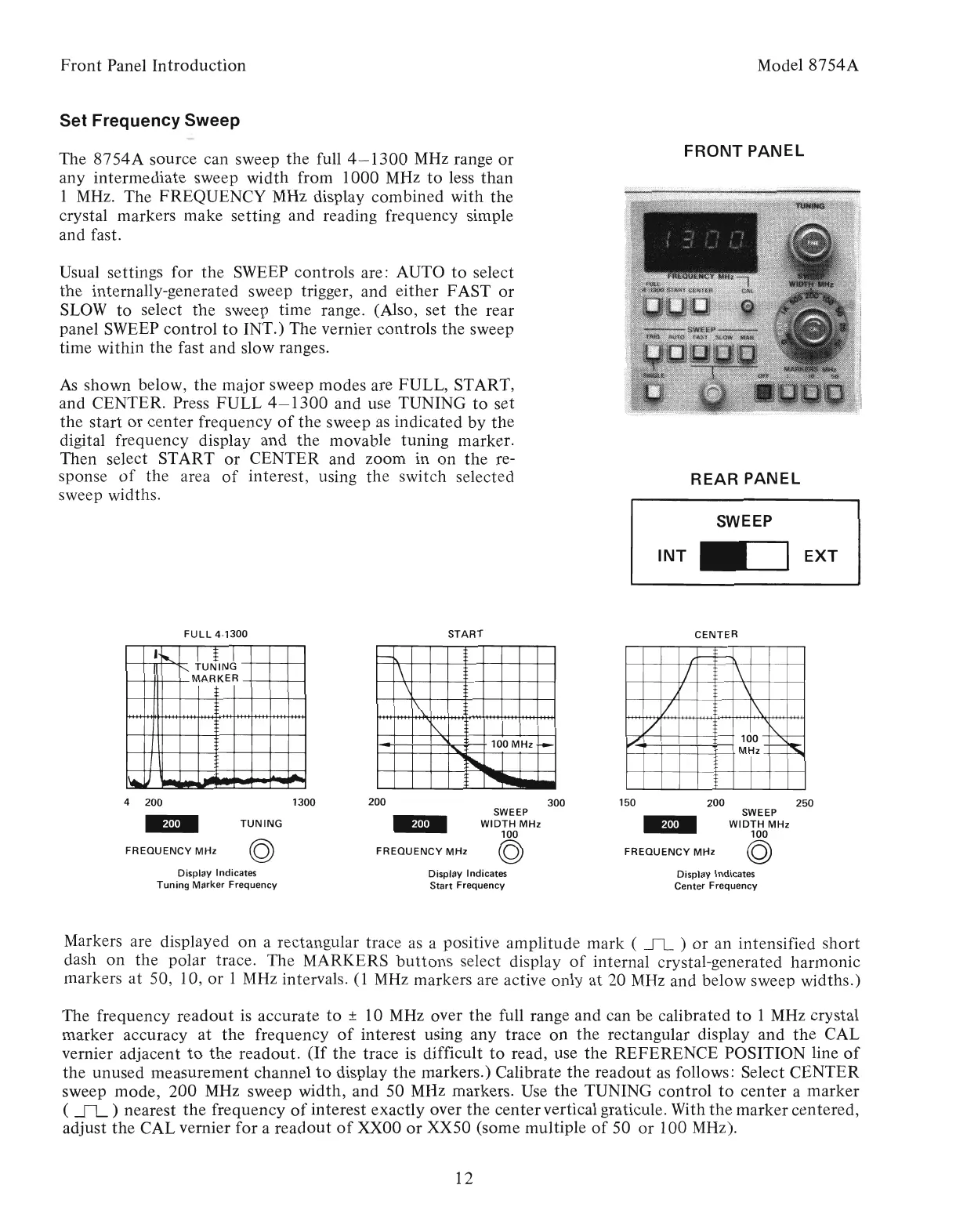
As
shown below, the major sweep modes are FULL, START,
and CENTER. Press
FULL
4-1300
and use TUNING
to
set
the start
or
center frequency
of
the sweep
as
indicated by the
digital frequency display and
the
movable tuning marker.
Then select START
or
CENTER and zoom in
on
the
re-
sponse
of
the area
of
interest, using
the
switch selected
sweep widths.
The
8754A
source can sweep
the
full
4-1300
MHz range
or
any intermediate sweep width from 1000 MHz
to
less
than
1 MHz. The FREQUENCY MHz display combined with
the
crystal markers make setting and reading frequency simple
and fast.
Artisan Technology Group - Quality Instrumentation ... Guaranteed | (888) 88-SOURCE | www.artisantg.com



 To Next Page