38
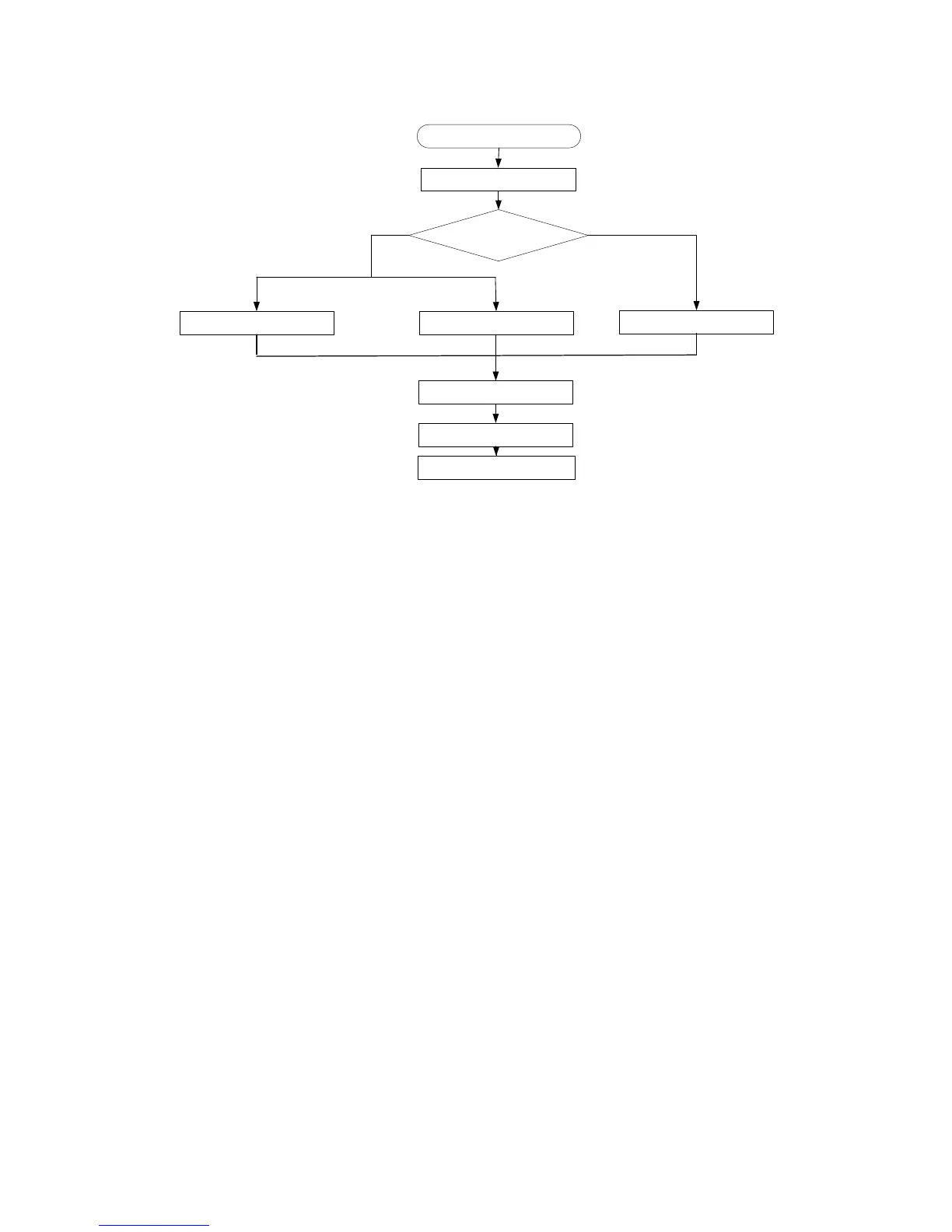
Figure 9 Dealing with password loss
Examining the state of password recovery
capability
1. Reboot the router.
System is starting...
Press Ctrl+D to Access BASIC-BOOTWARE MENU..........................
****************************************************************************
* *
* HP MSR30-20 BootWare, Version 4.0 *
* *
****************************************************************************
Copyright (c) 2004-2012 Hewlett-Packard Development Company, L.P.
Compiled Date : Feb 16 2012
CPU Type : MPC8349E
CPU L1 Cache : 32KB
CPU Clock Speed : 533MHz
Memory Type : DDR SDRAM
Memory Size : 256MB
Memory Speed : 266MHz
BootWare Size : 4096KB
Flash Size : 4MB
cfa0 Size : 256MB
CPLD Version : 2.0
PCB Version : 3.0
Enter 6 to skip
console login authentication
Password recovery
capability enabled?
Yes
No
Save the running configuration
Enter 8 to clear
user privilege level password
Reboot the router
Configure new passwords
in system view
Enter 5 to restore the
factory-default configuration
Password lost
Reboot the router to access
EXTEND-BOOTWARE menu
Console login
password lost
User privilege level
password lost



 To Next Page