Hood sensor
To remove the hood sensor, use these procedures.
Before removing the hood sensor, follow these steps:
1. Prepare the computer for disassembly (see Preparation for disassembly on page 17).
2. Remove the access panel (see Access panel on page 17).
3. Remove the fan (see Fan on page 18).
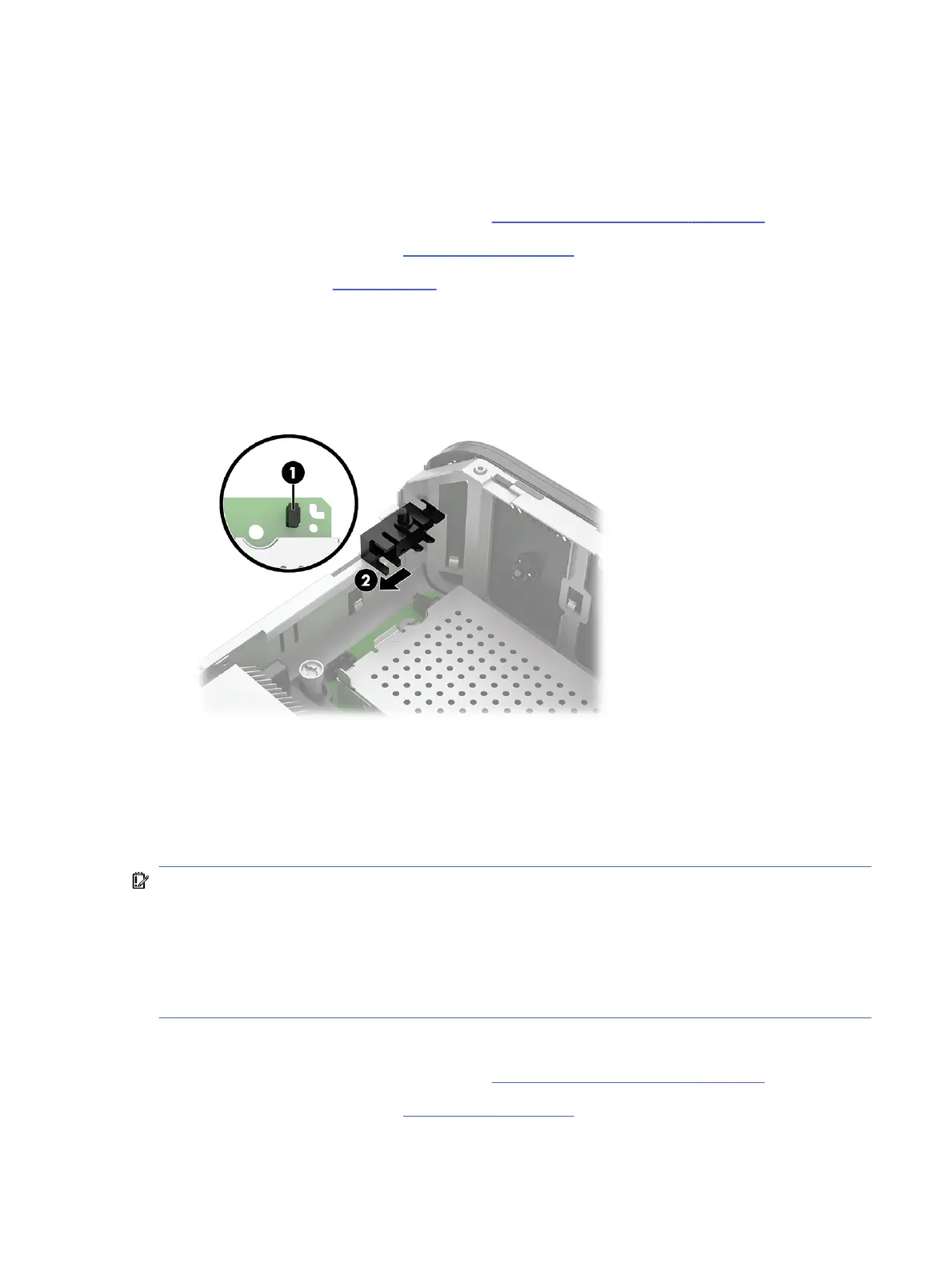
Remove the hood sensor:
1. Disconnect the hood sensor cable from the system board (1).
2. Use a tool to slide the sensor toward the back of the computer to remove it (2).
To install the hood sensor, reverse the removal procedure.
Heat sink
To remove the processor heat sink, use these procedures.
IMPORTANT: The bond between the heat sink and the processor can be very tight.
If the computer will turn on, before removing the heat sink, turn on the computer until it warms the heat
sink. Warming the heat sink loosens the bond between the heat sink and the processor, thereby making
it easier to separate them.
Do not pull the processor out of the socket when you lift the heat sink, especially if you cannot warm
the heat sink before removal. Inadvertently removing the processor can damage the pins.
Before removing the processor heat sink, follow these steps:
1. Prepare the computer for disassembly (see Preparation for disassembly on page 17).
2. Remove the access panel (see Access panel on page 17).
Hood sensor
19



 To Next Page