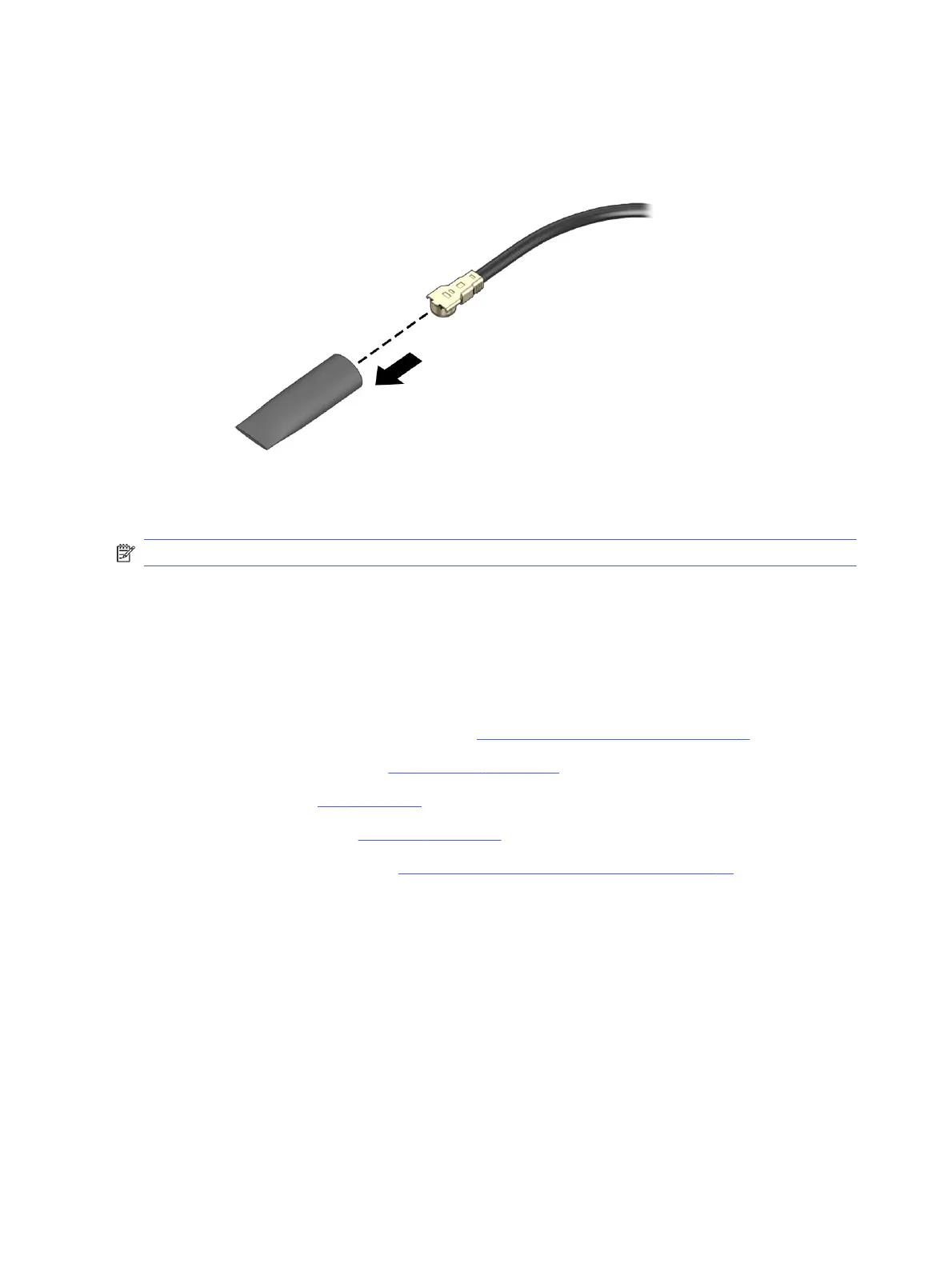
5. If the WLAN antenna is not connected to the terminal on the WLAN module, a protective sleeve
must be installed on the antenna connector, as shown in the following illustration.
To install the WLAN module, reverse the removal procedure.
NOTE: WLAN modules are designed with a notch to prevent incorrect insertion.
Wireless antennas and cables
To remove the wireless antennas and cables, use these procedures. The cables route from the WLAN
module to the antennas mounted on the side of the computer.
Before removing the wireless antennas and cables, follow these steps:
1. Prepare the computer for disassembly (see Preparation for disassembly on page 17).
2. Remove the access panel (see Access panel on page 17).
3. Remove the fan (see Fan on page 18).
4. Remove the heat sink (see Heat sink on page 19).
5. Remove the riser assembly (see Riser assembly and expansion cards on page 25).
Remove the wireless antennas:
1. External antenna: Disconnect the antenna cable from the WLAN module (1).
2. Remove the cable from the clips in the inside front and right sides of the computer (2).
30
Chapter 4 Removal and replacement procedures





 To Next Page