IMPORTANT: Tighten heat sink retaining screws in diagonally opposite pairs (as in an X) to evenly seat
the heat sink on the processor to avoid damage that could require replacing the system board.
To replace the heat sink, reverse the removal procedures.
Processor
To remove the processor, use these procedures.
For list of available processors, see Computer major components on page 5.
Before removing the processor, follow these steps:
1. Prepare the computer for disassembly (see Preparation for disassembly on page 17).
2. Remove the access panel (see Access panel on page 17).
3. Remove the fan (see Fan on page 18).
4. Remove the heat sink (see Heat sink on page 19).
Remove the processor:
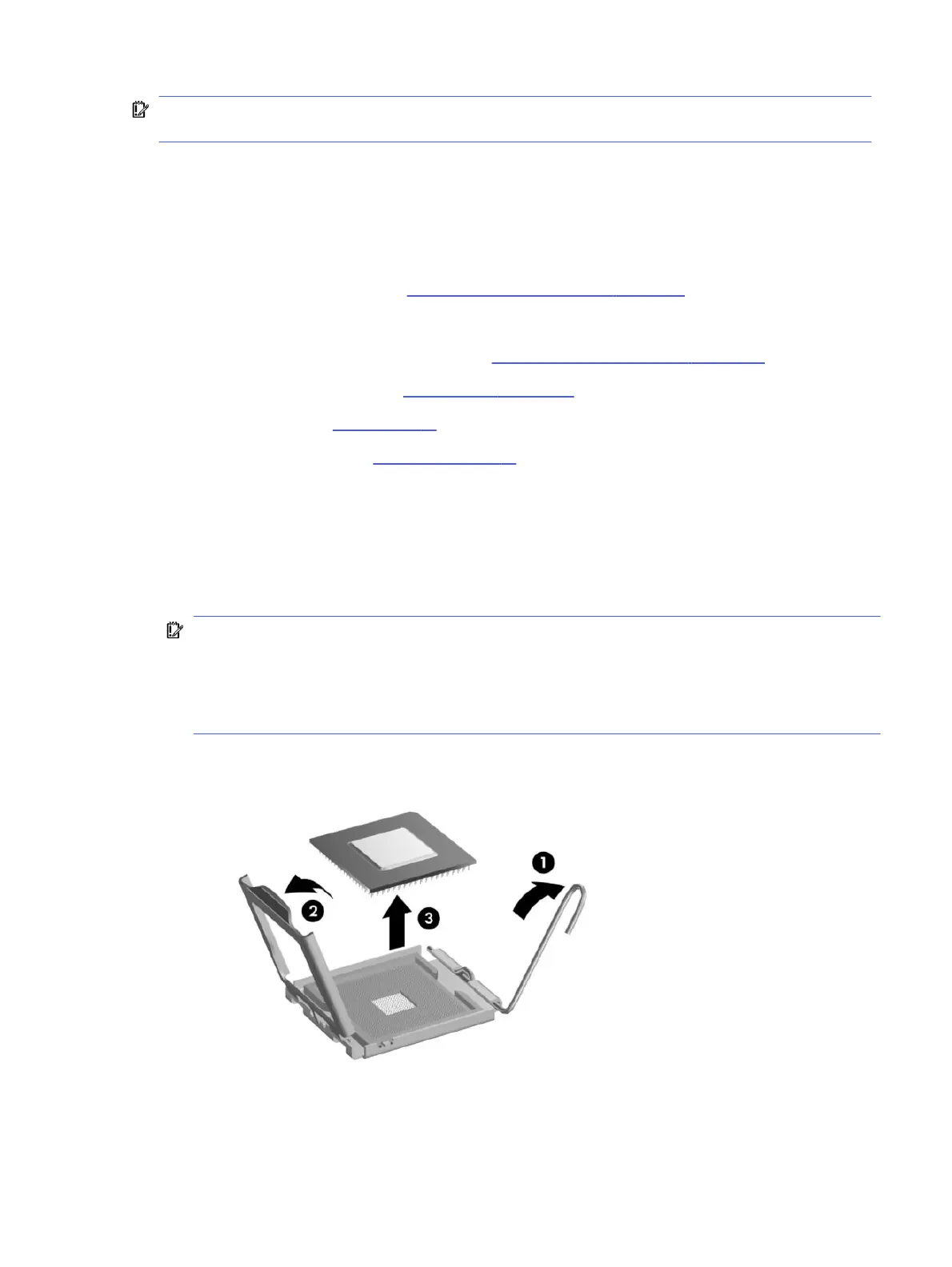
1. Pull the locking lever away from the processor, and then rotate the lever to its full open position (1).
2. Raise and rotate the microprocessor retainer to its fully open position (2).
3. Carefully lift the processor from the socket (3).
IMPORTANT: Do not handle the pins in the processor socket. These pins are fragile, and handling
them could cause irreparable damage. If pins are damaged, you might have to replace the system
board.
The heat sink must be installed within 24 hours of installing the processor to prevent damage to
the processor’s solder connections.
Processor
21





 To Next Page