To install the solid-state drive asssembly, reverse the removal procedure.
WLAN module
To remove the WLAN module, use these procedures.
For list of available WLAN modules, see Computer major components on page 5.
Before removing the WLAN module, follow these steps:
1. Prepare the computer for disassembly (see Preparation for disassembly on page 17).
2. Remove the access panel (see Access panel on page 17).
3. Remove the riser assembly (see Riser assembly and expansion cards on page 25).
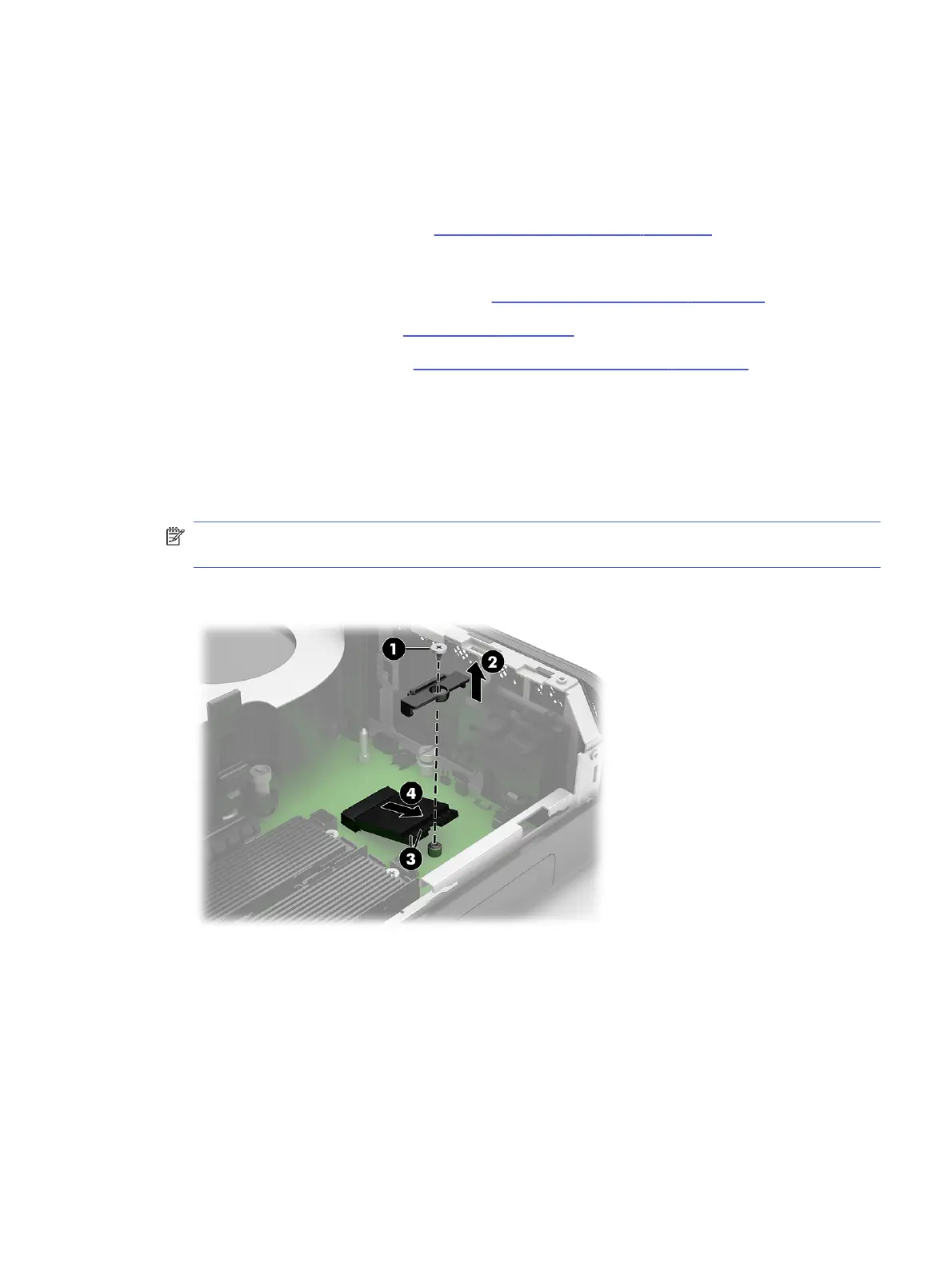
Remove the WLAN module:
1. Remove the Phillips screw (1) that secures the module to the computer.
2. Remove the plastic antenna connector cover (2).
3. Disconnect the antenna cables from the module (3).
NOTE: The WLAN antenna cable labeled 1/AUX connects to the WLAN module AUX terminal. The
WLAN antenna cable labeled 2/MAIN connects to the WLAN module MAIN terminal.
4. Pull the module out of the socket (4).
WLAN module
29





 To Next Page