NGN Cases Chapter 1 MA5600 Cases
Confidential Information of Huawei. No Spreading without Permission
14
1.12 Conflict mac-address also can not manage dslam from inbound management
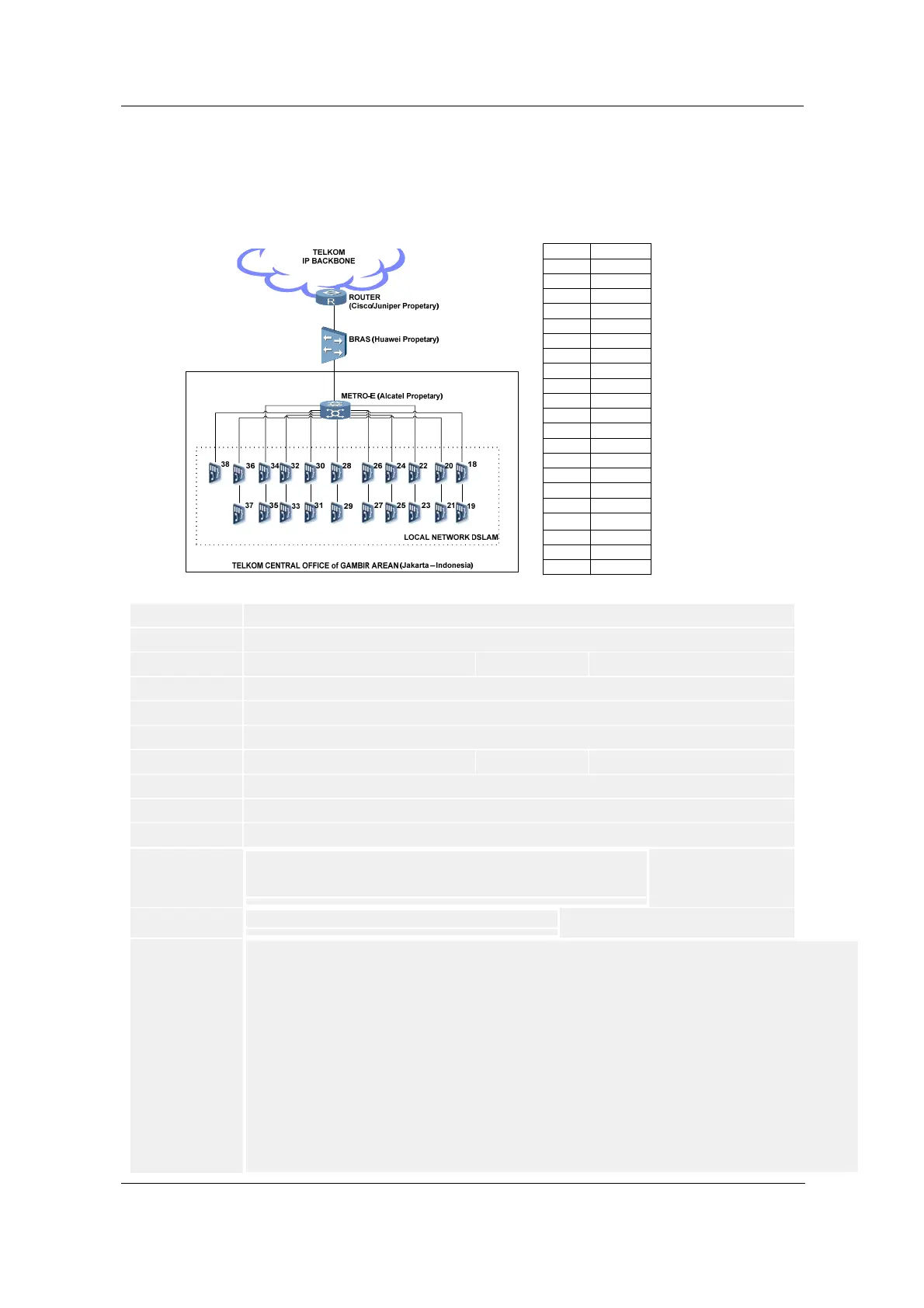
Mac Address (Case Topology)
10.12.24.7136
10.12.24.7237
10.12.24.7338
10.12.24.7035
10.12.24.6934
10.12.24.6833
10.12.24.6732
10.12.24.6631
10.12.24.6530
10.12.24.6429
10.12.24.6328
10.12.24.6227
10.12.24.6126
10.12.24.6025
10.12.24.5924
10.12.24.5823
10.12.24.5722
10.12.24.5621
10.12.24.5520
10.12.24.5419
10.12.24.5318
IP of DSLAMDSLAM
Title: Conflict mac-address also can not manage dslam from inbound management
ID: SE0000365895
Information Type :
Troubleshooting Cases
Quality Level:
C
Update Time: 2008-12-31 18:44:55
Views: 19
Author: Kores F B Sinaga - 00713498
Product Family:
Broadband Access
Product:
SmartAX MA5600
Fault Type:
Host/Network Management System (independent from service)
Keywords: mac-address conflict inbound management
Permission Level: 03Equipment Users Permission
Phenomenon Descr
iption:
Can not manage DSLAM33 and DSLAM 34 from Inbound-NMS network.
Also found conflict mac-address both of DSLAM34 and BRAS.
(You can the topology case in the attachments bellow)
Alarm Informatio
n:
Null --> No Alarm, (These not impacted to The Service)
Cause Analysis:
Found MAC ADDRESS CONFLICT BETWEEN DSLAM33, DSLAM34, AND BRAS.
A.Check All DSLAM on site, Local DSLAM (Telkom Central Office of Gambir Area)
B.Can not reach (Ping and Telnet) DSLAM34 from Inbound-NMS, The Interface VLAN Management was down.
C.Found DSLAM34 mac-address used in DSLAM33 Mac-Address.
C.1.Check Mac-Address of Interface VLAN Management firstly
both of DSLAM33 and DSLAM34.
C.2.Found VLAN Management Interface of DSLAM34 Down,
even the physical interface up, service running normally, and also
already delete and recreate vlan management interface of DSLAM34.
Use with these command bellow :
DSLAM33-D2-GBR(config)#display arp all
IP Address MAC Address VLAN ID Port Type
10.12.24.69 00e0-fc84-a76e 26 0 /7 /0 Dynamic >> DSLAM 34
.........
10.12.24.1 00e0-fc84-a76e 26 0 /7 /0 Dynamic >> BRAS
DSLAM34-D2-GBR(config)#display interface vlanif 26


 To Next Page