Scenario Grid-
Connect
ion
Point Power
Limit
PV Device Meter
Connection
Mode
PV
Power
Preferred
Dynamic
Charging
Power
PV+Charger/PV+ESS
+Charger (RS485 meter
& WLAN/FE Smart
Dongle)
√ √ Virtual meter √ √
PV+Charger/PV+ESS
+Charger (RS485 meter
& FE meter & non-
WLAN/FE Smart
Dongle)
√ √ FE meter √ √
The f
ollowing table lists the device congurations in dierent scenarios.
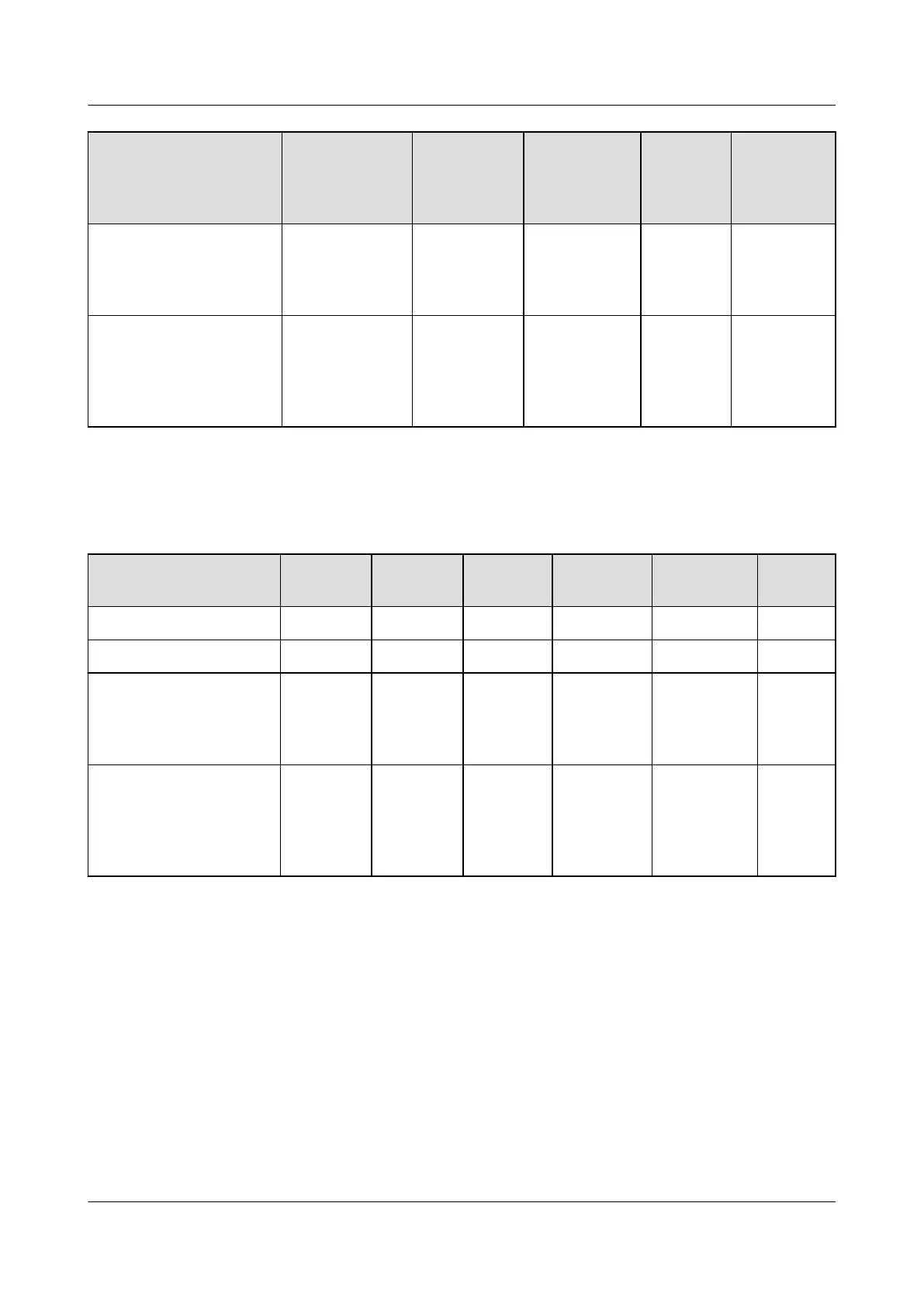
Table 2-4 Product conguration
Scenario Charger Huawei
Inv
erter
ESS WLAN/FE-
Dongle
FE meter RS485
meter
Charger-only √ × × × Optional ×
PV+Charger (FE meter) √ √ × Optional √ ×
PV+Charger/PV+ESS
+Charger (RS485 meter
& WLAN/FE Smart
Dongle)
√ √ Optional √ × √
PV+Charger/PV+ESS
+Charger (RS485 meter
& FE meter & non-
WLAN/FE Smart
Dongle)
√ √ Optional × √ √
Charger-Only
● The PV Power Preferred mode is not supported in charger-only scenarios.
● To implement dynamic charging power, a meter needs to be congured. The
meter can be directly connected to the charger through the FE port or
connected to the charger through a router.
● When the charger is connected to the router through WiFi, ensure that the
WiFi signal is good and there is no obstacle around the devices. Otherwise,
the meter may be disconnected and dynamic charging power cannot be
implemented.
PV+ESS+Charger Solution
User Manual 2 Solution Overview
Issue 02 (2023-01-13) Copyright © Huawei Technologies Co., Ltd. 18



 To Next Page