EasyManua.ls Logo

Humeau LIGHTNING MVP ICON - Chapter 4: Points; Points; Selecting a Test Point

Humeau LIGHTNING MVP ICON
87 pages
Print Icon
To Next Page IconTo Next Page
To Previous Page IconTo Previous Page
Loading...
Points 2
Points
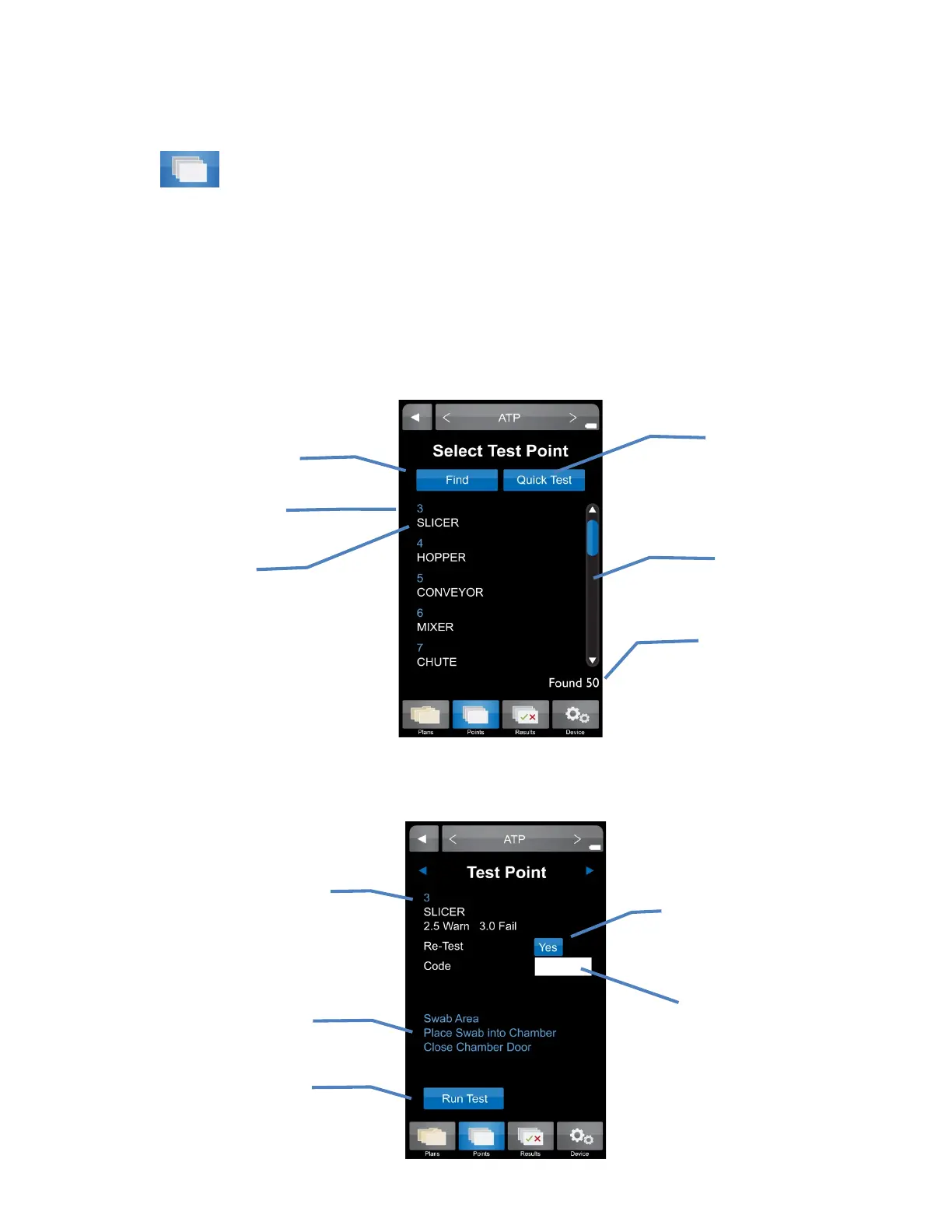
The “Points” tab on the bottom menu of the ICON contains a list of all created test points in
numerical order, independent of sample plan assignment.
Selecting a Test Point
Scroll through a list of test points in numeric order using the scroll bar on the right side of
the screen.
Further details for each test point can be found by selecting the desired test point.
Re-Test
See Chapter 7
Test point number, name,
and Warn/Fail thresholds
Code
See Chapter 9
Instructions for
inserting swab
Press to run
sample
Test point number
Quick Test
See Chapter 8
Search for a specific
test point
Total number of test
points assigned
Scroll Bar
Test point name
5

Table of Contents