Device 5
Device
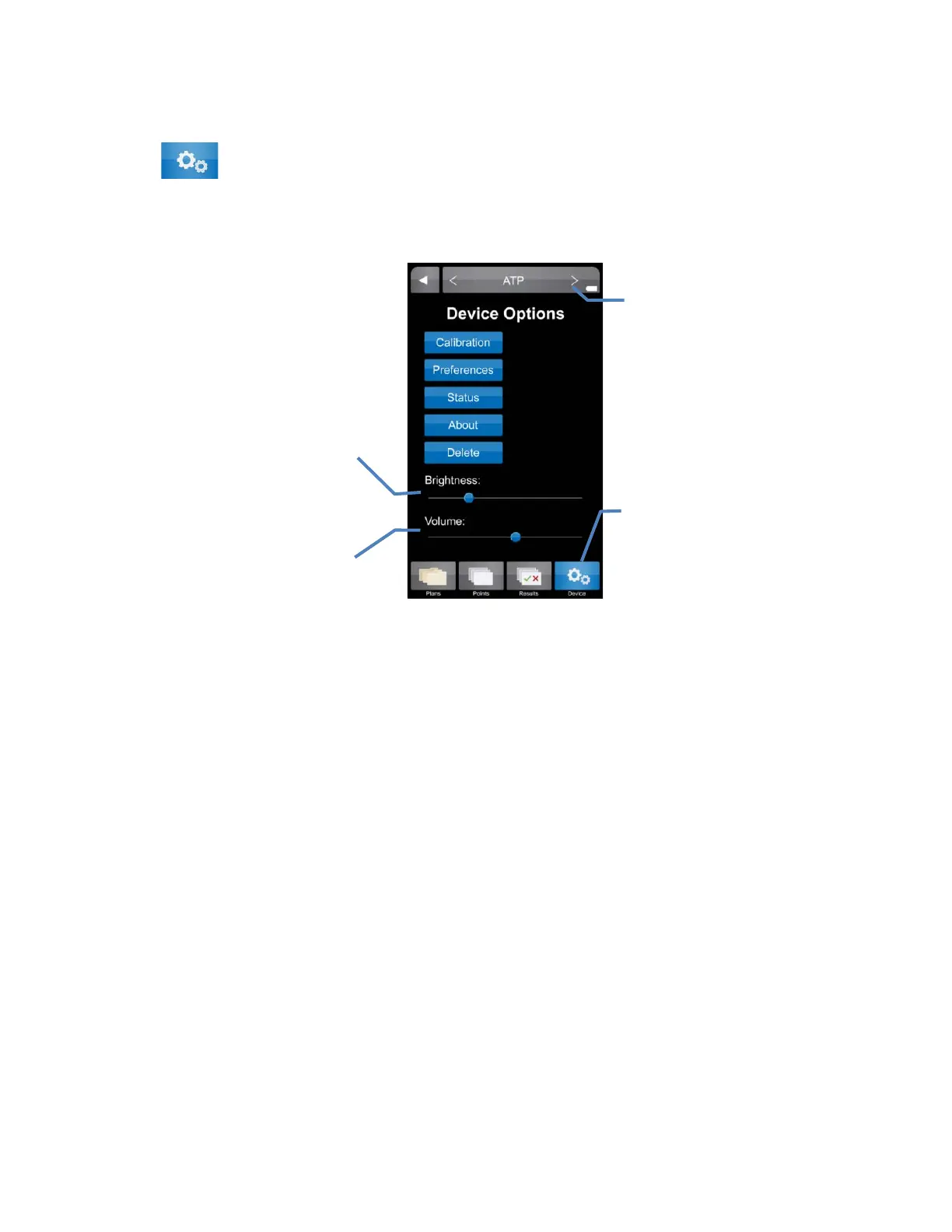
Device settings for the ICON can be accessed by selecting the “Device” tab at the bottom of the
ICON screen.
Calibration
Allows for calibration of the MVP ICON for the specific parameter selected (ATP, pH,
Temperature, Conductivity, or Concentration; See Chapter
11).
A
TP parameter includes procedures for system verification using LIGHTNING MVP ICON ATP
Positive Control and LIGHTNING MVP ICON Calibrator Set (see Chapter 11).
Preferences
Allows user to customize the language, date, time, temperature and RLU display
• Time – Time can be displayed in either a 12-hour (2:00 PM) or 24-hour format (14:00).
• Date – Date can be displayed as either Month/Day/Year or Day/Month/Year.
• Language – The following languages are available for the MVP ICON: English, French,
Spanish, German, and Portuguese.
• Show RLU – ATP results are displayed as Zones of Cleanliness; results can also be
displayed as Relative Light Units or RLU’s.
• Temperature – Temperature can be displayed as either °F or °C.
Status
Includes diagnostic information used to troubleshoot the instrument such as:
• Sample Chamber door status (open/closed)
• Charger status (battery/AC)
• Battery voltage
Change selected
parameter
Adjust display
brightness
alert volume
Access Device
settings
11


 To Next Page
 Loading...