Code Field 9
Code Field
The “Code” field on the ICON is a place to enter additional identifying information about an
assigned test point into the instrument at the time of testing. For example, a numeric code could
be entered prior to taking a sample to identify a particular sanitation worker, product, or location
within the facility not previously identified during test point setup in the software. The code field
on the ICON is a numeric value only. Any meaning correlating to this code should be documented
separately for reference.
Entering a Code
Codes are entered after a test point has been selected, either through “Points” or “Plans” and
must be entered prior to measuring the sample.
• Select desired test point via “Points” or “Plans”.
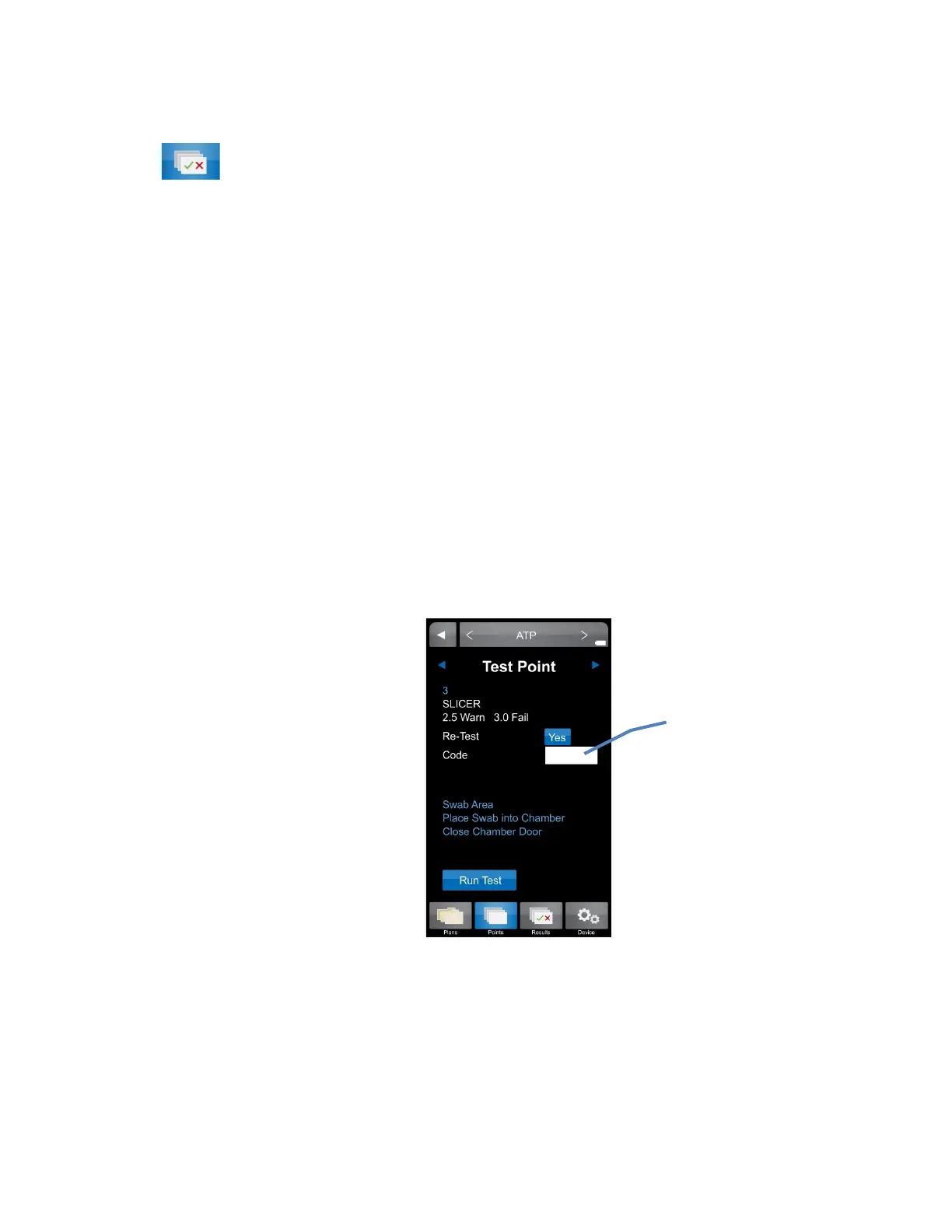
• At the “Test Point” screen, locate the “Code” field and lightly press the white box .
• Enter the desired code, up to 4 digits.
Note: This field is not password protected. Any 1 – 4 digit code can be entered on this
screen.
• The code will now be populated in the “Code” field and will be associated with that
particular result.
Viewing a Coded Result
• Any test point with an assigned code can be viewed in the “Results” section of the ICON
menu.
• Coded results are also available in “Raw Data” within the ICON Software, once uploaded
(see Chapter
20 – Raw Data for more information).
code here
18


 To Next Page
 Loading...