EasyManua.ls Logo

IBM TS4300 3555 - User Manual

IBM TS4300 3555
262 pages
Print Icon
To Next Page IconTo Next Page
Loading...
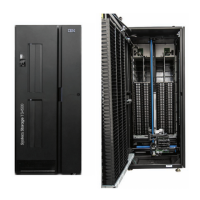
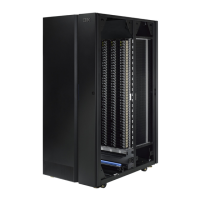
IBM TS4300 Tape Library
Machine Type 3555
User's Guide
IBM
SC27-4629-07

Table of Contents

Questions and Answers

  • E
    Eric WestSep 7, 2025
    Why can't I load the cleaning cartridge in my IBM TS4300 3555?
    • E
      Eric WilsonSep 7, 2025
      If you're unable to load a cleaning cartridge in your IBM Storage, ensure that you’re using an LTO cleaning cartridge and that it isn’t expired. Cleaning cartridges expire after 50 cleaning cycles.
  • J
    Joshua JacksonNov 26, 2025
    How to fix IBM Storage when I can't write to or read from tape?
    • X
      xmackNov 26, 2025
      If you're experiencing issues writing to or reading from tape with your IBM Storage, consider the following: * Ensure the cartridge isn't a WORM cartridge that has already been used. * Verify the cartridge is write-enabled by checking the write-protect switch position. * Confirm the data cartridge is compatible with the drive model. * Ensure you're using an LTO cartridge that hasn't been degaussed. * Check the cartridge for physical damage or exposure to harsh conditions. * If using a cartridge created with a different backup application, try erasing, formatting, or labeling the cartridge. * Review any data protection or overwrite protection schemes in your backup application that might be preventing you from writing to the cartridge. * Try a different, known good tape. * ...
  • N
    Nicole AlvarezNov 21, 2025
    How to fix IBM TS4300 3555 when I can't connect to the Management GUI?
    • M
      Michael Rich MDNov 21, 2025
      If you're unable to connect to the Management GUI for your IBM Storage, try these steps: * Ensure the Ethernet cable is properly connected to both the Base Module's controller card and the LAN. * Verify that the link LED on the RJ45 (LAN) connector is lit when the device is powered on. If it's not lit, the device isn't communicating with the LAN, so contact your network administrator. * Confirm the device is configured with a valid static network address or that DHCP is enabled. If using DHCP, note the device's network address from the Operator Panel login screen. If a valid DHCP address isn't available, the library isn't communicating with the DHCP server, so contact your network administrator. * Enter the library’s IP address into a web browser connected to the same LAN. If the ...
  • A
    Amanda LyonsSep 18, 2025
    How to troubleshoot IBM TS4300 3555 Storage when I can’t connect to Key Management Server for LME?
    • M
      michael79Sep 18, 2025
      If you're unable to connect to the Key Management Server for LME (Library Managed Encryption) on your IBM Storage: * Run the Encryption Connectivity Check or Key Path Diagnostics and review the results message. * Validate that the server configuration properties file includes support for TLS 1.2. Refer to the encryption server documentation. * If using SKLM v2.7 or higher with the Library Self-Signed Certificate, reset your encryption settings to clear out old versions of the self-signed certificate, reconfigure encryption, and accept the new self-signed certificate on the encryption server (one-time only). * Check that your certificate algorithm is supported by your version of the server.
  • J
    James KellySep 16, 2025
    What to do if cleaning or data cartridge is incompatible with the drive on IBM TS4300 3555 Storage?
    • J
      jade43Sep 16, 2025
      If a cleaning or data cartridge is incompatible with the drive on your IBM Storage, check the event log to identify the incompatible cartridge. Ensure you’re using data and cleaning cartridges that are compatible with the drive and model of your device, and that you’re using the correct cartridge type for the operation. The device automatically unloads incompatible cartridges, and the Attention LED flashes. Export the media.
  • S
    shawn84Sep 14, 2025
    How to unlock a locked user account on IBM TS4300 3555?
    • M
      Michele JonesSep 14, 2025
      If your user account is locked on IBM Storage, you can receive a temporary administrator password for login to the Management GUI from the Configuration > User Accounts > Access Recovery page. This password is valid for two hours.
  • T
    Tammy FreemanSep 12, 2025
    What to do if an IBM TS4300 3555 Storage cartridge imported from a different environment is causing issues?
    • A
      Allen MartinSep 12, 2025
      If a cartridge recently imported from a different environment is causing issues with your IBM Storage, it may need time to acclimate to the new conditions. Ensure the cartridge acclimates for at least 24 hours before use, especially if it was stored at a significantly different temperature or humidity level.
  • P
    paul34Sep 12, 2025
    How to resolve error messages on host for IBM TS4300 3555 Storage?
    • R
      Rachel RodriguezSep 12, 2025
      To resolve error messages received by the host for your IBM Storage, use ITDT (IBM Tape Diagnostic Tool) or Sense Data.
  • H
    Heather WagnerSep 9, 2025
    What does it mean if there is no message on the Operator Panel display of my IBM TS4300 3555?
    • R
      Roger YoungSep 9, 2025
      If no message appears on the Operator Panel display of your IBM Storage, check all power cord connections, check the LEDs on the power supplies, make sure that the power on the front panel was pressed and the green Ready LED is lit, and ensure that the outlet has power by trying another working outlet.
  • W
    Whitney CookAug 20, 2025
    Why is my IBM TS4300 3555 Storage device not powering on?
    • C
      christophervelazquezAug 21, 2025
      If your IBM Storage device isn't powering on, check the following: * Ensure all power cord connections are secure. * Check the LEDs on the power supplies. * Confirm that the power button on the front panel was pressed and the green Ready LED is lit. * Verify the outlet has power by testing with another working device. * Try replacing the power cord.

Summary

Accessing online technical support

Contacting IBM technical support

Chapter 1. Overview

Chapter 2. Planning

Chapter 3. Installing

Installing modules in a rack

Provides step-by-step instructions for installing library modules into a rack using rackmount kits.

The Initial Setup process

Guides users through the initial library setup process, including network configuration and administrator settings.

Chapter 4. Managing

The Management GUI

Describes the web-based graphical user interface for managing the tape library's functions.

The Operator Panel

Details the functions and operation of the library's front panel operator panel for monitoring and configuration.

Chapter 5. Troubleshooting

Chapter 6. Upgrading and servicing

Adding, removing, or replacing a tape drive

Step-by-step instructions for installing, removing, or replacing tape drives within the library modules.

Adding or replacing a Base or Expansion Module

Provides procedures for adding or replacing base and expansion modules in the tape library.

Removing the Module from a rack

Details the steps required to safely remove a library module from its rack mounting.

Adding, removing, or replacing a power supply

Guides users through the process of replacing or adding power supply units to the library modules.

Replacing a Base or Expansion controller card

Instructions for replacing the controller card in the base or expansion modules of the library.

Installing, removing, or replacing an accessor and spooling mechanism

Covers procedures for servicing the library's accessor and spooling mechanism components.

Appendix B. LTO media

Appendix C. Replacement parts

Appendix D. Manual cartridge removal procedure

Removing the drive brick from the sled

Step-by-step guide to safely remove the drive brick from its sled assembly.

Removing the drive cover

Detailed instructions for removing the cover from both full-height and half-height tape drives.

IBM TS4300 3555 Specifications

General IconGeneral
Maximum Number of Drives2
EncryptionYes
Product TypeTape Library
Power SupplyRedundant power supplies
Drive TypeLTO-6
Max Capacity (LTO-6)192 TB (compressed)
WeightApproximately 85 lbs
Operating Temperature10°C to 35°C
InterfaceFibre Channel, SAS
Host InterfaceFibre Channel, SAS

Related product manuals