1
PANEL DESCRIPTION
1-2
Previous view
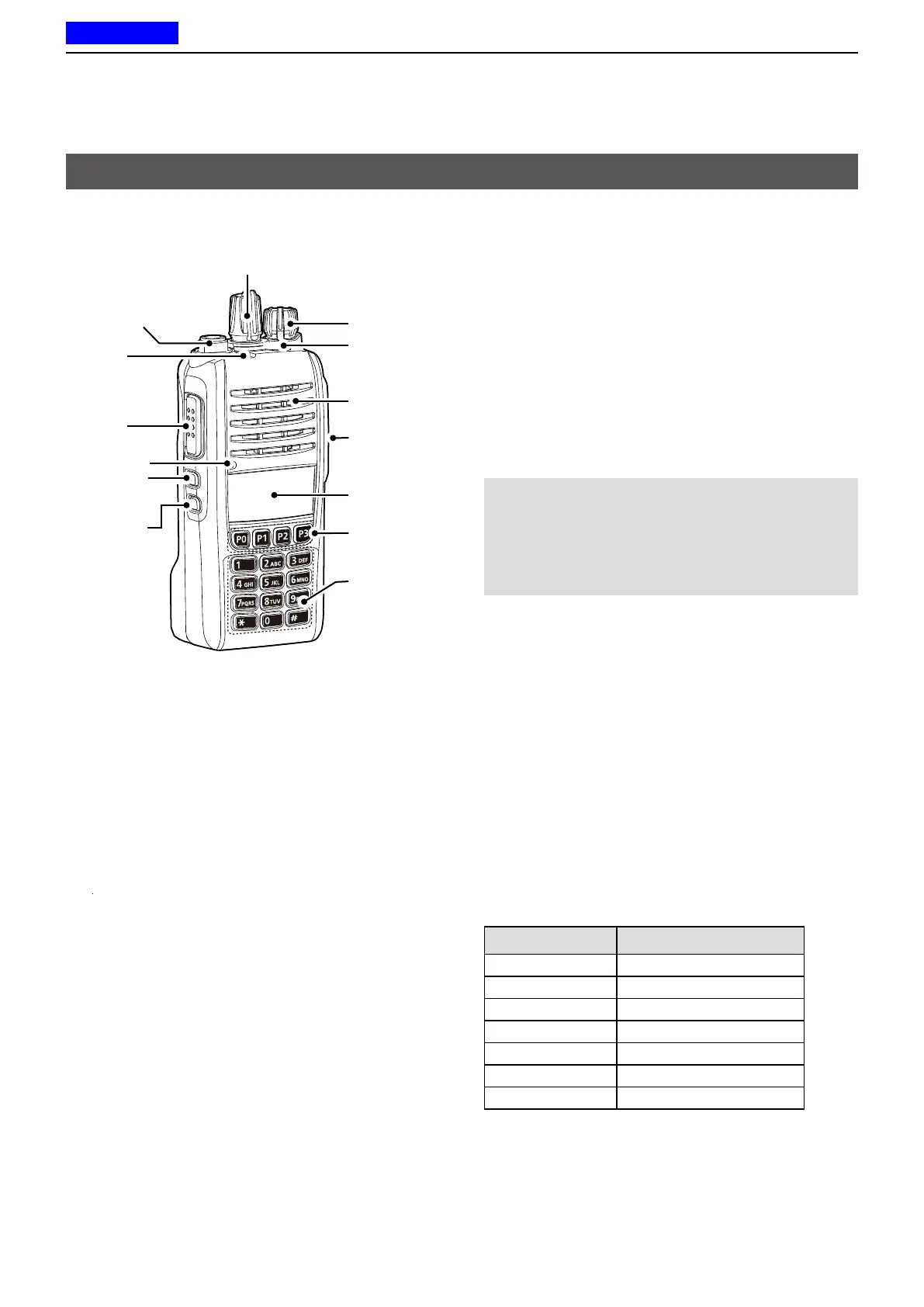
D Status indicator
• Lights red: Transmitting.
• Lights green: Receiving or squelch is open.
• Lights or blinks orange
: A matching signal is received,
depending on the presetting.
• Slowly blinks green: The battery should be charged.
• Quickly Blink green: The battery is exhausted.
L Refer to the Status indicator section.(pp.1-4 ~1-5)
D Speaker microphone jack
Connects to an optional speaker microphone or
headset.
CAUTION:
DO NOT
use the transceiver without the
connector cover or optional equipment attached.
The transceiver meets IP67 requirements for dust-
tight and waterproof protection only when the
connector cover or the HM-168LWP, HM-171GPW,
HS-94LWP, or HS-95LWP is attached.
D About the Software Key functions
Dealers can assign the Software Key functions to the
following keys. See pages 1-6 ~ 1-12 for details.
Non-display type
[Upper], [Lower], and [Emer]
Simple key type
[P0], [P1], [P2], [P3], [Up], [Down], and [Emer]
Ten-key type
[P0], [P1], [P2], [P3], [Up], [Down], and [Emer]
The following Software keys are assigned at default:
Key Assigned Software Key
[Upper] or [Up] Monitor
[Lower] or [Down] AquaQuake
[Emer] Emergency
[P0] Call
[P1] High/Low
[P2] Scan Start/Stop
[P3] Lock
Front, top and side panels
[Rotary Selector]*
1
Antenna
Connector
[Emer]*
1
[PTT]
Speaker
Function
display*
2
[P0], [P1],
[P2], [P3]*
1, 2
Ten-key*
1, 3
Status
indicator
Microphone
[VOL]
[Up]*
1,2
[Upper]*
1,4
[Down]*
1,2
[Lower]*
1,4
*
1
: Dealer assignable.
*
2
: Only for the Simple key and Ten-key types.
*
3
: Only for the Ten-key type.
*
4
: Only for the Non-Display type.
Speaker
microphone
jack



 To Next Page
 Loading...